EasyManua.ls Logo

Panasonic KX-B620 - Page 13

Panasonic KX-B620
75 pages
Print Icon
To Next Page IconTo Next Page
To Previous Page IconTo Previous Page
Loading...
KX-B620
Series
KX-B520
Series
@
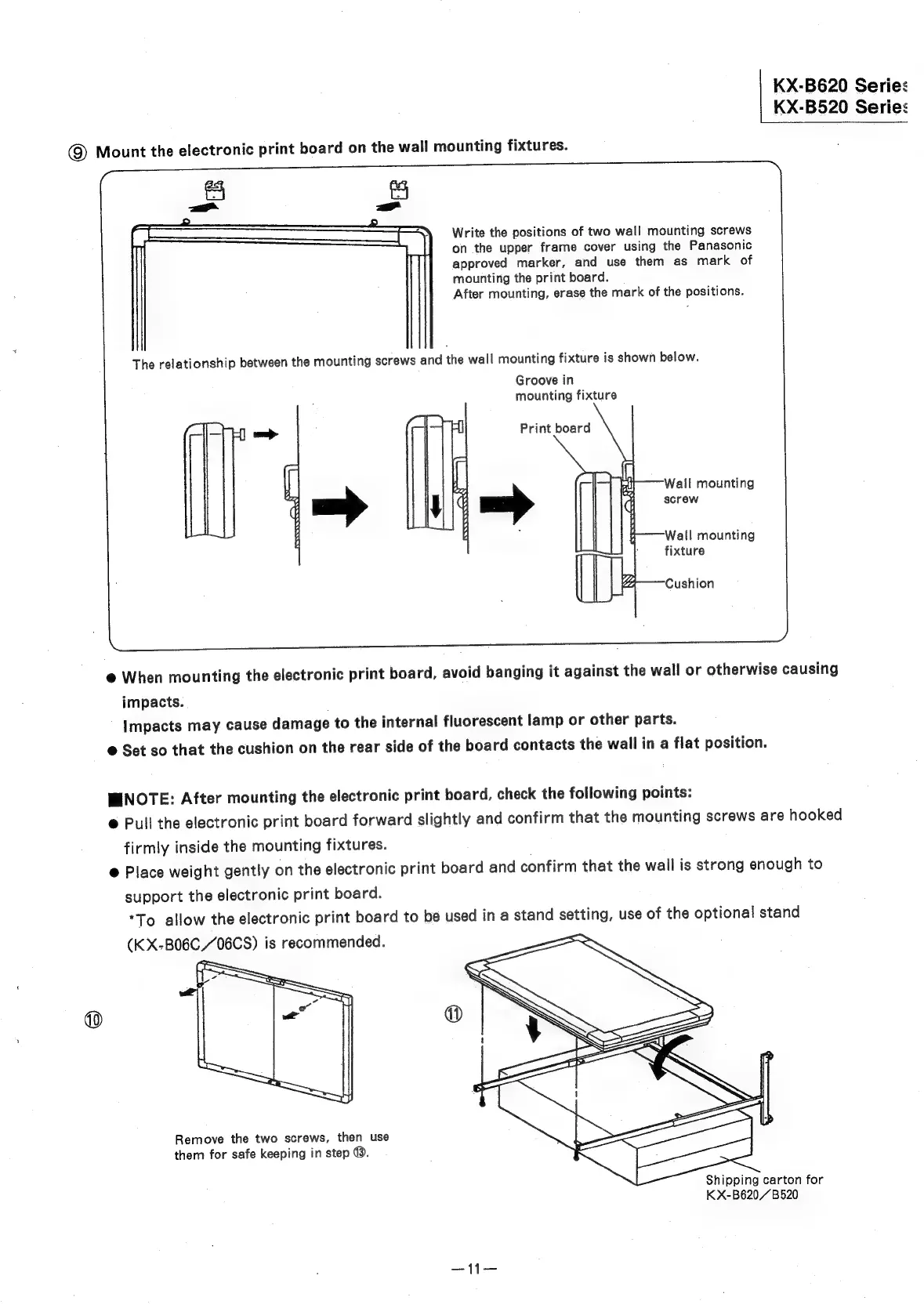
Mount
the
electronic
print
board
on
the
wall
mounting
fixtures.
Write
the
positions
of
two
wall
mounting
screws
on
the
upper
frame
cover
using
the
Panasonic
approved
marker,
and
use
them
as
mark
of
mounting
the
print
board.
After
mounting,
erase
the
mark
of
the
positions.
The
relationship
between
the
mounting
screws
and
the
wall
mounting
fixture
is
shown
below.
Groove
in
mounting
fixture
Print
board
Wall
mounting
axel
rea
sere
Wall
mounting
fixture
Cushion
@
When
mounting
the
electronic
print
board,
avoid
banging
it
against
the
wall
or
otherwise
causing
impacts.
Impacts
may
cause
damage
to
the
internal
fluorescent
lamp
or
other
parts.
@
Set
so
that
the
cushion
on
the
rear
side
of
the
board
contacts
the
wall
in
a
flat
position.
WINOTE:
After
mounting
the
electronic
print
board,
check
the
following
points:
®
Pull
the
electronic
print
board
forward
slightly
and
confirm
that
the
mounting
screws
are
hooked
firmly
inside
the
mounting
fixtures.
@
Place
weight
gently
on
the
electronic
print
board
and
confirm
that
the
wall
is
strong
enough
to
support
the
electronic
print
board.
*To
allow
the
electronic
print
board
to
be
used
in
a
stand
setting,
use
of
the
optional
stand
Remove
the
two
screws,
then
use
them
for
safe
keeping
in
step
@.
K
X-B620,/B520