EasyManua.ls Logo

Panasonic KX-B620 - Page 15

Panasonic KX-B620
75 pages
Print Icon
To Next Page IconTo Next Page
To Previous Page IconTo Previous Page
Loading...
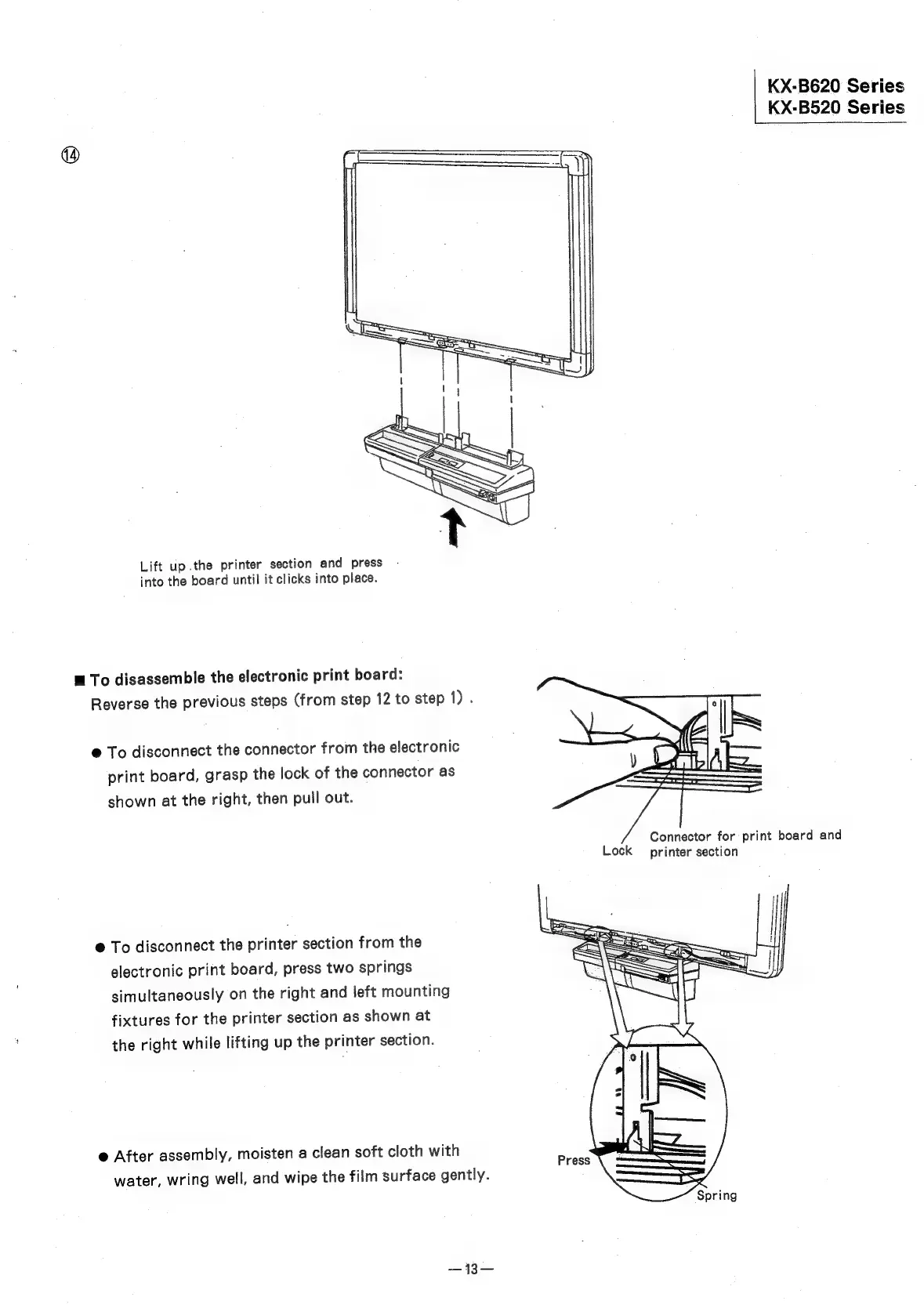
Lift
up
.the
printer
section
and
press
into
the
board
until
it
clicks
into
place.
m
To
disassemble
the
electronic
print
board:
Reverse
the
previous
steps
(from
step
12
to
step
1).
@
To
disconnect
the
connector
from
the
electronic
print
board,
grasp
the
lock
of
the
connector
as
shown
at
the
right,
then
pull
out.
@
To
disconnect
the
printer
section
from
the
electronic
print
board,
press
two
springs
simultaneously
on
the
right
and
left
mounting
fixtures
for
the
printer
section
as
shown
at
the
right
while
lifting
up
the
printer
section.
@
After
assembly,
moisten
a
clean
soft
cloth
with
water,
wring
well,
and
wipe
the
film
surface
gently.
KX-B620
Series
KX-B520
Series