This Manual: http://www.manuallib.com/file/2525964
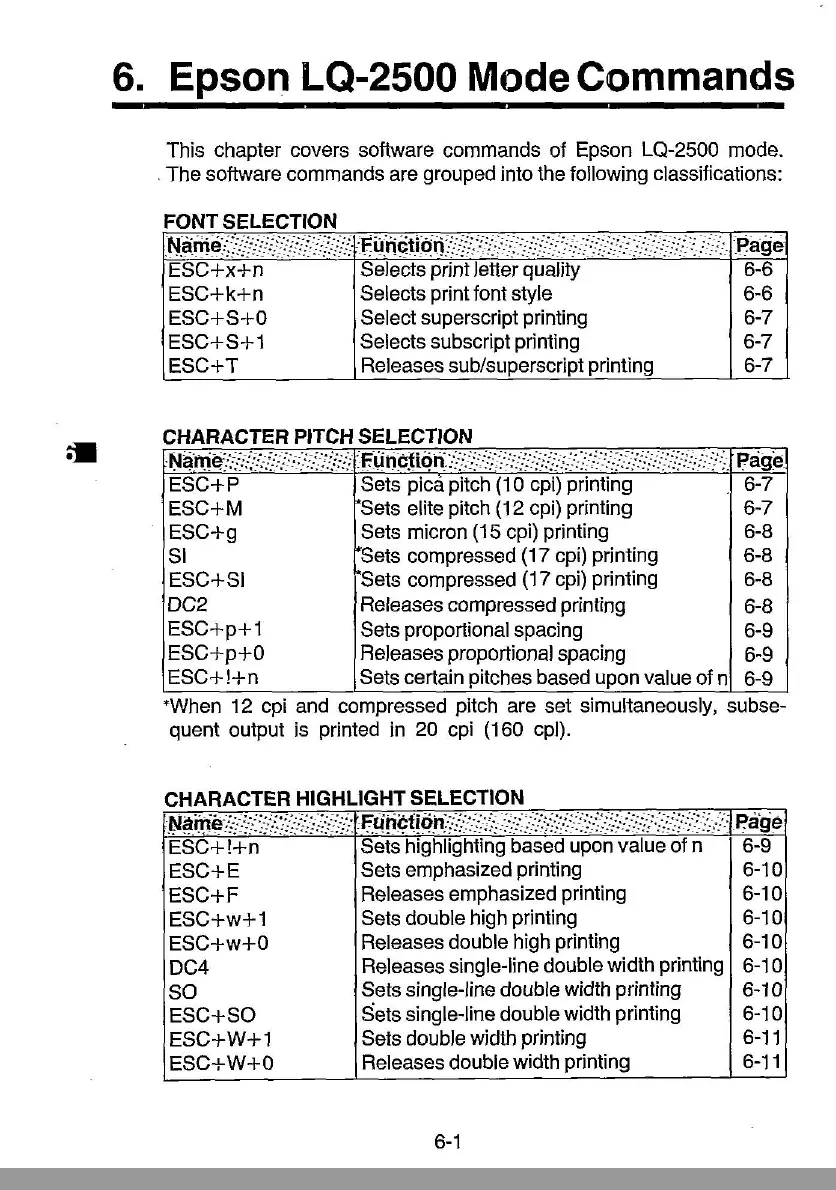
6.
Epson LQ-2S00 Mode Commands
This chapter covers software commands of Epson LQ-2500 mode .
. The software commands are grouped into the following classifications:
FONT SELECTION
NfiiTjc(J/ffFYF/.);
:r=u.nctl*i'jYF':E':i:fF'«/':;::!F«:i~::P.age
ESC+x+n
Selects print letter quality 6-6
ESC+ k + n Selects printfont style 6-6
ESC+S+O Select superscript printing 6-7
ESC+S+
1 Selects subscript printing 6-7
ESC+ T Releases sub/superscript printing 6-7
CHARACTER PITCH SELECTION
·Ni!iTifi;:!:!:::!;{
·
·;:::)/j'::'
:fli
ncMn:~~f~<:::jS:;.~:::':::;:·(:i!jJ::::Fj::'::
:::',;
Page
ESC+P
Sets pica pitch
(10
cpi)
printing
6-7
ESC+M
~Sets
elite pitch
(12
cpi) printing 6-7
ESC+g
Sets micron
(15
cpi)
printing
6-8
Sl
i*Sets
compressed
(17
cpi) printing
6-8
ESC+SI
Sets compressed (17
cpi)
printing
6-8
DC2 Releases compressed printing
6-8
ESC+p+1
Sets proportional spacing 6-9
ESC+p+O
Releases proportional spacing
6-9
ESC+!+n
Sets certain pitches based upon value of n
6-9
'When
12
Cpl
and
compressed pitch are set simultaneously, subse-
quent output is printed
in
20
cpi
(160 cpl).
CHARACTER HIGHLIGHT SELECTION
·.f;J~iti~·:?/:~:/":'j}j;:i/:
.f.(j!1i?fiq.h;-:;":::~<:;::::;::;/f:}::~;~:(f::;:,::/'(j::
Piige
ESC+!+n
Sets highlighting based upon value of n
6-9
ESC+E
Sets emphasized printing
6-10
ESC+F
Releases emphasized printing
6-10
ESC+w+1
Sets double high printing
6-10
ESC+w+O
Releases double high printing
6-10
DC4
Releases single-line double width printing 6-10
SO
Sets single-line double width printing 6-10
ESC+SO
Sets single-line double width printing
6-10
ESC+W+1
Sets double width printing
6-11
ESC+W+O
Releases double width printing
6-11
6-1



 To Next Page