EasyManua.ls Logo

Panasonic KX-TCA255 - Ringer Volume Adjustment; Receiver;Speaker Volume Adjustment

Panasonic KX-TCA255
56 pages
Print Icon
To Next Page IconTo Next Page
To Previous Page IconTo Previous Page
Loading...
Before Operating the PS
13
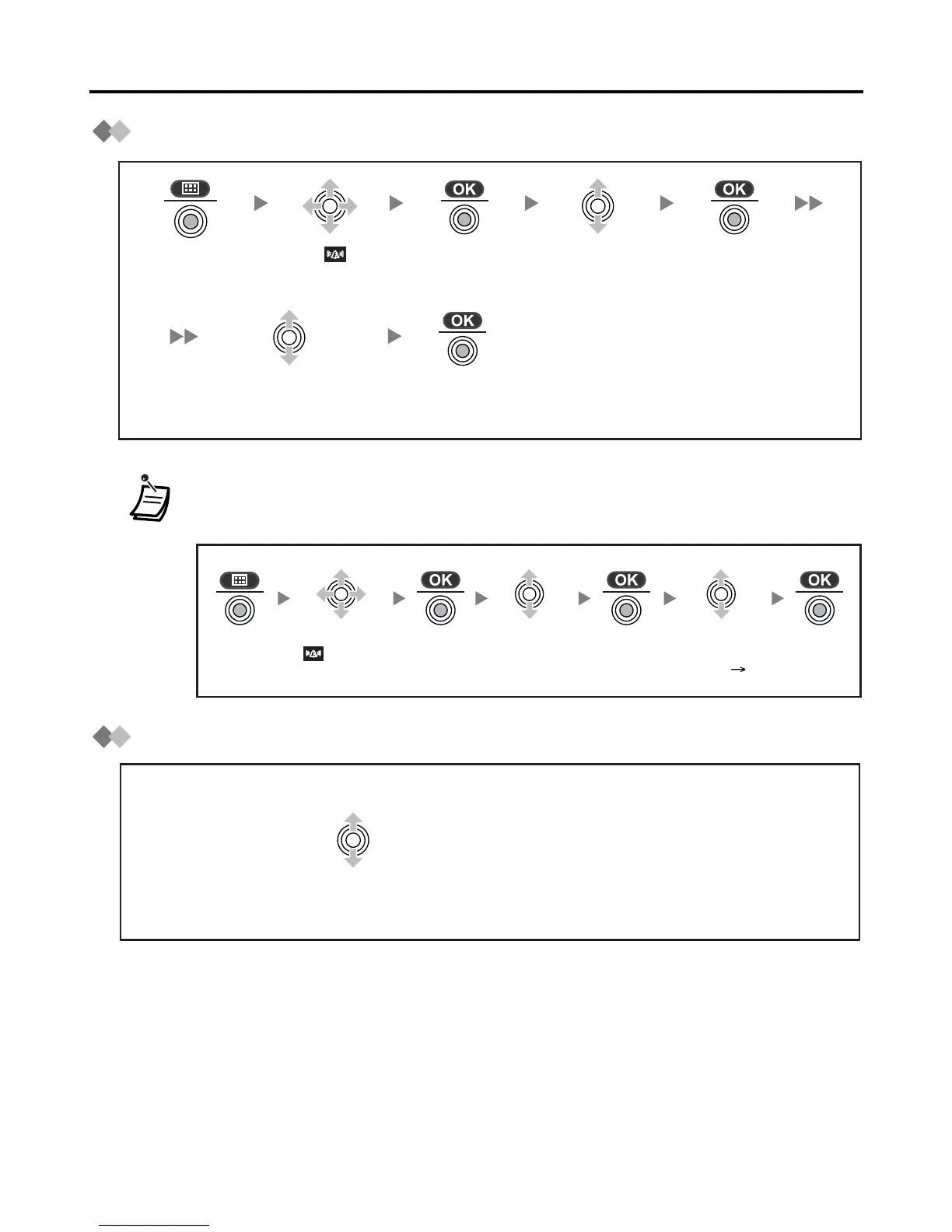
Ringer Volume Adjustment
Receiver/Speaker Volume Adjustment
In Meeting Mode: Vibration only/Key tone off/Microphone volume high
You can select whether the PS will vibrate while receiving a call.
Press the
Joystick.
Select “ Ringer
Option”.
Press the
Joystick.
Select “Ringer
Volume”.
Select the desired
setting (6 levels/
Meeting Mode/Off).
Press the
Joystick.
Press the
Joystick.
Select
Ringer
Option”.
Select
Vibration”.
Select the
desired setting
(On/Vib Ring/Off).
During a conversation
Move the Joystick UP or DOWN to adjust the volume.
(Receiver Volume - 3 levels, Speaker Volume - 6 levels)

Related product manuals