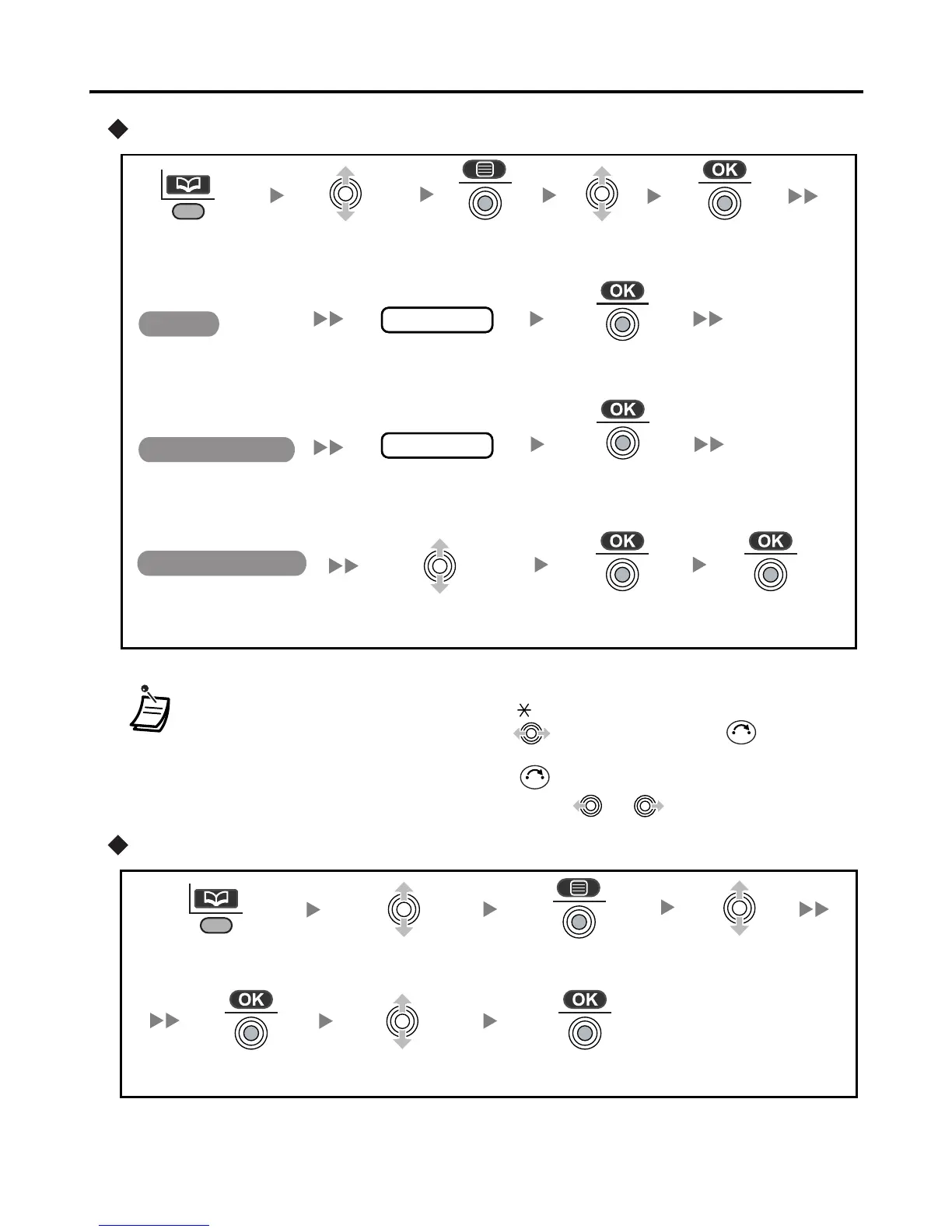
Using the Phonebook
26
Editing
Deleting
• To enter characters, refer to page 29.
• * The valid digits are “0” through “9”, “ ”, “#”, PAUSE.
• To change a character or digit, press to highlight it, press to delete it,
then enter the new character or digit.
• To clear an entire line, press and hold .
• To move the cursor to the left or right, press or , respectively.
name
phone no.
Select the desired
category number or Off.
Edit the
phone number*
(max. 24 digits).
Edit the name
(max. 16 characters).
Select the
desired item.
Press the
Left Soft Key.
Press the
Joystick.
Press the
Joystick.
Press the
Joystick.
Press the
Joystick.
Press the
Joystick.
Press the
Joystick.
Select
“Edit”.
Name
Phone Number
Private Category
C
C
Press the
Left Soft Key.
Select “Yes”.
Select the
desired item.
Select “Delete”.
Press the
Joystick.
Press the
Joystick.
Press the
Joystick.










 To Next Page