EasyManua.ls Logo

Panasonic KX-TG5431 - User Manual

Panasonic KX-TG5431
76 pages
Print Icon
To Next Page IconTo Next Page
Loading...
This unit is compatible with Caller ID. To use this feature, you must
subscribe to the appropriate service offered by your service provider.
Please read these Operating Instructions before using the unit and save
for future reference.
For assistance, visit our website: http://www.panasonic.com for
customers in the U.S.A. or Puerto Rico.
Charge the battery for 6 hours before initial use.
5.8 GHz Digital Cordless Answering System
Model No.
KX-TG5431
Operating Instructions
5.8 GHz Digital Cordless Answering System
with Dual Handsets
Model No.
KX-TG5432
5.8 GHz Digital Cordless Answering System
with Three Handsets
Model No.
KX-TG5433
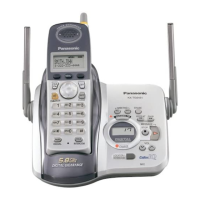
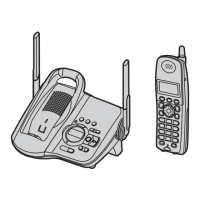
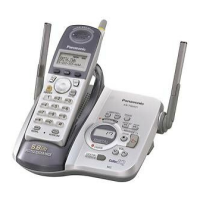
Model shown is KX-TG5431.
TG5431_5432_5433(e).book Page 1 Wednesday, November 17, 2004 11:16 AM

Table of Contents

Other manuals for Panasonic KX-TG5431

Questions and Answers

  • T
    Theresa ZunigaSep 16, 2025
    Why can't I dial an edited number on my Panasonic KX-TG5431?
    • M
      Mitchell WhiteSep 16, 2025
      If you cannot dial the phone number edited in the caller list on your Panasonic Answering Machine, the phone number you dialed might have an incorrect edited pattern (for example, the long distance “1” or the area code is missing). Edit the phone number with another pattern.
  • C
    Caitlin WatkinsAug 25, 2025
    Why is there static on my Panasonic Answering Machine?
    • S
      Steven RuizAug 26, 2025
      If you're experiencing static or sound cutting in and out on your Panasonic Answering Machine, the following could be the cause: * Interference from other electrical units. Move the handset and the base unit away from other electrical appliances. * You may be too far from the base unit, so move closer. * The base unit antennas may need to be raised. * The clarity booster feature may need to be turned on. * If your unit is connected to a telephone line with xDSL service, consider connecting a noise filter between the base unit and the telephone line jack.
  • A
    Anna JensenAug 26, 2025
    What to do if my Panasonic KX-TG5431 Answering Machine says 'Recharge battery'?
    • N
      Nicholas SampsonAug 27, 2025
      If your Panasonic Answering Machine displays “Recharge battery”, 7 flashes, or the handset beeps intermittently, fully charge the battery.
  • L
    latoya83Aug 27, 2025
    Why can't I program my Panasonic KX-TG5431 Answering Machine?
    • S
      Sharon GomezAug 27, 2025
      You may not be able to program your Panasonic Answering Machine for the following reasons: * Programming is not possible while the handset and base unit are being used. * Do not pause for over 1 minute while programming. * You may be too far from the base unit, so move closer. * While another user is listening to messages or the answering system is answering a call, you cannot program. Try again later.
  • R
    Richard DaySep 18, 2025
    Why can't I listen to messages remotely on my Panasonic KX-TG5431?
    • J
      Jill FrenchSep 18, 2025
      If you cannot listen to messages from a remote location on your Panasonic Answering Machine: * A touch tone phone is required for remote operation. * Press the remote code correctly and press each key firmly. * The answering system is off. Turn it on.
  • B
    browngregoryNov 22, 2025
    Why is my Panasonic KX-TG5431 Answering Machine not displaying the caller's name and number?
    • C
      Curtis WoodNov 22, 2025
      Several factors could be preventing the display of the caller's name and/or phone number on your Panasonic Answering Machine: * You may not have subscribed to Caller ID service, so contact your telephone company to subscribe. * If the unit is connected to additional telephone equipment, such as a Caller ID box or wireless telephone jack, disconnect the unit from the equipment and plug it directly into the wall jack. * If your unit is connected to a telephone line with xDSL service, consider connecting a noise filter between the base unit and the telephone line jack. * The name display service may not be available in some areas, so contact your telephone company for details. * Other telephone equipment might be interfering with the unit, so disconnect the other equipment and try ...
  • M
    Michelle SantiagoSep 9, 2025
    Why can't I store an item in the phonebook of my Panasonic KX-TG5431?
    • T
      Timothy PeckSep 9, 2025
      You cannot store an item in the phonebook of your Panasonic Answering Machine while the handset is in talk, speakerphone or intercom mode, or while listening to messages. Also, do not pause for over 1 minute while storing.
  • M
    Michael CarterSep 10, 2025
    Why can't I make long distance calls on my Panasonic Answering Machine?
    • L
      Lauren JacksonSep 10, 2025
      If you cannot make long distance calls on your Panasonic Answering Machine, make sure that you have long distance service.
  • V
    vsmithSep 3, 2025
    What to do if my Panasonic KX-TG5431 Answering Machine is still displaying 'Recharge battery' after charging?
    • S
      smithryanSep 3, 2025
      If you have fully charged the battery of your Panasonic Answering Machine, but “Recharge battery” is still displayed and/or 7 continues to flash, or “Charge for 6h” and 8 are displayed, clean the charge contacts and charge again. The battery may also need to be replaced. If you install a new battery, fully charge it.
  • C
    Connor GilbertSep 1, 2025
    How to fix Panasonic KX-TG5431 Answering Machine when the handset display is blank?
    • O
      ortizkathrynSep 2, 2025
      If the handset display of your Panasonic Answering Machine is blank, confirm that the battery is properly installed and fully charge the battery.

Summary

Introduction

Your Phone Models

Displays images and model numbers (KX-TG5431, KX-TG5432, KX-TG5433).

Energy Star and Trademarks

Information on energy efficiency compliance and product trademarks.

Accessory Information

Included Accessories

Lists accessories provided with the phone and their order numbers.

Additional;Replacement Accessories

Lists optional accessories and their respective order numbers.

Important Safety Instructions

General Safety Precautions

Outlines basic safety precautions to reduce risks during unit operation.

Installation Cautions

Provides crucial warnings for telephone wiring and installation safety.

For Best Performance

Base Unit Location and Noise

Recommendations for optimal base unit placement to ensure clear communication.

Environment and Routine Care

Guidelines for unit placement, environmental conditions, and cleaning.

Preparation

Connections

Details on connecting the base unit and charger unit to power and phone line.

Battery Installation

Step-by-step guide for inserting the battery into the handset.

Battery Charge

Instructions for charging the handset battery and understanding battery strength indicators.

Battery Performance and Replacement

Expected operating times and guidance on replacing the handset battery.

Controls and Displays

Identifies controls and display elements on the base unit, handset, and charger.

Setting Date and Time

Procedure for setting the date and time for message logging.

Making and Answering Calls

Making Calls

Instructions for initiating calls using the handset, speakerphone, and redial.

Answering Calls

How to answer incoming calls and use auto-talk features.

Call Features

Explains HOLD, MUTE, Voice Enhancer, Clarity Booster, PAUSE, and Flash functions.

Call Share

Allows joining an ongoing call with another handset.

Call Waiting and Tone Dialing

Using Flash for Call Waiting and Tone dialing for services.

Phonebook Management

Using and Adding Phonebook Entries

Overview of phonebook functionality and how to add new contacts.

Calling, Editing, and Erasing Contacts

Procedures for dialing, modifying, and deleting contacts.

Chain Dial and Copying Phonebook Items

Using chain dial for calls and copying entries between handsets.

Caller ID Service

Using Caller ID Features

Information on subscribing, displaying caller info, and call logging.

Caller List and Editing

Viewing the caller list, Ringer ID, light-up ID, and editing numbers.

Caller ID Auto Edit and Storing Info

Enabling auto edit and saving caller information to the phonebook.

Erasing Caller Information

Options for deleting selected or all caller information.

Intercom Features

Intercom Overview

Making calls between handsets and the base unit.

Intercom for Specific Models

Specific intercom procedures for KX-TG5431, KX-TG5432, and KX-TG5433.

Call Transfer and Conference Calls

How to transfer calls and set up conference calls.

Programmable Settings

Guide to Handset Programming

Overview of programmable functions and how to access them via menus.

Ringer and Call Settings

Adjusting ringer volume/tone, interrupt tone, auto-talk, and Caller ID edit.

Display and Telephone Settings

Configuring LCD contrast, language, dialing mode, and flash time.

Other Options and Direct Commands

Settings for key tone, registration, and programming via codes.

Answering System Features

Recording Greeting Message

How to record a personalized greeting message for the answering system.

Managing Messages and System On;Off

Erasing greetings, turning the system on/off, and screening calls.

Listening to Messages

Steps to play, control, and erase messages via base unit or handset.

Remote Operation and Memory

Accessing messages remotely and understanding memory capacity.

Answering System Settings

Configuring remote code, ring count, recording time, and message alert.

Useful Information and Support

Installation and Maintenance

Wall mounting, belt clip, headset, and routine care instructions.

Troubleshooting and Error Messages

Solutions for common problems, error messages, and system issues.

Technical Information and Warranty

Specifications, FCC compliance, RF exposure, and warranty details.

Customer Services and Support

Contact information, websites for support, parts, and accessories.

Panasonic KX-TG5431 Specifications

General IconGeneral
BrandPanasonic
ModelKX-TG5431
CategoryAnswering Machine
LanguageEnglish

Related product manuals