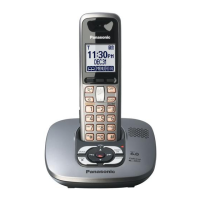
This document describes the Panasonic KX-TG6323CPK and KX-TGA631CS telephone equipment, which is an expandable digital cordless answering system, Pearl Silver Version, designed for Canada.
Function Description
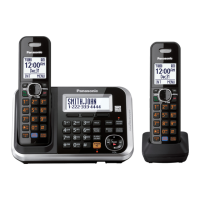
The Panasonic KX-TG6323CPK is a digital cordless answering system that includes a base unit (KX-TG6321CS) and a handset (KX-TGA631CS). The system is expandable, supporting up to 6 handsets. It features Call Display compatibility, allowing users to see caller information. The system also includes an answering machine with various programmable settings.
Important Technical Specifications
Standard: DECT 6.0 (Digital Enhanced Cordless Telecommunications 6.0)
Number of channels: 60 Duplex Channels
Frequency range: 1.92 GHz to 1.93 GHz
Duplex procedure: TDMA (Time Division Multiple Access)
Channel spacing: 1,728 kHz
Bit rate: 1,152 kbit/s
Modulation: GFSK (Gaussian Frequency Shift Keying)
RF transmission power: 115 mW (Max.)
Voice coding: ADPCM 32 kbit/s
Base Unit (KX-TG6321CS):
- Power source: AC Adaptor (PQLV207T, 120 V AC, 60 Hz)
- Receiving Method: Super Heterodyne
- Oscillation Method: PLL synthesizer
- Detecting Method: Quadrature Discriminator
- Tolerance of OSC Frequency: 13.824 MHz ±100 Hz
- Modulation Method: Frequency Modulation
- ID Code: 40 bit
- Ringer Equivalence No. (REN): 0.1B
- Power Consumption: Standby: Approx. 0.9 W, Maximum: Approx. 3.4 W
- Operating Conditions: 5 °C - 40 °C (41 °F - 104 °F), 20% - 80% relative air humidity (dry)
- Dimensions (H x W x D): Approx. 53 mm × 144 mm × 107 mm (2 3/32" × 5 21/32" × 4 7/32")
- Mass (Weight): Approx. 190 g (0.42 lb.)
Handset (KX-TGA631CS):
- Battery: Rechargeable Ni-MH battery AAA (R03) size (1.2 V 630 mAh)
- Receiving Method: Super Heterodyne
- Oscillation Method: PLL synthesizer
- Detecting Method: Quadrature Discriminator
- Tolerance of OSC Frequency: 13.824 MHz ±100 Hz
- Modulation Method: Frequency Modulation
- ID Code: 40 bit
- Dialing Mode: Tone (DTMF)/Pulse
- Redial: Up to 48 digits
- Speed Dialer: Up to 32 digits (Phonebook)
- Battery Performance: 11 days at Standby, 5 hours at Talk (continuous use), 3 hours max. (using clarity booster feature)
- Operating Conditions: 5 °C - 40 °C (41 °F - 104 °F), 20% - 80% relative air humidity (dry)
- Dimensions (H x W x D): Approx. 156 mm × 49 mm × 32 mm (6 1/8" × 1 15/16" × 1 1/4")
- Mass (Weight): Approx. 130 g (0.29 lb.)
Charger Unit:
- Power source: AC Adaptor (PQLV209T, 120 V AC, 60 Hz)
- Power Consumption: Standby: Approx. 0.3 W, Maximum: Approx. 2.9 W
- Operating Conditions: 5 °C - 40 °C (41 °F - 104 °F), 20% - 80% relative air humidity (dry)
- Dimensions (H x W x D): Approx. 51 mm × 75 mm × 88 mm (2" × 2 15/16" × 3 15/32")
- Mass (Weight): Approx. 60 g (0.13 lb.)
Usage Features
Installation:
- The base unit connects to an AC adaptor (PQLV207T) and a telephone line cord (RJ11C).
- The charger unit connects to an AC adaptor (PQLV209T).
- For DSL/ADSL service, a DSL/ADSL filter may be required between the base unit and the telephone line jack to prevent noise or Call Display issues.
- The handset uses rechargeable Ni-MH AAA (R03) batteries (HHR-65AAABU).
- Batteries should be charged for about 7 hours before initial use. "Charging" is displayed during charging, and "Charge completed" when full.
- The handset can be left on the base unit or charger without ill effect on the batteries.
Controls (Base Unit):
- Charge contacts
- Speaker
- (■) (STOP)
- (ERASE)
- (GREETING REC) (Recording)
- (GREETING CHECK)
- (▲) (VOL.: Volume up)
- (▼) (VOL.: Volume down)
- (◀◀) (Repeat)
- (▶▶) (Skip)
- MIC (Microphone)
- (▶) (Play)
- Message indicator
- (LOCATOR) (INTERCOM)
- (ANSWER ON)
- ANSWER ON indicator
Controls (Handset):
- Speaker
- (MENU)
- Soft keys
- Headset jack
- (?) (TALK)
- (SP-PHONE: Speakerphone)
- Dial keypad ([*]: TONE)
- (FLASH) (CALL WAIT)
- Charge indicator
- Ringer indicator
- Message indicator
- Receiver
- Display
- (OFF)
- Navigator key ([^]/[▶]/[◀]/[▼]) (Volume: (▲)/(▼))
- (PAUSE) (REDIAL)
- (HOLD) (INTERCOM)
- Microphone
- Charge contacts
Programmable Settings (via Handset):
- Message play: Play messages.
- V.M. access: Access voicemail.
- Night mode: On/Off, Start/End time.
- Ringer setting: Ringer volume (Low, Medium, High, Off), Ringer tone (Tone 1-3, Melody 1-4).
- Set date & time: Date and time, Alarm, Time adjustment (automatic adjustment when caller information is received).
- Initial setting: Set answering (Ring count: 2-7 rings, Toll saver; Recording time: 1min, 2min, 3min, Greeting only; Remote code: 111).
- Voice Mail: Store VM access number, VM tone detect.
- Message alert: On/Off.
- LCD contrast: Levels 1-6.
- Key tone: On/Off.
- Auto talk: On/Off (if off, you need to press TALK to answer a call).
- Set tel line: Set dial mode (Pulse, Tone), Set flash time (700ms, 600ms, 400ms, 300ms, 250ms, 110ms, 100ms, 90ms), Set line mode (A, B), C.WTG options (Call Waiting options).
- Registration: HS registration, Deregistration.
- Change language: Display (English, Français), Voice prompt.
Direct Commands: Many settings can be programmed using direct commands via the handset by pressing (MENU) then (#) and entering a feature code and setting code.
Error Messages: The manual provides a comprehensive list of display messages (e.g., "Busy," "Check tel line," "Insert battery," "No link to base") with corresponding causes and solutions.
Troubleshooting:
- General use issues (unit not working, no dial tone, indicator flashing slowly).
- Programmable settings issues (changed display language, handset rings during programming, cannot register handset).
- Battery recharge issues (handset beeps/flashes, short operating time).
- Making/answering calls, intercom issues (noise, sound cuts, handset/base unit not ringing, cannot make calls, cannot make long distance calls).
- Call Display issues (information not displayed, displayed late, cannot dial edited number, time shifted, 2nd caller information not displayed).
- Answering system issues (unit not recording, cannot operate, cannot operate remotely, unit rings during recording).
Maintenance Features
Battery Maintenance:
- Use only supplied rechargeable Ni-MH batteries (AAA size).
- Do NOT use Alkaline/Manganese/Ni-Cd batteries.
- Wipe battery ends and unit contacts with a dry cloth before installation.
- Ensure correct polarities (⊕, Θ) when installing batteries.
- If battery level is not displayed correctly after replacement, charge for at least 7 hours.
- Clean charge contacts of handset, base unit, and charger with a soft, dry cloth if exposed to grease, dust, or high humidity.
Repair and Safety:
- Service information is for experienced repair technicians only.
- Products powered by electricity should only be serviced by experienced professionals.
- Special components important for safety are marked by a triangle (▲) in diagrams and lists; these must be replaced with manufacturer's specified parts.
- Do not modify the original design without manufacturer's permission.
- Lead-Free (PbF) Soldering: Printed circuit boards manufactured with lead-free solder are marked "PbF." Standard leaded solder can be used on boards without the PbF mark. Special instructions apply for PbF-marked boards.
- Static Electricity Precautions: When repairing, cover plastic parts boxes with aluminum foil, ground soldering irons, use a conductive mat, and avoid grasping IC or LSI pins with bare fingers.
Liquid Damage:
- If liquid enters the handset/base unit, disconnect the AC adaptor and telephone line cord, remove batteries, and leave to dry for at least 3 days.
- Reconnect and charge fully after the unit is completely dry.
- Do not use a microwave oven to speed up drying.
General Maintenance:
- The serial number (11 digits) can be found on the bottom of the unit.
- Illustrations in the Service Manual may vary slightly from the actual product.
- The AC adaptor must remain connected at all times. It is normal for the adaptor to feel warm.
- Connect the AC adaptor to a vertically oriented or floor-mounted AC outlet to prevent disconnection due to weight.
- In case of power failure, the unit will not work. A corded-type telephone is recommended for connection to the same line.

 Need help?
 General



 To Next Page