EasyManua.ls Logo

Panasonic KX-TG6671 - User Manual

Panasonic KX-TG6671
56 pages
Print Icon
To Next Page IconTo Next Page
Loading...
Operating Instructions
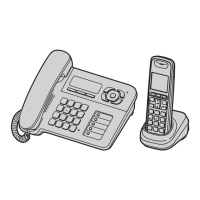
Digital Corded/Cordless Answering System
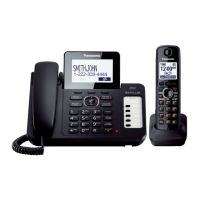
Model shown is KX-TG6671.
Model No. KX-TG6671
KX-TG6672
Before initial use, see “Getting Started” on
page 8.
Thank you for purchasing a Panasonic product.
Please read these operating instructions before using the unit and save them for future
reference.
Consulte “Guía Rápida Española”, página 47.
This unit is compatible with Caller ID. You must subscribe to the appropriate service offered
by your service provider/telephone company.
For assistance, visit our Web site: http://www.panasonic.com/help for customers in the
U.S.A. or Puerto Rico.
Please register your product: http://www.panasonic.com/prodreg


Questions and Answers

  • J
    Joe MathewsSep 9, 2025
    What to do if I cannot register a handset to my Panasonic Answering Machine base unit?
    • B
      Brandon BergSep 9, 2025
      You may not be able to register a handset if the maximum number of handsets (6) is already registered to the base unit. Cancel unused handset registrations from the base unit.
  • C
    Craig SmithAug 23, 2025
    Why is my Panasonic KX-TG6671 handset beeping and/or flashing?
    • J
      Joanna YoungAug 23, 2025
      The handset beeps and/or flashes when the battery charge is low. Fully charge the batteries.
  • H
    Heather MillerAug 25, 2025
    What to do if the Panasonic KX-TG6671 Answering Machine handset does not ring?
    • C
      Christine MuellerAug 25, 2025
      If the handset does not ring, the ringer volume may be turned off. Adjust the ringer volume. Alternatively, silent mode may be turned on, so turn it off.
  • M
    Michelle StanleyAug 26, 2025
    What to do if my Panasonic KX-TG6671 unit does not work?
    • S
      Shannon ParsonsAug 26, 2025
      If the unit does not work, make sure the batteries are installed correctly. Fully charge the batteries. Check the connections. Unplug the base unit’s AC adaptor to reset the unit and reconnect the adaptor. The handset may not have been registered to the base unit, so register the handset.
  • J
    jasmine32Aug 27, 2025
    How to troubleshoot a Panasonic KX-TG6671 when I cannot operate the answering system remotely?
    • D
      David ThomasAug 28, 2025
      If you cannot operate the answering system remotely, the remote access code may not be set. Set the remote access code. You may be entering the wrong remote access code, so check your current code. Ensure you press each key firmly. The answering system may be turned off, so turn it on.
  • C
    Christopher ShawAug 29, 2025
    What to do if my Panasonic KX-TG6671 handset does not turn on?
    • L
      laura59Aug 29, 2025
      Place the handset on the charger to turn on the handset.
  • W
    William MooreSep 17, 2025
    What to do if the caller list is not edited automatically on my Panasonic KX-TG6671?
    • E
      Elizabeth RobertsSep 18, 2025
      If the Caller ID number auto edit feature is turned off, turn it on and try again. You may also need to call back the edited number to activate Caller ID number auto edit.
  • E
    Emma MillerSep 18, 2025
    What to do if I cannot dial the phone number edited in the caller list on my Panasonic KX-TG6671 Answering Machine?
    • B
      bryanglassSep 18, 2025
      The phone number you dialed might have been edited incorrectly (for example, the long distance “1” or the area code is missing). Edit the phone number with another pattern.
  • T
    Toni WatsonSep 7, 2025
    How to fix Panasonic KX-TG6671 when I cannot make a call?
    • P
      Patricia WarrenSep 8, 2025
      If you cannot make a call, the dialing mode may be set incorrectly. Change the setting. Also, the handset may be too far from the base unit, so move closer and try again.
  • S
    Samuel Weiss MDSep 4, 2025
    Why is caller information displayed late on my Panasonic Answering Machine?
    • M
      Molly ThomasSep 4, 2025
      Depending on your service provider/telephone company, the unit may display the caller’s information at the 2nd ring or later. Also, move closer to the base unit.

Summary

Important Information

For Your Safety

Critical safety warnings and precautions for safe operation of the product.

Getting Started

Setting Up

Step-by-step guide for connecting the base unit, charger, and installing batteries.

Making and Answering Calls

Making Calls

Procedures for dialing numbers using the base unit, handset, or redial list.

Answering Calls

Instructions for receiving incoming calls on the base unit or handset.

Caller ID Service

Using Caller ID Service

Overview of Caller ID features and subscription requirements.

Answering System

Turning the Answering System On;Off

Basic controls for activating or deactivating the answering system.

Listening to Messages

Accessing and managing recorded messages via base unit or handset.

Intercom and Locator

Useful Information

Error Messages

Explanations and solutions for common error messages displayed on the unit.

Troubleshooting

A comprehensive guide for resolving general operational problems.

Panasonic KX-TG6671 Specifications

General IconGeneral
Number of Handsets1
Recording Time18 minutes
Caller IDYes
Call WaitingYes
SpeakerphoneYes
Talk TimeUp to 10 hours
Frequency1.9 GHz
TechnologyDECT 6.0
DisplayLCD
KeypadYes
Ringer IDYes
IntercomYes
Conference CallingYes
TypeCordless phone
Expandable Handsets6
Answering SystemDigital
Phonebook Capacity100 names & numbers
Battery TypeNi-MH
RangeUp to 1000 feet outdoors

Related product manuals