EasyManua.ls Logo

Panasonic KX-TG6513B - User Manual

Panasonic KX-TG6513B
64 pages
Print Icon
To Next Page IconTo Next Page
Loading...
Thank you for purchasing a Panasonic product.
Please read these operating instructions before using the unit and save
them for future reference.
This unit is compatible with Caller ID. You must subscribe to the appropriate
service offered by your service provider/telephone company.
For assistance, visit our Web site: http://www.panasonic.com/help for
customers in the U.S.A. or Puerto Rico.
Before initial use, see “Getting
Started” on page 10.
Consulte “Guía Rápida Española”, página 56.
Please register your product: http://www.panasonic.com/prodreg
Operating Instructions
Expandable Digital Cordless Answering System
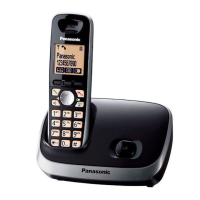
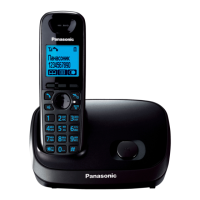
Model shown is KX-TG6511.
KX-TG6524
KX-TG6525
KX-TG6531
KX-TG6532
KX-TG6533
KX-TG6534
KX-TG6541
KX-TG6542
KX-TG6543
KX-TG6544
KX-TG6545
Model No.
KX-TG6522
KX-TG6523
Expandable Digital Cordless Phone
Model No. KX-TG6511
KX-TG6512
KX-TG6513
TG6511(e).book Page 1 Thursday, January 21, 2010 1:11 PM

Table of Contents

Questions and Answers

  • G
    Gabriela BakerSep 23, 2025
    What to do if my Panasonic KX-TG6513B got wet?
    • J
      Jeanne EvansSep 23, 2025
      If liquid or other moisture has entered your Panasonic Cordless Telephone handset/base unit, disconnect the AC adaptor and telephone line cord from the base unit. Remove the batteries from the handset and leave to dry for at least 3 days. After drying, reconnect the AC adaptor and telephone line cord, insert the batteries, and charge fully before use. If it still doesn't work, contact an authorized service center.
  • M
    millerpamelaAug 23, 2025
    How to fix no dial tone on Panasonic Cordless Telephone?
    • J
      Joshua WolfAug 23, 2025
      If you cannot hear a dial tone on your Panasonic Cordless Telephone, ensure the base unit’s AC adaptor or telephone line cord is properly connected. If the connections are correct, disconnect the base unit from the telephone line and connect the line to a known working telephone. If the working telephone operates properly, contact our service personnel to have the unit repaired. If the working telephone does not operate properly, contact your service provider/ telephone company.
  • J
    Jasmine BakerAug 25, 2025
    Why is my Panasonic KX-TG6513B not ringing?
    • A
      Anna ThompsonAug 26, 2025
      If your Panasonic Cordless Telephone handset does not ring, check that the ringer volume is not turned off and adjust it. Also, make sure silent mode is turned off.
  • A
    Alisha LawrenceAug 26, 2025
    What to do if my Panasonic KX-TG6513B is not working?
    • F
      fergusonjenniferAug 27, 2025
      If your Panasonic Cordless Telephone unit isn't working, ensure the batteries are installed correctly. Fully charge the batteries. Check all connections. Unplug the base unit’s AC adaptor to reset the unit, then reconnect it. Also, the handset may not be registered to the base unit, so register the handset.
  • S
    Stephanie JohnsonAug 27, 2025
    How to correct the time on my Panasonic Cordless Telephone?
    • E
      ereynoldsAug 27, 2025
      If the time on your Panasonic Cordless Telephone has shifted, it could be due to incorrect time information from incoming Caller ID. Set the time adjustment to “Manual” (off).
  • H
    Heather DavisSep 16, 2025
    Why doesn't my Panasonic KX-TG6513B Cordless Telephone show the 2nd caller ID?
    • R
      richard29Sep 16, 2025
      If the 2nd caller’s information is not displayed during an outside call on your Panasonic Cordless Telephone, you must subscribe to Caller ID, call waiting, or Call Waiting Caller ID (CWID) from your service provider. After subscribing, you may need to contact them again to activate the specific service.
  • B
    briggsmasonSep 13, 2025
    Why is caller ID delayed on my Panasonic Cordless Telephone?
    • C
      Christie HerringSep 13, 2025
      If caller information is displayed or announced late on your Panasonic Cordless Telephone, it may be due to your service provider, who may display or announce the caller’s information at the 2nd ring or later. Also, try moving closer to the base unit.
  • S
    Shane OrtizSep 14, 2025
    Why can't I dial edited numbers on my Panasonic KX-TG6513B?
    • K
      Katherine GreeneSep 14, 2025
      If you cannot dial the phone number edited in the caller list on your Panasonic Cordless Telephone, the phone number might have been edited incorrectly (for example, the long distance “1” or the area code is missing). Edit the phone number with another pattern.
  • A
    apollardSep 5, 2025
    Why is caller ID not announced on my Panasonic Cordless Telephone?
    • A
      Amy BrownSep 6, 2025
      If caller information is not announced on your Panasonic Cordless Telephone, ensure the handset or base unit’s ringer volume is not turned off and adjust it. Also, verify that the Talking Caller ID feature is turned on. Check that the number of rings for the answering system is not set to “2 rings” or “Toll saver”, and select a different setting. If the base unit and another handset are having an intercom call, your handset will not announce caller information.
  • C
    Cheryl KingSep 3, 2025
    What to do if Panasonic Cordless Telephone handset does not turn on?
    • S
      Susan LopezSep 3, 2025
      If the handset of your Panasonic Cordless Telephone doesn't turn on even after installing charged batteries, place the handset on the base unit or charger to turn it on.

Summary

Important Information and Safety Precautions

For Your Safety: Warnings and Precautions

Crucial safety warnings and precautions for product use.

Operating Safeguards and Cautions

Guidelines for safe operation, medical considerations, and installation.

Battery Handling and Safety Guidelines

Instructions for safe battery use, charging, and disposal.

Getting Started: Setup and Initial Configuration

Initial Phone System Setup Guide

Step-by-step guide for initial setup, connections, and battery charging.

Understanding Handset and Base Unit Controls

Identification and explanation of controls on the handset and base unit.

Initial Settings: Dialing Mode and Date;Time Configuration

Configuration of dialing mode and setting the current date and time.

Making and Answering Calls

How to Make Phone Calls

Instructions for making calls using the handset, speakerphone, and redial list.

How to Answer Phone Calls

Procedures for answering calls with the handset or base unit.

Useful Features During a Call

Using Hold, Mute, and Flash functions during calls.

Shared Phonebook Features

Shared Phonebook Functionality

Functionality of the shared phonebook for storing and dialing contacts.

Programming Phone Features

Programming Using Direct Command Codes

Using specific codes to access and set features directly.

Feature Codes and Setting Options

Detailed list of feature codes and their corresponding settings.

Answering System Programming Options

Settings specific to the answering system functionality.

Special Programming: Alarm and Silent Mode

Setting alarms and managing silent mode periods.

Call Blocking Features and Management

Blocking unwanted callers and managing the call block list.

Caller ID Service Features

Using the Caller ID Service

Introduction to Caller ID compatibility and service requirements.

Answering System Operation

Answering System Overview and Memory Capacity

Functionality, memory capacity, and basic operation of the answering system.

Turning the Answering System On or Off

How to enable or disable the answering system via base unit or handset.

Remote Access Code Management

Setting and managing the code for remote access.

Detailed Remote Answering System Operation

Detailed steps for remote operation and voice guidance.

Answering System Settings Configuration

Adjusting ring count, recording time, and greeting options.

Intercom and Locator Functions

Useful Information and Troubleshooting

Troubleshooting Error Messages

Common error messages and their corresponding troubleshooting steps.

Troubleshooting Common Operational Problems

Step-by-step solutions for general use and programmable setting issues.

Troubleshooting Battery and Call Reception Issues

Solutions for battery recharge problems and call reception issues.

Panasonic KX-TG6513B Specifications

General IconGeneral
TypeDECT telephone
IntercomYes
Answering machineNo
Phonebook capacity50 entries
Redial list capacity5
User memory phonebook16
Backlight colorWhite
Display number of lines1 lines
Display size (HxV) (imperial)1.8 x 1.8 \
Frequency band1.9 GHz
Channels quantity60 channels
Mounting typeDesk
Product colorBlack
Battery typeAAA
Standby time264 h
Battery technologyNickel-Metal Hydride (NiMH)
Battery recharge time7 h
Number of batteries supported2
Weight and Dimensions IconWeight and Dimensions
Base weight328 g
Handset weight130 g
Base dimensions157 x 152 x 91 mm
Handset dimensions (WxDxH)48 x 33 x 167 mm

Related product manuals