EasyManua.ls Logo

Panasonic KX-TG8061E - User Manual

Panasonic KX-TG8061E
52 pages
Print Icon
To Next Page IconTo Next Page
Loading...
Thank you for purchasing a Panasonic product.
Please read these operating instructions before using the unit and save them for
future reference.
This unit is compatible with Caller ID. You must subscribe to the appropriate service
offered by your service provider/telephone company.
Before initial use, see “Getting Started”
on page 11.
Please access our online customer survey:
http://panasonic.net/pcc/tel/q
Operating Instructions
Model No. KX-TG8061E
KX-TG8062E
KX-TG8063E
Digital Cordless Answering System
Digital Cordless Phone
Model No. KX-TG8051E
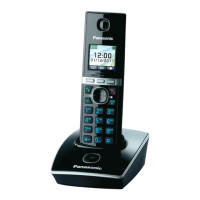
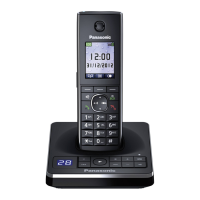
Model shown is KX-TG8051.
TG8051_8061E(e).book Page 1 Monday, January 24, 2011 4:37 PM

Questions and Answers

  • M
    Michael CastroSep 23, 2025
    What to do if liquid entered my Panasonic Cordless Telephone?
    • J
      Justin LarsonSep 23, 2025
      If liquid or other moisture has entered the handset/base unit, disconnect the AC adaptor and telephone line cord from the base unit. Remove the batteries from the handset and leave to dry for at least 3 days. After the handset/base unit are completely dry, reconnect the AC adaptor and telephone line cord. Insert the batteries and charge fully before use.
  • D
    Deborah GregoryAug 23, 2025
    Why I cannot hear a dial tone on my Panasonic Cordless Telephone?
    • V
      Vanessa BakerAug 23, 2025
      If you cannot hear a dial tone on your Panasonic Cordless Telephone, ensure you are using the supplied telephone line cord. Check that the base unit’s AC adaptor and telephone line cord are properly connected. As a test, disconnect the base unit from the telephone line and connect the line to a known working telephone to identify where the problem is.
  • R
    Ryan TurnerAug 25, 2025
    How to fix a Panasonic KX-TG8061E Cordless Telephone when the handset does not ring?
    • C
      charles65Aug 26, 2025
      If the handset on your Panasonic Cordless Telephone does not ring, check if the ringer volume is turned off and adjust it accordingly. Also, verify that night mode is turned off.
  • B
    Brandon MorrowAug 27, 2025
    How to fix blank or dark display on Panasonic KX-TG8061E Cordless Telephone?
    • J
      james60Aug 27, 2025
      If the handset display on your Panasonic Cordless Telephone is blank or dark, it may be in screen saver mode. Activate the display by pressing {} when on a call, or pressing {ic} at all other times. Also, check if “LCD in charging” is set to “Off” while on charge and change the setting if needed. Ensure the handset is turned on.
  • N
    Nicole BrownAug 27, 2025
    Why is my Panasonic KX-TG8061E Cordless Telephone handset beeping and flashing?
    • M
      Michael ChavezAug 27, 2025
      If your Panasonic Cordless Telephone handset is beeping and flashing, it indicates that the battery charge is low. Fully charge the batteries.
  • C
    Courtney BrownSep 15, 2025
    Why my greeting message cannot be properly heard on my Panasonic KX-TG8061E Cordless Telephone?
    • R
      Rebecca ColeSep 15, 2025
      If your own greeting message cannot be properly heard on your Panasonic Cordless Telephone, record your own greeting message again.
  • D
    Dustin BarronSep 12, 2025
    Why is the sound quality getting worse on my Panasonic KX-TG8061E Cordless Telephone?
    • J
      julianstewartSep 13, 2025
      The sound quality on your Panasonic Cordless Telephone may be declining because you have registered a handset that is not recommended. The clearest sound quality is only possible by registering the recommended handset.
  • B
    Bobby MillerSep 14, 2025
    Why does my Panasonic KX-TG8061E return to standby mode while programming?
    • V
      Virginia BennettSep 14, 2025
      While programming, if the display returns to standby mode, it may be because a call matching an entry in the call barred list is being received. Wait and try again later.
  • C
    carrolldeborahSep 5, 2025
    What does it mean when '_' is displayed on my Panasonic KX-TG8061E Cordless Telephone?
    • M
      Michael HamiltonSep 5, 2025
      If '_' is displayed on your Panasonic Cordless Telephone, it could mean the handset is too far from the base unit; try moving closer. Ensure the base unit’s AC adaptor is properly connected. Check if the handset is registered to the base unit, and if one-touch eco mode is activated, try turning it off as it reduces the base unit's range in standby mode.
  • D
    Dennis NormanSep 2, 2025
    Why does the battery flash on my Panasonic KX-TG8061E Cordless Telephone even after fully charging?
    • R
      Rhonda LesterSep 3, 2025
      If the battery still flashes on your Panasonic Cordless Telephone or the operating time seems shorter after a full charge, clean the battery ends and the charge contacts with a dry cloth and charge again. It may also be time to replace the batteries.

Summary

Introduction to Panasonic Phone

Model Composition Details

Details the components included for each model series.

Accessory Information

Lists supplied and additional/replacement accessories for the phone.

Expanding Your Phone System

Information on expanding the phone system with optional handsets.

General Information and Conformity

Provides general details about the equipment and its conformity.

For Your Safety

Safety Warnings and Precautions

Covers power, installation, operation, medical, and environmental safety.

Battery Safety and Disposal

Precautions for handling, charging, and disposing of batteries, including environmental aspects.

Base Unit Location and Environment

Guidance on optimal placement of the base unit and environmental considerations.

Product Specifications

Technical Specifications Overview

Details frequency range, power consumption, operating conditions, and standards.

Getting Started Guide

Setting Up the Unit

Step-by-step guide for connecting the base unit, charger, and telephone line.

Battery Installation and Charging

Instructions for installing and charging rechargeable batteries.

Controls and Display Overview

Identifies base unit and handset controls, battery level, and display items.

Power, Initial Setup, and Eco Mode

Guides on turning the unit on/off, initial settings, screen saver, and eco mode.

Display Mode Settings

Customizing how information is displayed on the screen.

Making and Answering Calls

Making and Answering Calls

Procedures for making, answering, using speakerphone, and auto talk.

Useful Call Features

Explains hold, mute, recall/flash, call waiting, equalizer, and call share.

Key Lock Functionality

How to lock and unlock the handset keys to prevent accidental use.

Phonebook Management

Handset Phonebook Operations

Adding, editing, searching, and categorizing phonebook entries.

Speed Dial and Chain Dial

Setting up speed dial keys and using chain dial for quick dialing.

Copying Phonebook Entries

Procedures for copying entries between handsets.

Programming Unit Settings

Programmable Settings Overview

Accessing and programming various unit settings via menus or direct command codes.

Special Programming Features

Setting up alarms, night mode, and ring delay for customized operation.

Call Barring and Handset Settings

Managing incoming call barring and customizing handset names.

Base Unit PIN and Registration

Changing the base unit PIN and registering/deregistering handsets.

Repeater Setup for Extended Range

Instructions for increasing range using a DECT repeater.

Caller ID Service

Using Caller ID Features

Viewing caller information, name display, and category ringer tones.

Caller List Operations

Viewing the caller list, calling back, editing, and erasing entries.

Storing Caller Information to Phonebook

Saving caller information directly to the phonebook.

Answering System Operations

Answering System On;Off and Call Screening

Turning the answering system on/off and using the call screening feature.

Greeting Message Management

Recording, using, and resetting greeting messages.

Listening to Messages

How to listen to messages using the base unit or handset.

Remote Operation and Settings

Accessing and controlling the answering system remotely and setting system parameters.

Answering System Settings Customization

Customizing number of rings, recording time, and greeting-only mode.

Voice Mail Service Information

Voice Mail Service Details

Details on using voice mail service provided by the service provider.

Intercom and Locator Functions

Intercom Call Procedures

Making, answering, and transferring intercom calls between handsets.

Handset Locator Function

How to locate a misplaced handset by paging it.

Transferring and Conference Calls

Procedures for transferring outside calls and establishing conference calls.

Character Entry Guide

Character Entry Modes and Tables

Explains character entry methods and provides tables for different character sets.

Extended and Cyrillic Character Tables

Details character sets for extended and Cyrillic alphabets.

Error Messages

Error Message Causes and Solutions

Lists common display messages and their troubleshooting steps.

Troubleshooting Common Issues

General Use Problems

Solutions for common issues like handset not turning on or no dial tone.

Programmable Settings Issues

Troubleshooting for problems related to display language and programming.

Battery Recharge Issues

Solutions for battery-related problems like low charge or short operating time.

Call and Intercom Issues

Troubleshooting for problems with calls, intercom, and display indicators.

Caller ID and Time Issues

Solutions for caller information display problems and time shifts.

Answering System and Liquid Damage

Troubleshooting for answering system functions and liquid damage.

Accessories and Mounting

Belt Clip and Wall Mounting

Instructions on attaching belt clip and mounting the unit on a wall.

Conditions of Guarantee

Guarantee Terms and Conditions

Details the terms, conditions, and duration of the product guarantee.

Panasonic KX-TG8061E Specifications

General IconGeneral
BrandPanasonic
ModelKX-TG8061E
CategoryCordless Telephone
LanguageEnglish

Related product manuals