Temporary Confidential
Preparation
12
For assistance, please visit http://www.panasonic.com/help
Connections
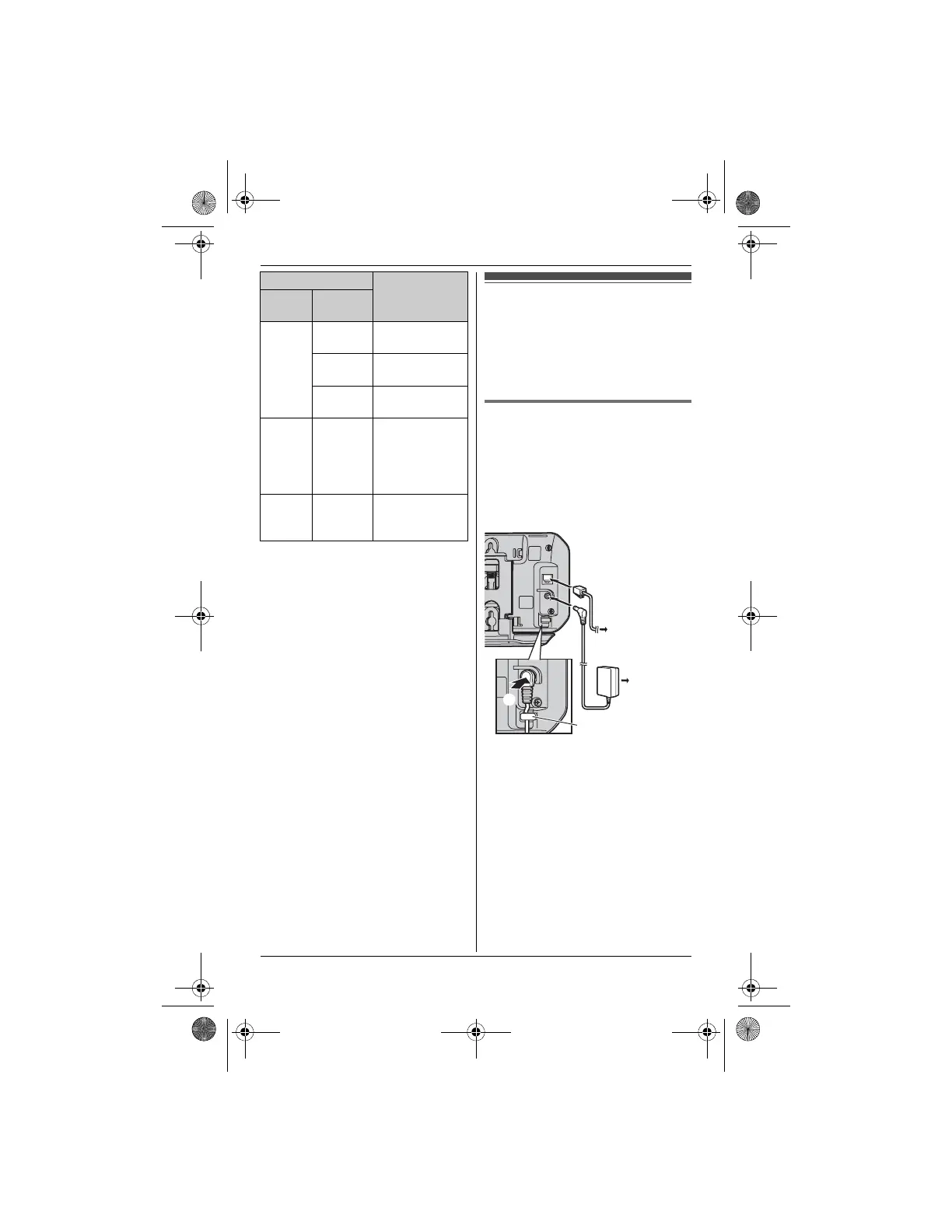
Connect the AC adaptor cord (A) by
pressing the plug firmly (B).
KX-TH1211/KX-TH1212: Connect the
telephone line cord until it clicks into the
base unit and telephone line jack (C).
Base unit
L Use only the supplied Panasonic AC
adaptor PQLV207.
L KX-TH1211/KX-TH1212: Use only the
supplied telephone line cord. Using
another telephone line cord may not
allow the unit to work properly.
*1 KX-TH1201: The base unit does not
have a telephone line jack.
L Model shown is KX-TH1211.
Red On The cellular line
is in use.
Flashing A cellular call is
on hold.
Flashing
rapidly
A cellular call is
being received.
Amber on A cellular phone
is registered but
not connected
to the base unit
(page 18).
Light
off
– A cellular phone
is not registered
to the base unit.
Status Meaning
Color Light
pattern
(120 V AC,
60 Hz)
To single-line
telephone
jack (RJ11C)*1
B
A
C
Hook
TH12XX.book Page 12 Wednesday, December 19, 2007 4:17 PM











 To Next Page