EasyManua.ls Logo

Panasonic KX-TPA65 - User Manual

Panasonic KX-TPA65
178 pages
Print Icon
To Next Page IconTo Next Page
Loading...
Base Unit
Model No. KX-TGP600G
KX-TGP600CEG
KX-TGP600UKG
KX-TGP600ALG
Model No.
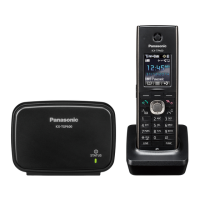
SIP Cordless Phone
KX-TGP600
Model No.
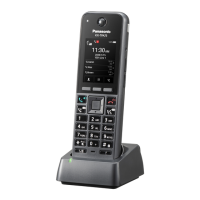
SIP Cordless Handset
KX-TPA60
Model No.
SIP Wireless Desk Phone
KX-TPA65/KX-TPA68
Operating Instructions
KX-TGP600 KX-TPA65 KX-TPA68
KX-TGP600G/
KX-TGP600CEG/
KX-TGP600UKG/
KX-TGP600ALG
KX-TPA60
Thank you for purchasing this Panasonic product. Please read this manual carefully before
using this product and save this manual for future use.
Please use the batteries provided and charge the batteries for about 6 hours before using the
handset for the first time. For details, see 9.2.3 Charging the Batteries, page 133 in this
manual.
Note
In this manual, the suffix of each model number is omitted unless necessary.
The illustrations such as some keys may differ from the appearance of the actual product.
Certain products and features described in this document may not be available in your
country or area. Contact your phone system dealer/service provider.
The contents and design of the software are subject to change without notice.
Document Version: 2020-07

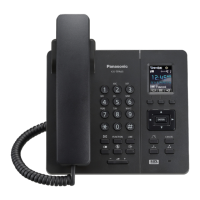
Table of Contents

Other manuals for Panasonic KX-TPA65

Questions and Answers

  • J
    Joseph LewisSep 18, 2025
    Why is the charge indicator flashing red on my Panasonic IP Phone?
    • D
      Dr. William RiveraSep 22, 2025
      If the charge indicator on your Panasonic IP Phone flashes red rapidly, the charger might not be connected properly. Make sure the battery is inserted correctly and the handset is properly set in the charger.
  • C
    Carla LittleAug 25, 2025
    How to fix a Panasonic Handsets that doesn't ring?
    • A
      ana41Aug 25, 2025
      If your Panasonic handset isn't ringing, the ringer volume might be set to "Off". Adjust the ringer volume level. Also, Silent Mode might be activated. In this case, turn off Silent Mode.
  • E
    erobertsAug 25, 2025
    Why is there so much noise on my Panasonic Handsets?
    • M
      meyerskathyAug 26, 2025
      Frequent noise during calls on your Panasonic handsets might be due to interference from nearby electrical appliances or being too far from the base unit. Try placing the handset and base unit away from other electrical appliances and move closer to the base unit.
  • J
    Jordan KrauseAug 27, 2025
    What to do if Panasonic Handsets stops working during operation?
    • A
      Alexander MataAug 27, 2025
      If your Panasonic handset stops working during operation, an unknown error may have occurred. Try turning the handset off and then back on. Alternatively, re-insert the battery and try again.
  • A
    Alexander CowanSep 23, 2025
    Why is the LED blinking rapidly while charging my Panasonic IP Phone?
    • U
      urodriguezSep 23, 2025
      If the LED indicator blinks rapidly while charging your Panasonic IP Phone battery, but the handset doesn't beep, the battery's temperature might be outside the normal limits. Ensure the charging area is between 5 °C (41 °F) and 40 °C (104 °F), and wait for the battery’s temperature to drop.
  • N
    nwangSep 23, 2025
    Why can't I delete all phonebook entries on my Panasonic IP Phone?
    • W
      williamspaulSep 23, 2025
      If the "Delete All" operation isn't working on your Panasonic IP Phone, the batteries might be drained, preventing the operation from completing. Charge the battery fully and try again.
  • B
    bparkerSep 10, 2025
    How to fix a Panasonic IP Phone handset that does not work?
    • F
      freyrobertoSep 10, 2025
      If your Panasonic IP Phone handset isn't working, it might be due to a drained battery. Charge the battery fully. Alternatively, the power might be off. Turn it on, or try re-inserting the battery and setting the handset on the charger.
  • A
    Ashley AguirreSep 12, 2025
    Why can't I dial on my Panasonic IP Phone?
    • J
      Jessica BlevinsSep 12, 2025
      If you cannot dial on your Panasonic IP Phone, the number you're trying to dial might be restricted by your phone system. Another possibility is that key lock mode is activated. To cancel it, press and hold the key lock button for about 2 seconds. Also, the radio channel may be busy, so try again later.
  • S
    Stacey FrankSep 3, 2025
    Why do I hear two short beeps during a conversation on my Panasonic Handsets?
    • M
      milesbryceSep 4, 2025
      If you hear two short beeps during a conversation on your Panasonic handset, the radio signal is weak. Try moving closer to the base unit.
  • M
    Michael McgeeSep 1, 2025
    Why is the charge indicator flashing red on my Panasonic Handsets?
    • C
      csampsonSep 2, 2025
      If the charge indicator flashes red rapidly on your Panasonic handset, the charger is not connected properly. Make sure the battery is inserted properly and set the handset in the charger correctly.

Summary

Introduction

Outline

Briefly describes the manual's content regarding installation and operation.

Related Documentation

Lists other guides like Quick Start Guide and Administrator Guide for further information.

Important Information

Data Security

Details measures to prevent unauthorized access and protect private/confidential information.

For Users in European Countries

Declaration of conformity and frequency band usage for EU countries.

Battery Information (KX-TPA60 only)

Details on battery operation time, charging, and low battery warnings.

Before Operating the Telephones

System Overview

Provides a system overview of the KX-TGP600, its components, and features.

Location of Controls

Details the physical controls and indicators for the base unit, handset, and desk phone.

Display and Icons

Explains the meaning of pictographs and icons displayed on the phone screen.

Setting the Password

Guide to setting a 4-digit password for security and feature access.

Basic Operation

Covers fundamental operations like going off-hook and on-hook.

Making Calls

Basic Calling

Covers standard procedures for making calls, including dialing and redialing.

Easy Dialing

Explains methods for quick dialing like redial list and hot keys.

Receiving Calls

Answering Calls

Details how to answer incoming calls and reject them.

Hands-free Mode

Explains how to enable and use hands-free mode for conversations.

During a Conversation

Transferring a Call

Describes how to transfer an ongoing call to another destination.

Holding a Call

Instructions on putting a call on hold and retrieving it.

Before Leaving Your Desk

Call Forwarding;Do Not Disturb

How to forward incoming calls to another destination or reject them.

Using the Phonebook

Using the Handset Phonebook

Details on storing, editing, and searching entries in the handset phonebook.

Searching for an Item in the Handset Phonebook

Methods for finding entries by name or category.

Locking the Handset Phonebook

How to lock and unlock the phonebook for security.

Customizing the Telephone

Hot Keys

How to assign phone numbers to keys for quick dialing.

Changing Function Keys;Program Keys

How to customize the behavior of function and program keys.

Block Anonymous Calls

How to set the phone to reject calls without caller ID.

Installation and Setup

Attaching the Stand

Steps for attaching the stand to the desk phone.

Charging the Batteries

Guide on how to charge the handset batteries properly.

Registering;Deregistering a Handset;Desk Phone

Procedures for pairing new or removing existing phones from the base unit.

Appendix

Character Mode Table

Tables showing character mappings for dial keys across different modes.

Handset;Desk Phone Setting Menu Layout

Overview of available settings and their options in the phone's menu.

Troubleshooting

Common problems and their solutions for handset and base unit issues.

Error Messages

Lists error messages, their causes, and solutions.

Panasonic KX-TPA65 Specifications

General IconGeneral
Answering machineNo
Mounting typeDesk
Product colorBlack
Speakerphone-
Phonebook capacity- entries
Caller IDYes
Display diagonal1.8 \
Number of handsets included0

Related product manuals