EasyManua.ls Logo

Panasonic KX-TPA60 - User Manual

Panasonic KX-TPA60
178 pages
Print Icon
To Next Page IconTo Next Page
Loading...
Base Unit
Model No. KX-TGP600G
KX-TGP600CEG
KX-TGP600UKG
KX-TGP600ALG
Model No.
SIP Cordless Phone
KX-TGP600
Model No.
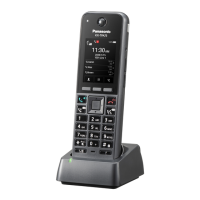
SIP Cordless Handset
KX-TPA60
Model No.
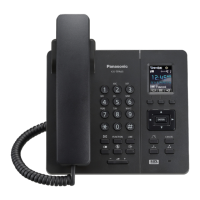
SIP Wireless Desk Phone
KX-TPA65/KX-TPA68
Operating Instructions
KX-TGP600 KX-TPA65 KX-TPA68
KX-TGP600G/
KX-TGP600CEG/
KX-TGP600UKG/
KX-TGP600ALG
KX-TPA60
Thank you for purchasing this Panasonic product. Please read this manual carefully before
using this product and save this manual for future use.
Please use the batteries provided and charge the batteries for about 6 hours before using the
handset for the first time. For details, see 9.2.3 Charging the Batteries, page 133 in this
manual.
Note
In this manual, the suffix of each model number is omitted unless necessary.
The illustrations such as some keys may differ from the appearance of the actual product.
Certain products and features described in this document may not be available in your
country or area. Contact your phone system dealer/service provider.
The contents and design of the software are subject to change without notice.
Document Version: 2020-07

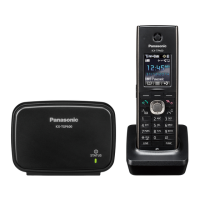
Table of Contents

Other manuals for Panasonic KX-TPA60

Questions and Answers

  • D
    dlambertSep 18, 2025
    Why is the charge indicator flashing red on my Panasonic IP Phone?
    • A
      Alexander LawrenceSep 18, 2025
      If the charge indicator on your Panasonic IP Phone flashes red rapidly, the charger might not be connected properly. Make sure the battery is inserted correctly and the handset is properly set in the charger.
  • C
    Chris HarrisAug 25, 2025
    How to fix a Panasonic Handsets that doesn't ring?
    • L
      Lisa GambleAug 25, 2025
      If your Panasonic handset isn't ringing, the ringer volume might be set to "Off". Adjust the ringer volume level. Also, Silent Mode might be activated. In this case, turn off Silent Mode.
  • S
    stephen78Aug 25, 2025
    Why is there so much noise on my Panasonic Handsets?
    • G
      Gregory GuerreroAug 26, 2025
      Frequent noise during calls on your Panasonic handsets might be due to interference from nearby electrical appliances or being too far from the base unit. Try placing the handset and base unit away from other electrical appliances and move closer to the base unit.
  • G
    Gabrielle CarterAug 26, 2025
    What to do if Panasonic Handsets stops working during operation?
    • T
      tmckinneyAug 27, 2025
      If your Panasonic handset stops working during operation, an unknown error may have occurred. Try turning the handset off and then back on. Alternatively, re-insert the battery and try again.
  • A
    Alexander GarciaSep 23, 2025
    Why is the LED blinking rapidly while charging my Panasonic IP Phone?
    • J
      Jason CollinsSep 23, 2025
      If the LED indicator blinks rapidly while charging your Panasonic IP Phone battery, but the handset doesn't beep, the battery's temperature might be outside the normal limits. Ensure the charging area is between 5 °C (41 °F) and 40 °C (104 °F), and wait for the battery’s temperature to drop.
  • C
    Charles PetersonSep 23, 2025
    Why can't I delete all phonebook entries on my Panasonic IP Phone?
    • C
      Carla WoodSep 23, 2025
      If the "Delete All" operation isn't working on your Panasonic IP Phone, the batteries might be drained, preventing the operation from completing. Charge the battery fully and try again.
  • M
    micheal81Sep 10, 2025
    How to fix a Panasonic IP Phone handset that does not work?
    • M
      Michael ChristensenSep 10, 2025
      If your Panasonic IP Phone handset isn't working, it might be due to a drained battery. Charge the battery fully. Alternatively, the power might be off. Turn it on, or try re-inserting the battery and setting the handset on the charger.
  • M
    Mary TaylorSep 12, 2025
    What does 'No Service' mean on my Panasonic IP Phone?
    • N
      Nicole Brown DDSSep 12, 2025
      If your Panasonic IP Phone displays "No Service" and you hear beep tones, it could mean the handset or desk phone is out of range. Try moving closer to the base unit or try again later.
  • J
    John WilliamsSep 3, 2025
    Why do I hear two short beeps during a conversation on my Panasonic Handsets?
    • J
      Jessica BushSep 3, 2025
      If you hear two short beeps during a conversation on your Panasonic handset, the radio signal is weak. Try moving closer to the base unit.
  • J
    Johnathan SerranoSep 1, 2025
    Why is the charge indicator flashing red on my Panasonic Handsets?
    • P
      paige14Sep 1, 2025
      If the charge indicator flashes red rapidly on your Panasonic handset, the charger is not connected properly. Make sure the battery is inserted properly and set the handset in the charger correctly.

Summary

Introduction and Overview

Manual Outline and Related Resources

Describes the manual's content and lists related documentation and font info.

Future Reference Notes

Section for recording product information for future reference.

Important Information and Regional Guidelines

Data Security Measures

Guidelines for protecting data and preventing unauthorized access.

Country-Specific User Information

Information for users in European, UK, Australian, NZ, US, Canadian, and Argentine regions.

Performance, Environment, and Battery Details

Tips for best performance, operating environment, care, and battery info.

Making Calls

Basic Calling and Easy Dialing Methods

Covers making calls by dialing, redialing, hot keys, and hot lines.

Multicast Voice Paging

Instructions for making group voice announcements to multiple units.

Receiving and Managing Calls

Answering Calls and Caller ID Information

Handling incoming calls, viewing caller ID, and answering methods.

Hands-free, Intercom, Silent, and Noise Reduction

Using hands-free, intercom, silent modes, and noise reduction features.

During a Conversation

Call Transfer, Holding, and Conference

Procedures for transferring calls, placing them on hold, and setting up conferences.

Mute, Call Waiting, and Off-hook Monitor

Using mute, handling call waiting, and activating the off-hook monitor feature.

Before Leaving Your Desk

Call Forwarding and Do Not Disturb Settings

Configuring call forwarding rules and activating Do Not Disturb mode.

Voice Mail Message Access

Instructions for accessing and listening to voicemail messages.

Using the Phonebook

Phonebook Types and Handset Management

Overview of phonebook types and detailed management of handset phonebook.

Base Unit and Remote Phonebook Usage

Procedures for managing phonebook entries on base units and remotely.

Customizing the Telephone

Display, Keys, and Alarm Customization

Customizing display, hot keys, alarms, function keys, and default settings.

Security and Call Management Settings

Blocking anonymous calls, call barring, anonymous calls, and web interface settings.

Installation and Setup

Physical Installation and Connections

Attaching stands, connecting power, batteries, belt clip, and wall mounting.

Software Updates and Device Registration

Updating device software and pairing/unpairing with base units.

Appendix

Character Tables and Settings Layouts

Character mode tables and detailed menu layouts for various settings.

Specifications, RF Information, and Troubleshooting

Technical specs, RF info, troubleshooting common issues, and error messages.

Revision History

Records of software updates and changes made to the product.

Panasonic KX-TPA60 Specifications

General IconGeneral
Speakerphone-
Phonebook capacity500 entries
Brand compatibilityPanasonic
Headset connectivityYes
Display typeLCD
Product colorBlack
Display diagonal1.8 \
Harmonized System (HS) code85177900
Weight and Dimensions IconWeight and Dimensions
Depth25.5 mm
Width47.8 mm
Height153.2 mm
Weight117 g

Videos

How to Boost Incoming Call Volume on Panasonic KX-TPA60

Related product manuals