
 Need help?
Do you have a question about the Panasonic KXDT543 and is the answer not in the manual?
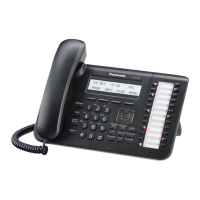
Explains the LCD for information display and the Navigator Key for adjustments and selections.
Details buttons for essential call management like Hold, Transfer, Redial, and Intercom.
Covers buttons for Call Forwarding/Do Not Disturb, Hands-free (SP-Phone), and Message functions.
Describes Auto Dial/Store for speed dialing and Programmable Keys for custom functions.
Step-by-step guide to setting up your personal voicemail box, passcode, and greeting.
Instructions for placing external calls using lines or CO/DSS keys, and internal calls via extension.
Procedures for performing attended, unattended, and direct-to-voicemail call transfers.
How to redial the last number and place calls on hold, including exclusive hold.
Instructions on putting calls on hold to answer other lines and retrieving held calls.
Guides for initiating conference calls and picking up calls ringing at other extensions.
Procedures for leaving voicemails and accessing the incoming call log for redialing.
How to use the outgoing call log and store contacts in the station directory.
Instructions for storing numbers in station speed dial bins and personal directories.
Methods for dialing numbers stored in station and system speed dial directories.
Guides for setting up different types of call forwarding, including immediate, busy, and no answer.
Instructions for forwarding calls externally and setting up 'follow me' forwarding to another extension.












 To Next Page
 General