EasyManua.ls Logo

Panasonic KXTG8521E - Base Unit and Handset Display; Base Unit Controls and Indicators; Handset Display Icons Explained

Panasonic KXTG8521E
60 pages
Print Icon
To Next Page IconTo Next Page
To Previous Page IconTo Previous Page
Loading...
Getting Started
12
Helpline Tel. No.: U.K. 0844 844 3898 R.O.I. 01289 8333
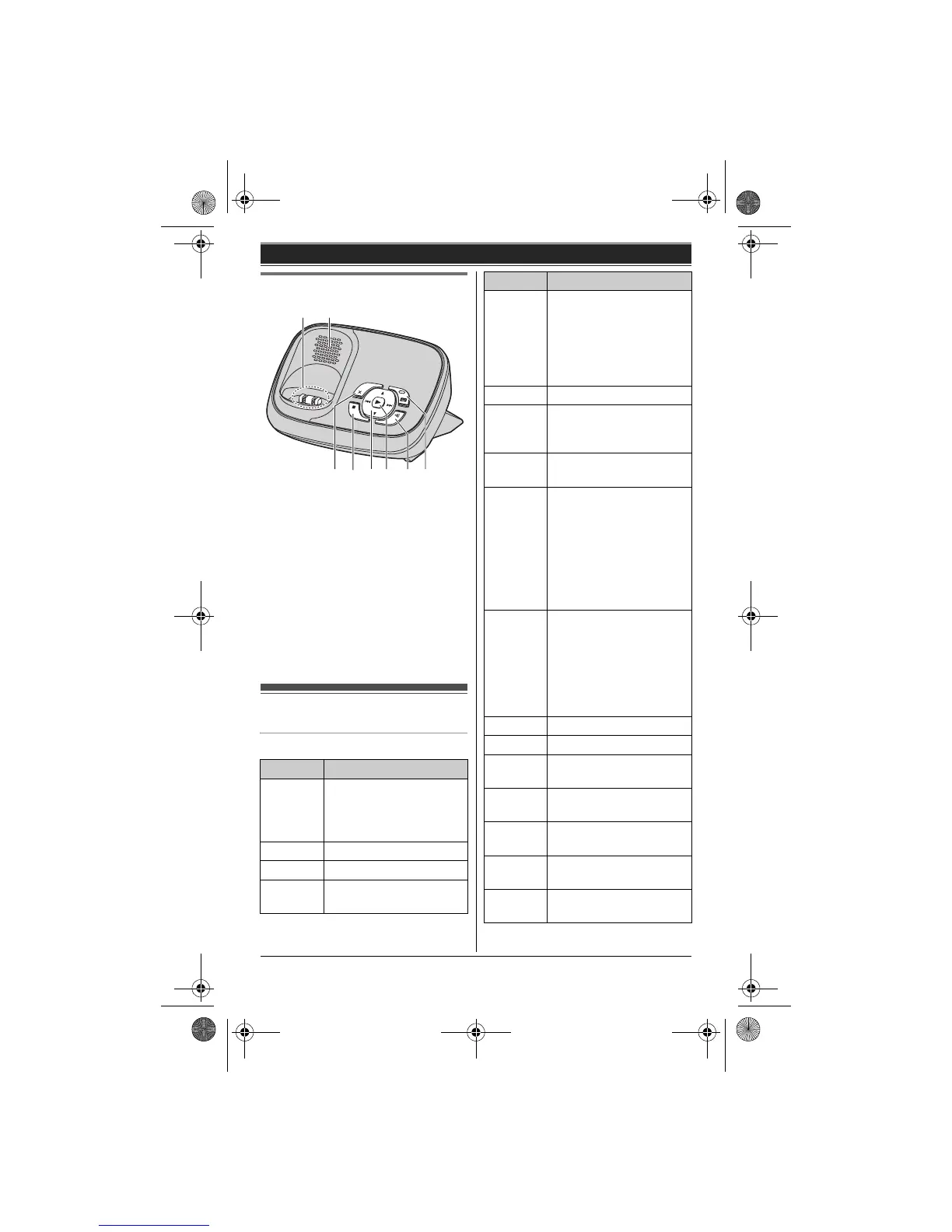
Base unit
A Charge contacts
B Speaker
C {4} (Erase)
D {} (Stop)
E {^}/{V} (Volume up/down)
{7}/{8} (Repeat/Skip)
F {6} (Play)
Message indicator
G {x} (Locator)
H {s} (Answer on)
Answer on indicator
Display
Handset display items
Item Meaning
l Range status; the more
bars visible, the closer
the handset is to the
base unit.
_ Out of base unit range
x Paging, intercom mode
s Speakerphone is on.
(page 16)
DC E F G
H
A B
C The line is in use.
L When flashing slowly:
The call is put on hold.
L When flashing rapidly:
An incoming call is
now being received.
y Missed call
*1
(page 33)
i The base unit
transmission power is
set to Low. (page 14)
k The key backlight is off.
(page 25)
u L When displayed next
to the battery icon:
Answering system is
on. (page 40)
L When displayed with
a number: New
messages have been
recorded. (page 42)
d Answering system
answers calls with a
greeting message and
caller messages are not
recorded. (“Selecting
“Greeting Only””, page
45)
& Battery level
E Alarm is on. (page 28)
x Privacy mode is on.
(page 25)
~ Ringer volume is off.
(page 27)
3 Night mode is on.
(page 29)
7 Blocked call
*1
(page 30, 34)
h New SMS message
received.
*2
(page 37)
Item Meaning
TG8521E(e).book Page 12 Wednesday, March 17, 2010 3:39 PM

Table of Contents