24 System settings
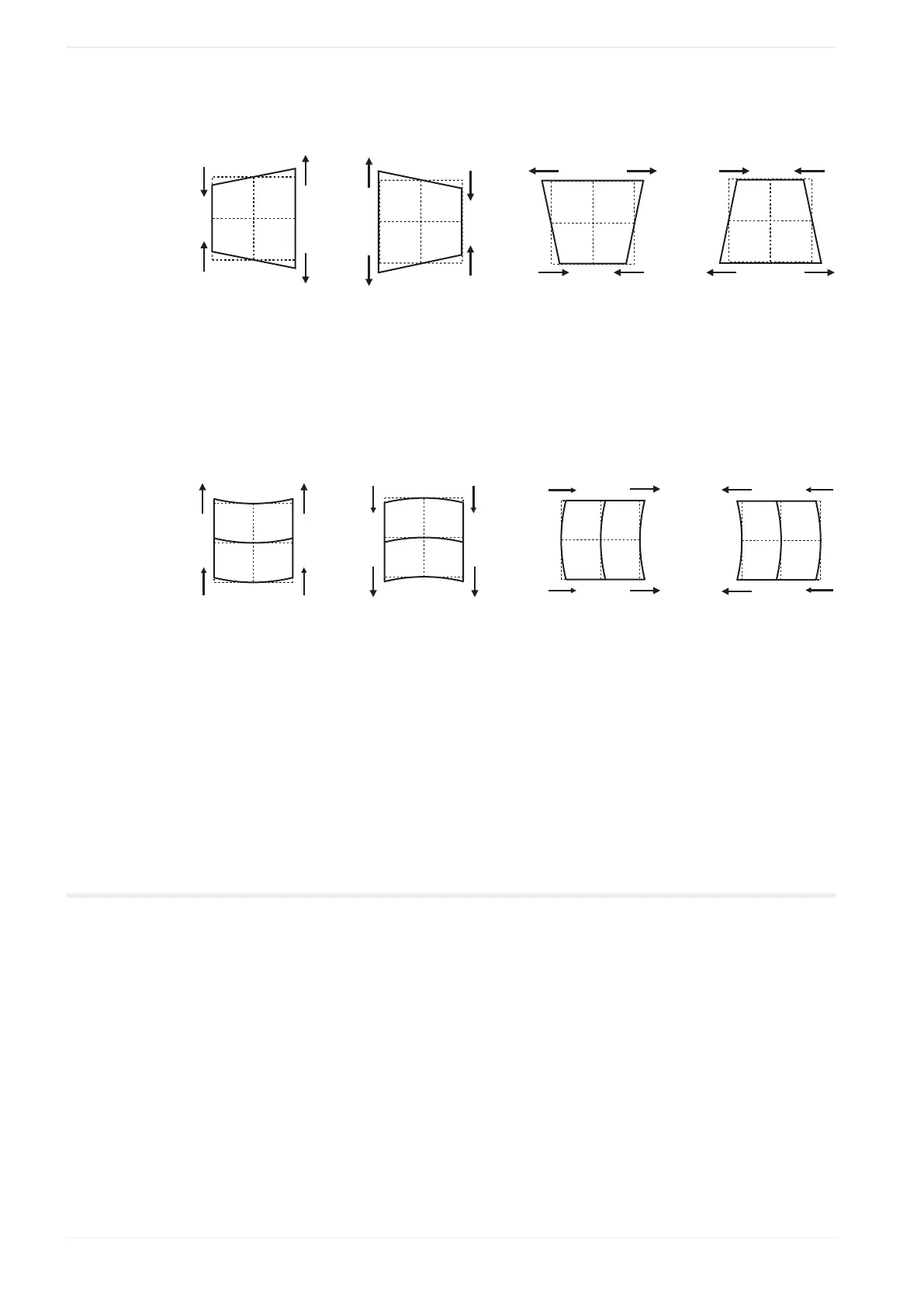
Trapezoid
(1) (2) (3) (4)
(1)
X value reduced
(2)
X value increased
(3)
Y value reduced
(4)
Y value increased
Bow-shape
(1) (2) (3) (4)
(1)
X value reduced
(2)
X value increased
(3)
Y value reduced
(4)
Y value increased
Related topics
Calibrate the marking field (page 277)
24.24 Set or disable a password
You can set a password in the “System settings” screen. The password is required when you
switch from “Restricted user” to “Administrator”.
In offline mode, you cannot select a user.
1. Start the Laser Marker NAVI smart software.
2. Establish an online connection between your PC and the laser marking system.
3. Go to the “System settings” screen and select “Access permissions”.
4. Select “Change” next to “Password for administrator” to specify a password.
5. In the dialog, select “Enable password protection”. If you do not use the password
protection, deselect the check box.
280 ME-NAVIS2-OP-1










 To Next Page