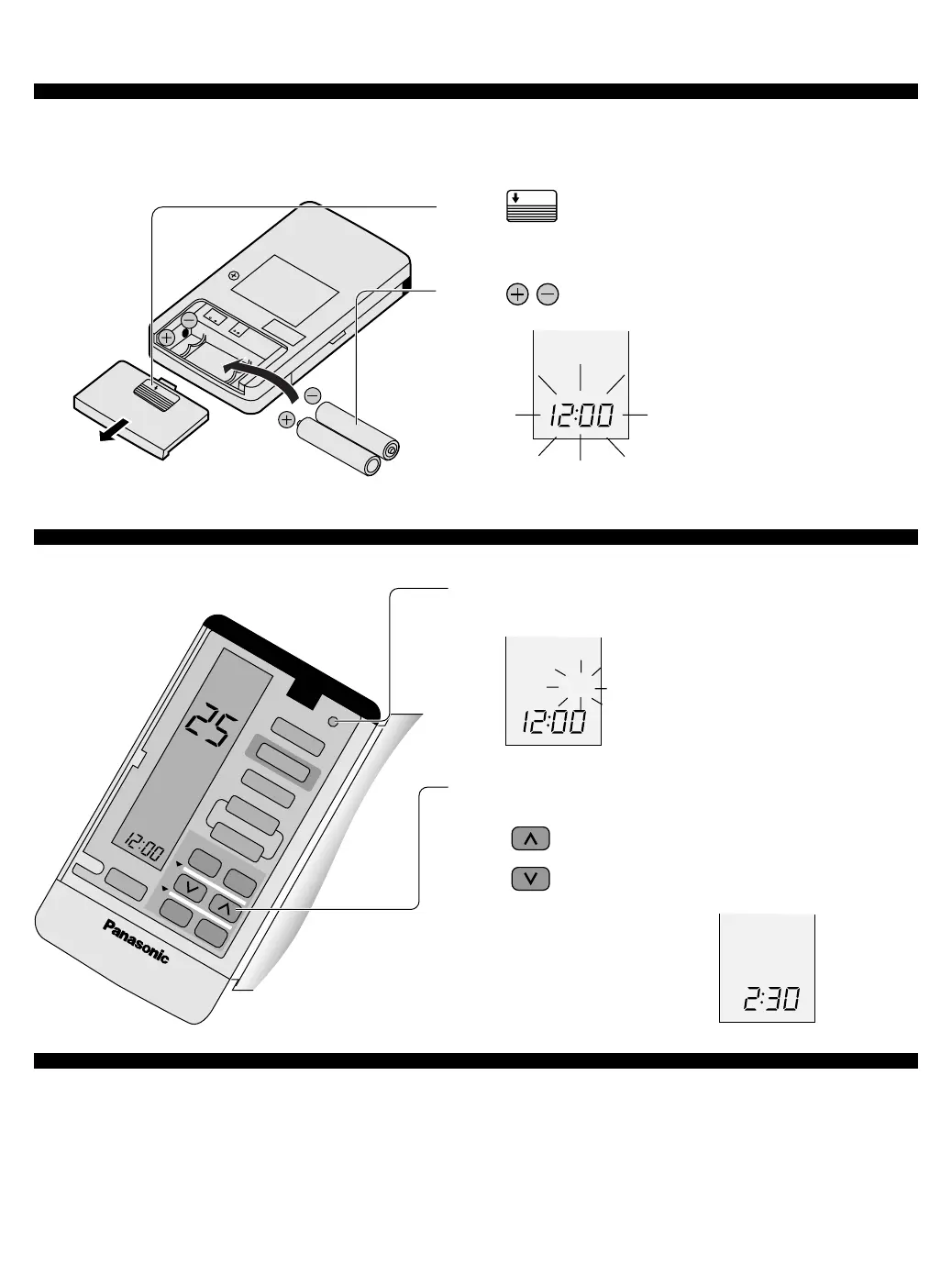
1 Press the clock button
2 Press to set the current time
Press continuously for fast forwarding.
Press continuously for fast reversing.
3 Press the clock button
• Can be used for approximately one year.
Observe the following when replacing the batteries
• Replace with new batteries of the same type .
• Do not use rechargeable batteries (Ni-Cd).
• Remove the batteries if the unit is not going to be used for a long period.
← lights up
PM
1
Slide the cover to open
2 Be sure the directions are correct
• Open the remote control
cover and confirm the
display 12:00 PM
is flashing.
PM
■ Setting the clock
■ About the batteries
* Set the current time (Clock) immediately to prevent battery exhaustion.
← flashes
← lights up
← lights up
● Remote Control
■ Inserting batteries
AIR SWING
TIMER
CLOCK
1
2
3
COOL
PM
MODE
ECONOMY
FAN SPEED
AUTO
MANUAL
ON OFF
SET
CANCEL
SLEEP
OPEN



 To Next Page