EasyManua.ls Logo

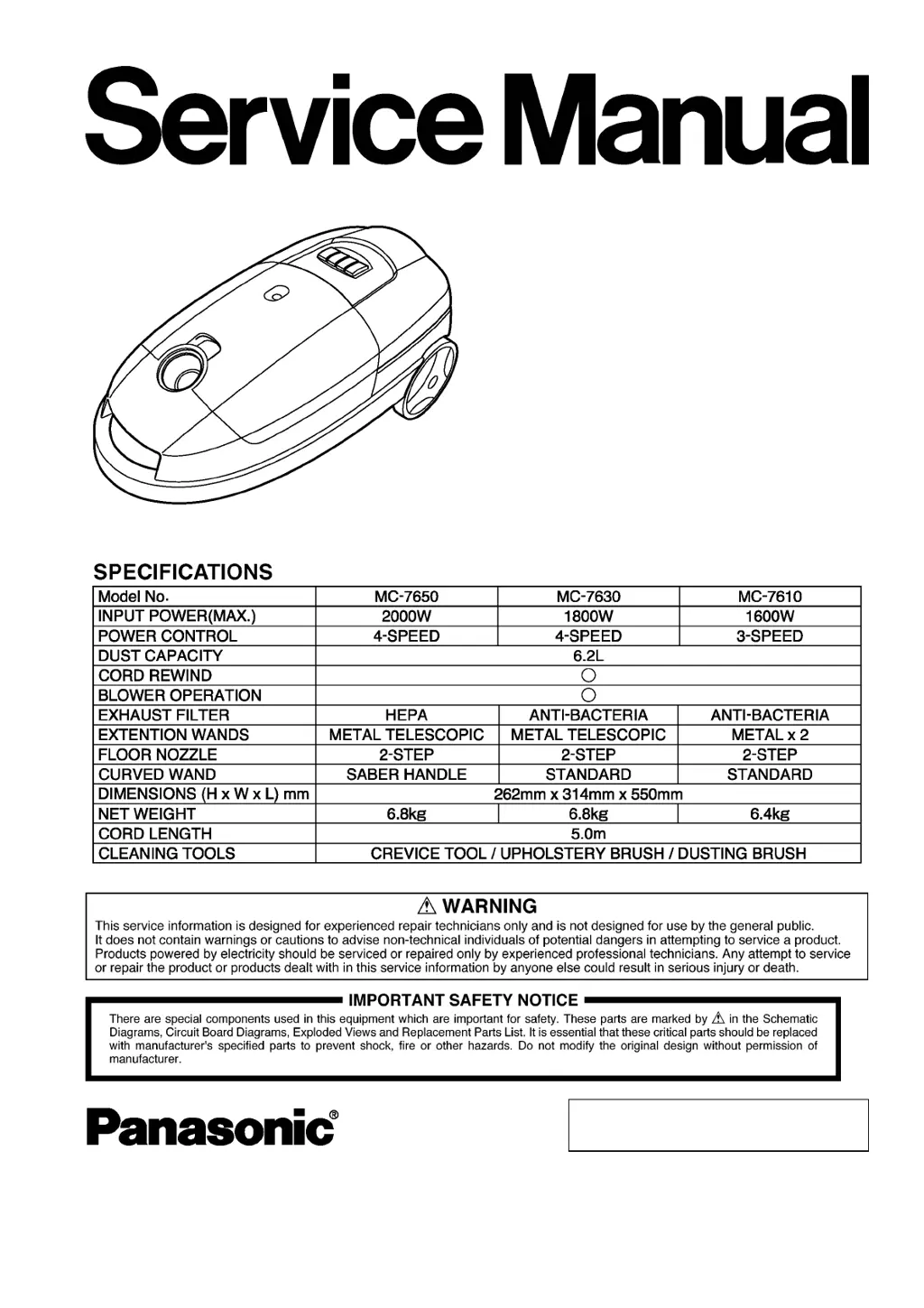
Panasonic MC-7650 - User Manual

Panasonic MC-7650
26 pages
Print Icon
To Next Page IconTo Next Page
Loading...
© 2004 Matsushita Electric Industrial Co., Ltd. All
rights reserved. Unauthorized copying and
distribution is a violation of law.
MC-7650
MC-7630
MC-7610
Product Color : Red (R), Black (K)
Vacuum Cleaner
Order No.VCD0312001C3

Questions and Answers

  • M
    Monique WoodAug 5, 2025
    What to do if suction power cannot be changed on Panasonic MC-7650?
    • M
      Matthew MillerAug 6, 2025
      If the suction power cannot be changed on your Panasonic Vacuum Cleaner (4-step speed inoperative), and any position checks open, replace the whole switch.
  • S
    Samuel OrtizAug 11, 2025
    Why Panasonic Vacuum Cleaner motor does not rotate?
    • F
      foxjenniferAug 12, 2025
      If your Panasonic Vacuum Cleaner motor doesn't rotate, several issues could be the cause. First, the power source might be defective, especially if the voltage is lower than specified. The cord could be open, indicated by no movement on a tester needle. Also, check for accumulated dust in the brush holder or worn-out brushes; adjust or replace them if there's a gap. Ensure all terminals are tightened, and if there's no continuity, the ON/OFF switch may be defective. In the absence of continuity, the motor or stator/rotor coil might be open.
  • A
    April GarzaAug 17, 2025
    What to do if my Panasonic MC-7650 has poor suction power?
    • C
      carol60Aug 17, 2025
      If your Panasonic Vacuum Cleaner has poor suction power and the dust bag indicator shows full, start by removing the dust. If there's a clog, clear it. Additionally, wash or replace the filter to improve suction.
  • A
    Alan BrownAug 25, 2025
    How to fix noise and vibration in Panasonic MC-7650 Vacuum Cleaner?
    • O
      Oscar WardAug 25, 2025
      If your Panasonic Vacuum Cleaner is making excessive noise and vibration, you should clean the dust out of the motor fan and check the filter position and condition. Also, consider replacing the carbon brushes, replacing them at the same time.
  • T
    Tony ThomasAug 29, 2025
    How to fix a Panasonic MC-7650 cord that is wound improperly?
    • D
      Daniel SteinAug 29, 2025
      If the cord on your Panasonic Vacuum Cleaner is wound improperly and 1-2 meters of the cord is not rewound, increase the cord reel tension by one turn.

Summary

Schematic Diagram

Pictorial Wiring Diagram

Exploded View (Attachments) [A]-Block

Parts List (Attachments) [A]-Block

List of part numbers and descriptions for vacuum cleaner attachments [A].

Exploded View (Attachments) [B]-Block

Parts List (Attachments) [B]-Block

List of part numbers and descriptions for main vacuum cleaner body components [B].

Exploded View (Attachments) [C]-Block

Parts List (Attachments) [C]-Block

List of part numbers and descriptions for specific vacuum cleaner attachments [C].

Repair of Main Parts

Connection Pipe, Hose

Instructions for removing and assembling the connection pipe and hose assembly.

Dust Cover Unit

Procedure for removing and assembling the dust cover unit of the vacuum cleaner.

Hose Fitting Rubber

Steps for removing and installing the hose fitting rubber component.

Dust Bag Holder

Guide for removing and assembling the dust bag holder and its spring.

ON;OFF Switch Button, Cord Rewind Button, and Ornamental Plate

Procedure for detaching and installing switch buttons and the ornamental plate.

Power Control Switch

Instructions for removing and replacing the power control switch.

Rear Cover

Procedure for removing and replacing the rear cover of the vacuum cleaner.

ON;OFF Switch

Steps for removing and securing the ON/OFF switch and fuse.

Power Control Unit

Procedure for removing the power control unit from the motor case.

Cord Reel Assy

Detailed steps for removing and assembling the cord reel assembly.

Power Cord

Instructions for removing and assembling the power cord and its reel.

Motor

Procedure for removing and installing the motor, including support rubbers and capacitor.

Carbon Brush

Steps for removing the carbon brush from the motor's brush holder.

Trouble Shooting Guide

Packing Instructions

Packing List

Panasonic MC-7650 Specifications

General IconGeneral
BrandPanasonic
ModelMC-7650
CategoryVacuum Cleaner
LanguageEnglish

Related product manuals