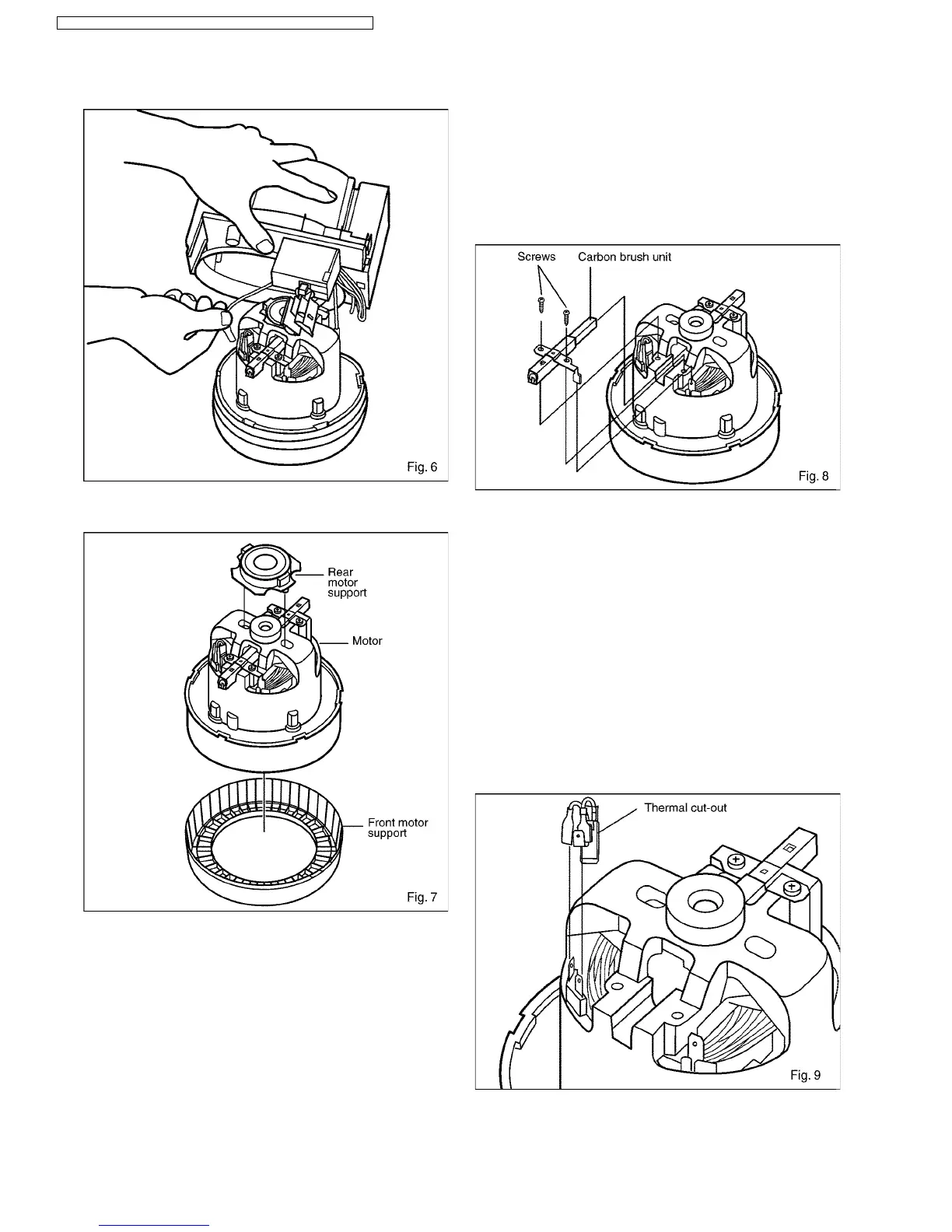
6. Disconnect the two lead wires (provided with quick-connect
terminals) from the motor tabs. (Fig.6)
7. Remove from the motor front / rear motor support and
replace with a new one. (Fig.7)
8. Reassemble front / rear motor support and connect the two
lead wires to the motor tabs. Place the motor cover and
reinstall the motor unit into the lower body.
9. Connect the lead wires according to the schematic diagram
and reassemble the remaining parts in the reverse order.
Note: Make sure the lead wires are correctly positioned
to avoid pinching them between parts.
3.2. CARBON BRUSHES
Note: Replace both carbon brushes at the same time.
1. Take out motor unit and remove motor cover as explained
previously in paragraph 3.1 Motor, points 1-6.
2. Disconnect lead wires (provided with quick-connect
terminal) from the motor tabs.
3. Remove the two screws from the carbon brush holder and
take it out. (Fig.8)
4. Replace the carbon brush unit with a new one and reinstall
it refastening with the screw.
5. Connect the lead wires according to the schematic diagram
and reassemble the motor unit.
6. Re-install motor unit, cord reel ass´y into their lodging and
reassemble the remaining parts in the reverse order.
3.3. AS FOR THERMAL CUT-OUT
1. Take out motor unit and remove motor cover as explained
previously in paragraph 3.1 Motor, points 1-6.
2. Disconnect lead wires (provided with quick-connect
terminal) from the motor tabs.
3. The thermal cut-out is secured in the motor. (Fig.9)
*To change the Thermal Cut-out, replace the entire motor
with new one. You can´t replace only the Thermal Cut-out.
4. Connect the lead wires according to the schematic diagram
and reassemble motor unit and remaining parts in the
reverse order.
6
MC-E8021 / MC-E8021K / MC-E8023 / MC-E8023K / MC-E8024 / MC-E8024K



 To Next Page