English
- Eng-14 -
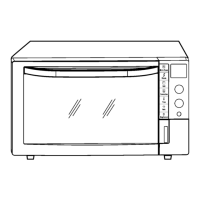
Display Window
Slider bar Features
To help you operate the oven, the following numbers/symbols will appear in the display window.
Time Setting
To set cooking time or clock.
Power Level/Temperature Setting
To set power level or temperature.
Menu Setting
To set auto menu and steam menu.
Weight Setting
To set serving/weight for auto menu and steam menu, turbo defrost.
More/Less Setting
To set more/less for reheat with steam.
NOTE:
The maximum programmable time using slider bar is up to 9 hours.
Select the time, power level, temperature, menu or weight by tapping "+"/"-" or swipe the slider bar. The time/power level/
temperature/menu/weight appears in the display window.
Number/Character
Child Safety Lock Setting
3-Stage Display
Set Display
Plastic Trivet Display
Metal Tray Display
Glass Shelf Display
Convection Feature
Grill Feature
Grill Tray Display
Micro power Feature
Time Display
(Minute/Second)
Defrost Feature
Start Feature
System Cleaning
More/Less Display
Temperature Display
Weight Display (kg/g)
Accessory Placement
Steam Feature
IP4965_3BH70HP_Eng_30_140703.indd 14IP4965_3BH70HP_Eng_30_140703.indd 14 2014-7-3 15:39:252014-7-3 15:39:25








 To Next Page