- 8 -
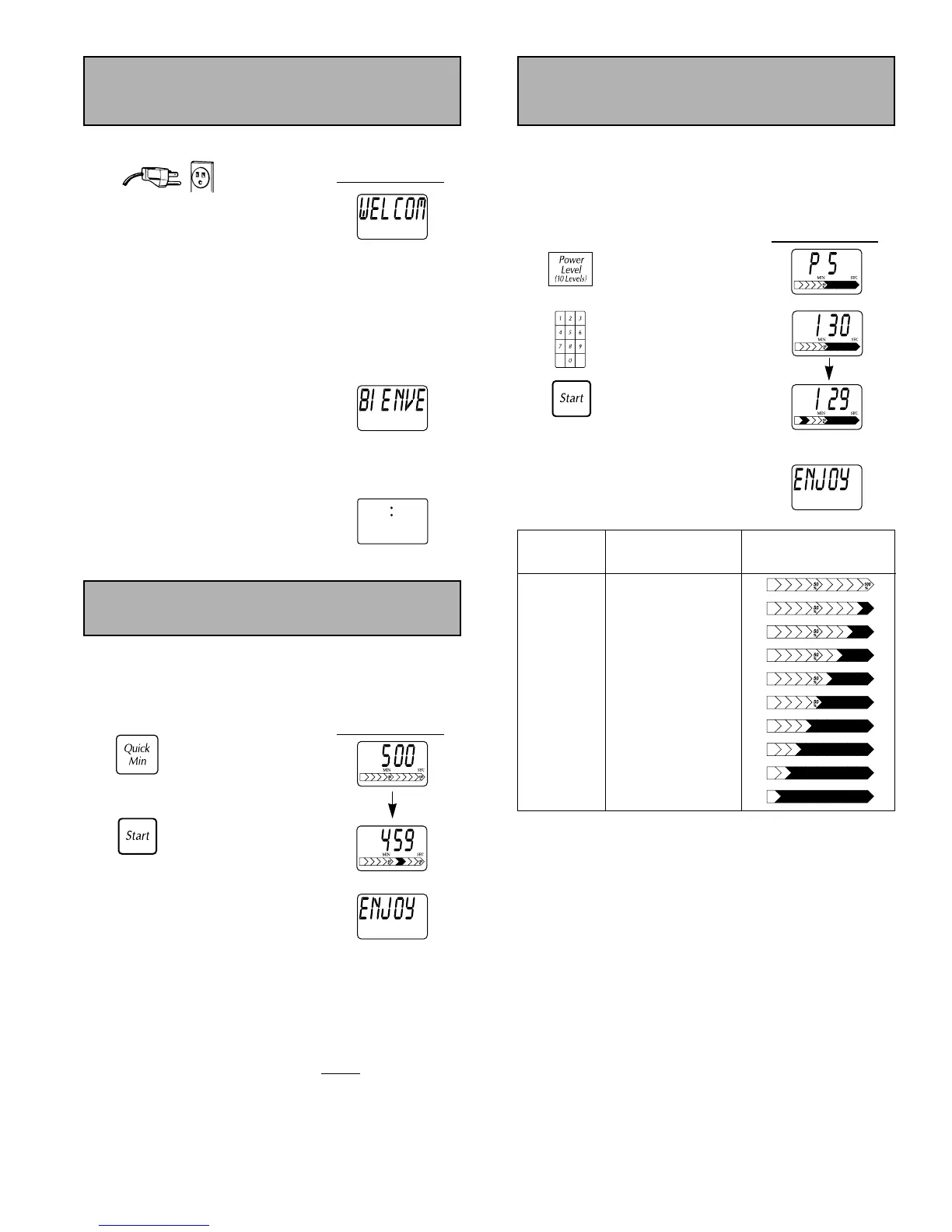
1. Plug into a properly grounded electrical outlet.
Display Window
“WELCOME TO PANASONIC - -
REFER TO OPERATING
INSTRUCTIONS BEFORE USE
” scrolls
across
Display Window.
2. The messages on the Display Window
automatically appear in English.
If you wish to use Spanish or
French, use the
Function pad
language option.
When French is selected,
"
BIENVENUE A PANASONIC - -
LIRE LE MANUEL D'UTILISATION
AVANT USAGE
" scrolls across the
Display Window.
If you wish to use metric measurements,
use the
Function pad weight option.
3. At the end of the “WELCOME . . .”
message, a colon appears on the
Display Window.
Now enjoy cooking with your Panasonic microwave.
Let’s Start to
Use Your Oven!
This feature allows you to manually set the power and time
for microwave cooking.
Press
Power Level pad until desired power appears on the
Display Window. See Chart below.
Example: To cook at P 5 for 1 minute 30 seconds.
Display Window
1. “P 5 SET TIME”
appears on
Display
Window
.
Press six times.
2. Enter cooking time
using number pads.
3. Display Window
counts down and
Press. power level arrow
begins to scroll.
At the end of cooking, five beeps sound
and “ENJOY YOUR MEAL” appears on the
Display Window.
NOTES:
1. For more than one stage cooking, repeat steps 1 & 2 for
each stage of cooking before pressing
Start pad.
Maximum number of stages for cooking is 5 stages.
2. When selecting P10 (HIGH) power for the first stage, you
can begin at step 2.
3. Two beeps will sound between each stage of
programming. Five beeps will sound at the end of the
entire sequence.
4. When selecting P10 (HIGH) power, the maximum time is
30 minutes. For other power levels the maximum time is
99 minutes and 99 seconds.
5. For reheating, use P10 (HIGH) for liquids, P7 (MEDIUM-
HIGH) for most foods and P6 (MEDIUM) for dense foods.
6. For defrosting, use P3 (MEDIUM-LOW/DEFROST).
Manual Operation
(Power & Time Setting)
Press
Power Level Display Window
Power Level
once P10 (HIGH)
twice P9
3 times P8
4 times P7 (MED. HIGH)
5 times P6 (MEDIUM)
6 times P5
7 times P4
8 times P3 (MED. LOW/DEF.)
9 times P2
10 times P1 (LOW)
This feature allows you to set and/or add cooking times
easily in multiples of one minute.
To Set Cooking Time:
Example: 5 minutes
Display Window
1. Set cooking time.
Power level is
P10 (HIGH).
Press.
(up to 10)
2. Cooking begins and
time counts down.
Power level arrow
Press.
begins to scroll.
At the end of cooking, five beeps sound
and “ENJOY YOUR MEAL” appears on the
Display Window.
NOTES:
1. To use with other power levels, Press Power Level, then
Quick Min.
2. If you use
Quick Min, you can not use the Number Pads
or vice versa.
3. Press
Quick Min to add more time during
cooking. To
verify the additional cooking time, check the Display
Window
.
Quick Min



 To Next Page