- 12 -
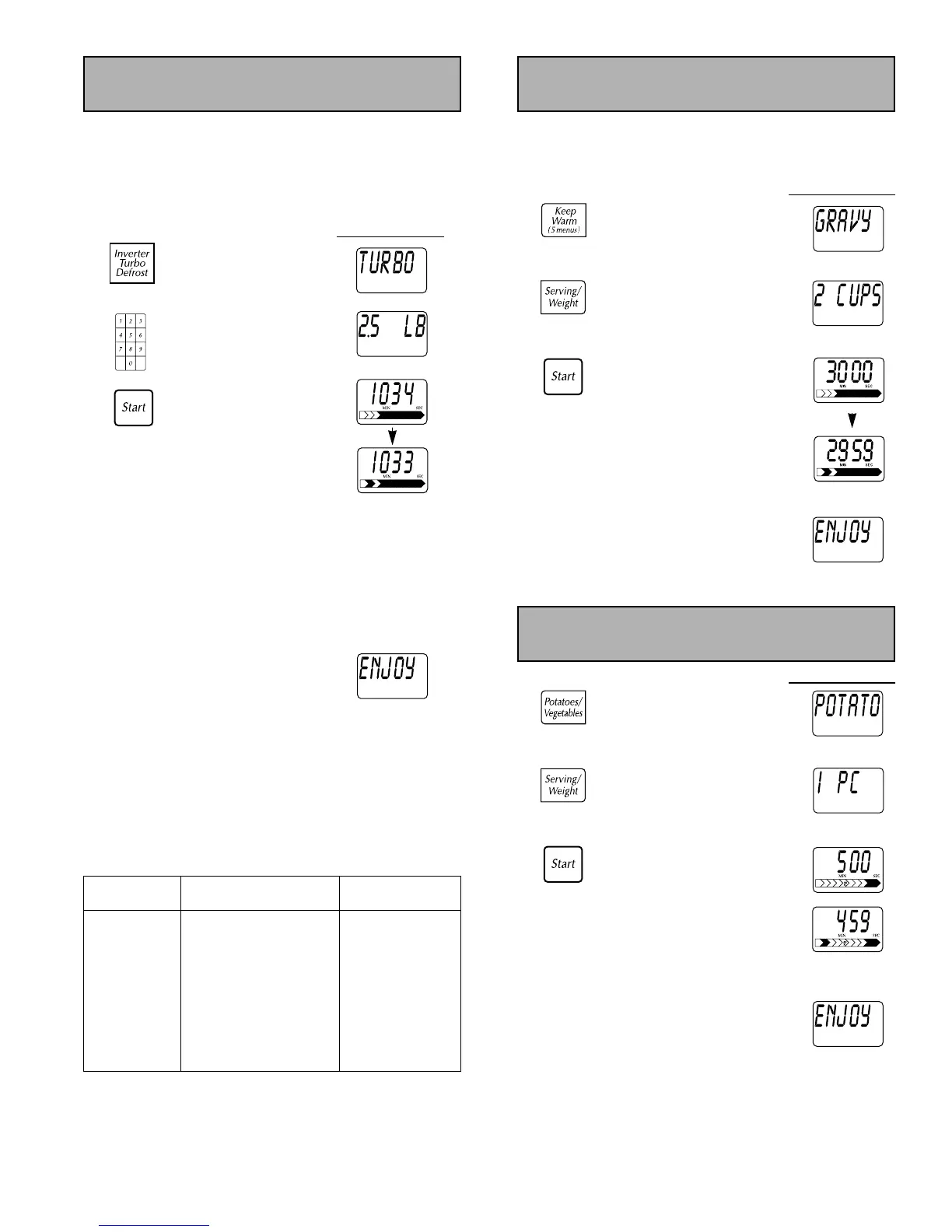
This feature allows you to defrost meat, poultry and seafood
simply by entering the weight.
Example: To defrost 2.5 lbs (2 lbs 8 oz) of meat.
Place food on microwave safe roasting rack in an
appropriately sized dish.
Display Window
1. “INVERTER TURBO
DEFROST - - SET WEIGHT”
appears on
Display Window
Press.
2. Enter weight using
number pads.
(6.0 lb maximum)
3. Defrost time* appears.
Press.
Display Window
counts down and Power
Level arrow scrolls.
Halfway through
defrosting, beep sounds.
Turn over, rearrange
foods, remove defrost
areas or shield with
aluminum foil. (See directions
“DURING DEFROSTING”
in page 13)
At the end of cooking, five beeps sound
and “ENJOY YOUR MEAL” appears on the
Display Window.
*NOTE: Time will vary depending on size and wattage of
your oven.
Conversion Chart:
Follow the chart to convert ounces or hundredths of a pound
into tenths of a pound.
Example: If a piece of frozen meat weighs 1 pound 14
ounces, the equivalent is 1.9 pounds.
Inverter Turbo Defrost
This feature helps you to keep a certain selection of foods
warm for 30 minutes after cooking. (Pie, Gravy, Stew,
Casserole or Mashed Potatoes)
Display W
indow
1. “GRAVY - - PRESS
SERV/WEIGHT”
appears on
Display Window.
2. Verify serving size
on
Display Window.
3. Keep Warm time
appears on
Display
Window
and begins to
count down from
30 minutes. Power Level
arrow scrolls.
At the end of cooking, five beeps
sound and “ENJOY YOUR MEAL”
appears on the
Display Window.
Keep Warm Pad
Press twice.
Press twice.
Press.
Display Window
1. “POTATOES - - PRESS
SERV/WEIGHT”
appears on
Display Window.
2. Verify serving size
on
Display Window.
3. Auto Cooking time
appears on
Display
Window
and begins to
count down from
5 minutes. Power Level
arrow scrolls.
At the end of cooking, five beeps
sound and “ENJOY YOUR MEAL”
appears on the
Display Window.
Inverter Auto Cooking
Press once.
Press.
Press.
Ounces Hundredths Tenths of
of a Pound a Pound
0 .01 - .05 0.0
1 - 2 .06 - .15 0.1
3 - 4 .16 - .25 0.2
5 .26 - .35 0.3
6 - 7 .36 - .45 0.4
8 .46 - .55 0.5
9 - 10 .56 - .65 0.6
11 - 12 .66 - .75 0.7
13 .76 - .85 0.8
14 - 15 .86 - .95 0.9



 To Next Page