EasyManua.ls Logo

Panasonic NN-S952BF - Quick Guide to Operation; How to Operate

Panasonic NN-S952BF
44 pages
Print Icon
To Next Page IconTo Next Page
To Previous Page IconTo Previous Page
Loading...
- 20 -
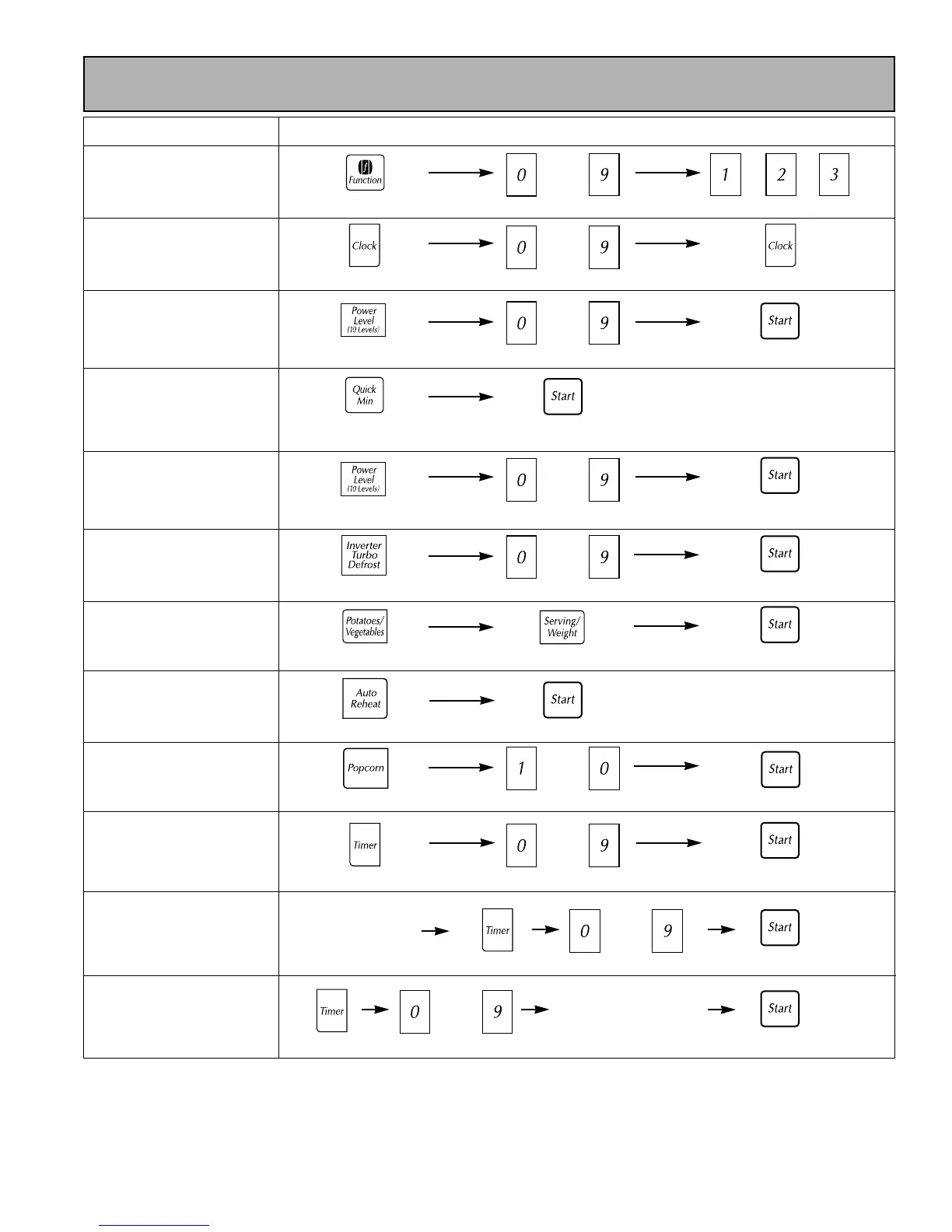
Quick Guide to Operation
Feature How to Operate
To Set Clock
(page 10)
To Cook using
Power and Time
( page 8)
To Cook using
Quick Min
(page 8)
To Defrost using
Power and Time
(page 8)
To Cook using
Popcorn
(page 10)
To Use as a
Timer
(page 11)
To Set
Standing Time
(page 11)
To Set
Delay Start
(page 11)
To Reheat using
Auto Reheat
(page 11)
Enter time of day.
Set cooking time.Select power.
Press.
Press.
Tap desired number
of times (up to 10).
Press to select weight.
Input up to 4
Cooking
Programs.
(
)
Input up to 4
Cooking
Programs.
(
)
Press.
Press.
To Cook using
Inverter Turbo Defrost
(
page 12)
Press.
Enter defrost time.
Press.
Enter weight.
Press.
Press.
Press.
Press.
Press.
Press.
Press.
Press.
Select serving 1-4.
Press.
Enter time.
Enter time.
Enter time.
Thru
To use Function
(page 9)
Press.
Select category. Select option.
or or
Press 8 times to
select P3.
Thru
Thru
Thru
Thru
Optional.
or
To Cook using
Inverter Auto Cooking
(page 12)
Press desired category.
eg.
Press to select weight.
Press.
Thru
Thru
Thru

Related product manuals