- 11 -
Auto Reheat
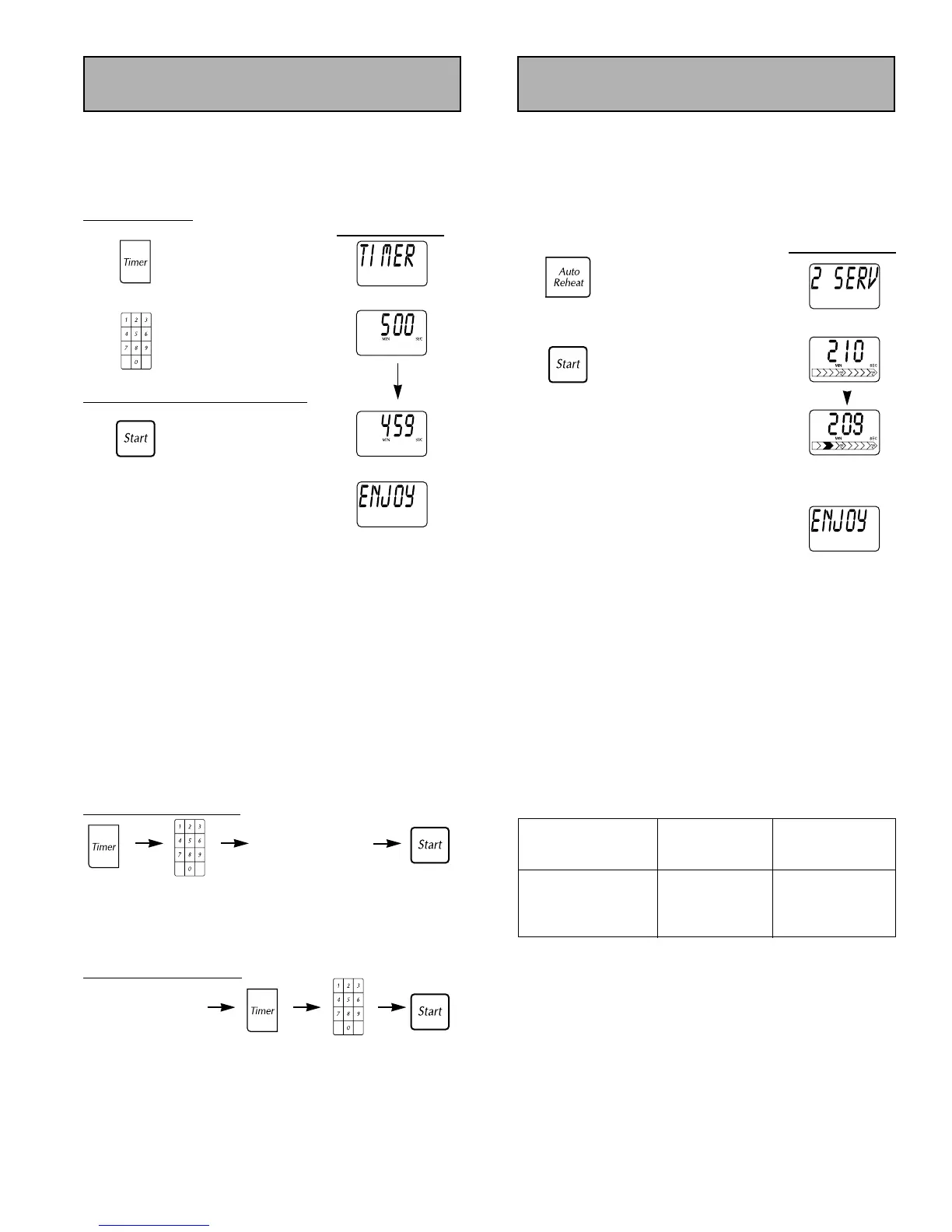
This feature allows you to reheat up to 4 servings.
Example: To reheat 2 servings.
Press Auto Reheat pad until desired number of servings
appears on the
Display Window. See Chart below.
Display Window
1.
Press 2 times.
2. Cooking time
appears.
Press.
Display Window
counts down and
power level arrow
scrolls.
At the end of cooking, "ENJOY YOUR
MEAL" appears on the
Display Window.
NOTES: For best results, follow these recommendations:
1. All foods must be previously cooked.
2. Foods should always be covered loosely with plastic wrap,
wax paper or a casserole lid.
3. All foods should have a covered stand time of 3 to 5
minutes.
4.
DO NOT reheat bread and pastry products using Auto
Reheat
. Use manual power and time instead.
5.
DO NOT reheat beverages.
6. Times are based on an approximate serving size of 110 g
(4 oz).
7. A plate of food is normally 3 - 4 servings.
Press Auto Reheat Average
pad to indicate Serving Time
number or servings Size
once 110-170 g (4-6 oz) will vary
twice 225 g (8 oz) depending
three times 340 g (12 oz) on size and
four times 450 g (16 oz) wattage of oven
This feature allows you to:
1) Use it as a Kitchen
TIMER.
2) Program STAND time after cooking is completed.
3) Program
DELAY time for cooking to begin.
T
o Set TIMER:
Display W
indow
1. "TIMER - - SET TIME"
appears on the
Display
Window
.
Press once.
2. Enter time using Number
pads (up to 99 minutes
and 99 seconds).
To Activate TIMER Program:
3. Timer will count down.
No cooking will occur.
Press once.
At the end of cooking, five beeps sound
and “ENJOY YOUR MEAL” appears on the
Display Window.
NOTES:
1. When each stage finishes, a two beep signal sounds. At
the end of the program, the oven will beep five times.
2. If oven door is opened during the TIMER/DELAY/STAND
time, the time on the
Display Window will continue to
count down.
3. Stand time and Delay time cannot be programmed before
any Auto Control Feature. This is to prevent the starting
temperature of the food from rising before defrosting or
cooking begins. A change in the starting temperature
would cause inaccurate cooking results.
4. Timer can be set up to 99 minutes and 99 seconds.
To Set DELAY Start:
Press Enter DELAY Press.
once. time using
number pads.
* Cooking will start after DELAY time has expired.
To Set STAND Time:
Press Enter STAND Press.
once. time using
number pads.
* STAND time will count down after cooking occurs.
Timer
Input up to
4-stage Cooking
Program.
(
)
Input up to
4-stage Cooking
Program.
(
)



 To Next Page