13
Connecting and Setting Up
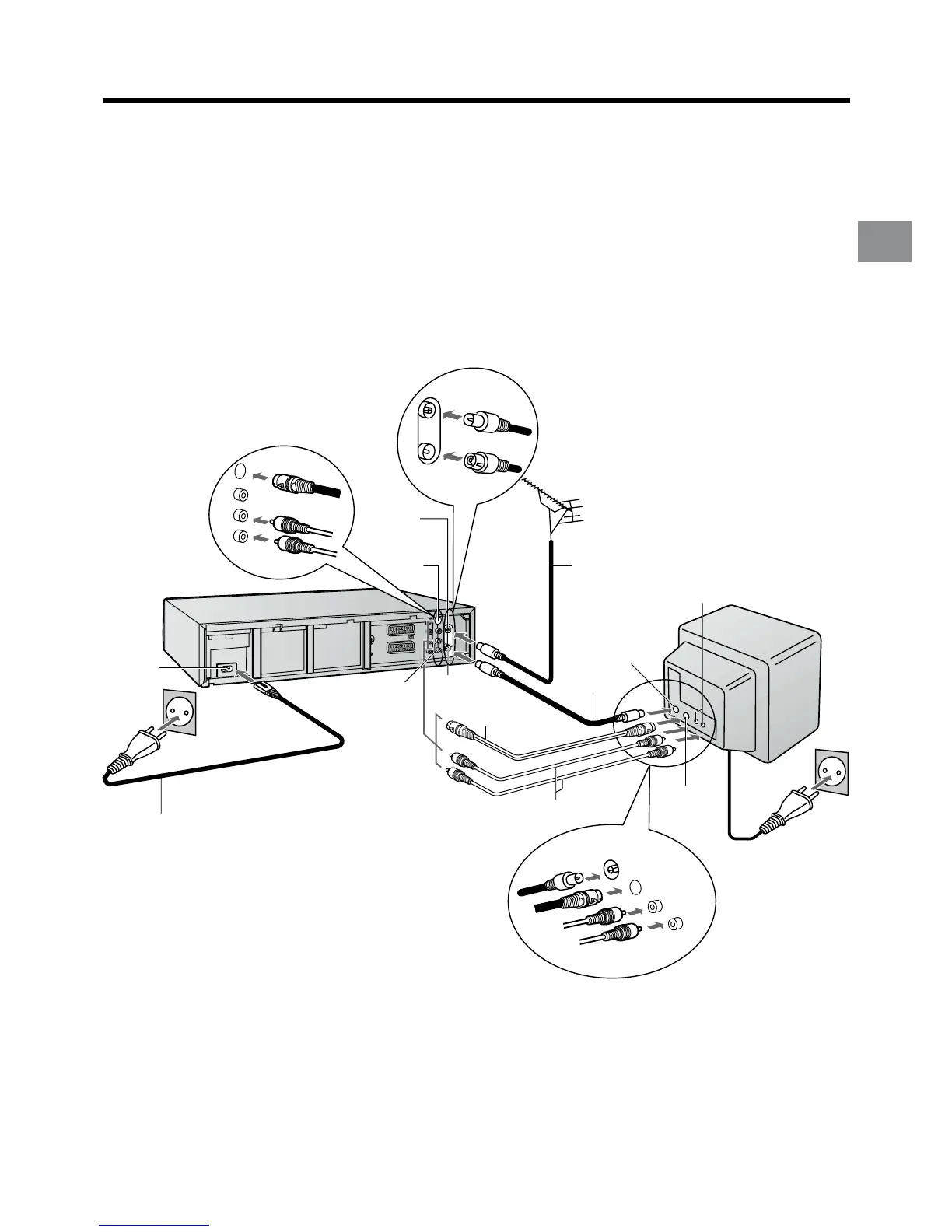
Connecting and Preparations for a TV Equipped with the
S-Video Socket
Connections and preparations for a TV with S-Video socket.
This VCR uses the S-VHS format that makes it possible to obtain high resolution and high picture quality by using the high-
performance S-VHS video cassette tapes.
The conventional video sockets of VCRs output (input) a combination of the luminance signal (Y) and colour signal (C) which
are recorded on the video tape. The new S (Separate)-Video Socket allows separate transmission of signals in order to obtain
clearer pictures.
The connection with the S-Video Cable can also be used for playback of a tape that was recorded in the conventional VHS
system. The “S” in the “S-Video Socket” stands for “SEPARATED Y/C” not for “S-VHS”.
Be sure to keep both the TV and VCR switched off until all connections have been made.
For your safety, be sure not to connect or handle the equipment with wet hands.
After completing the above connections, proceed to the Auto Setup page (Page 14).
Aerial Input
socket
q
AC Input
socket
r
AC Mains lead
(supplied)
S-Video
Output
socket o
Aerial Output
socket
z
Audio Output
sockets
y
Aerial (not supplied)
Aerial lead
(not supplied)
Audio Input
sockets
Aerial Input
socket
S-Video Input
socket
To AC Mains socket
Audio cables
(not supplied)
RF Coaxial cable
(supplied)
S-Video cable
(supplied)
TV with S-Video
Input socket
(not supplied)



 To Next Page