ENGLISH-15
Preparation
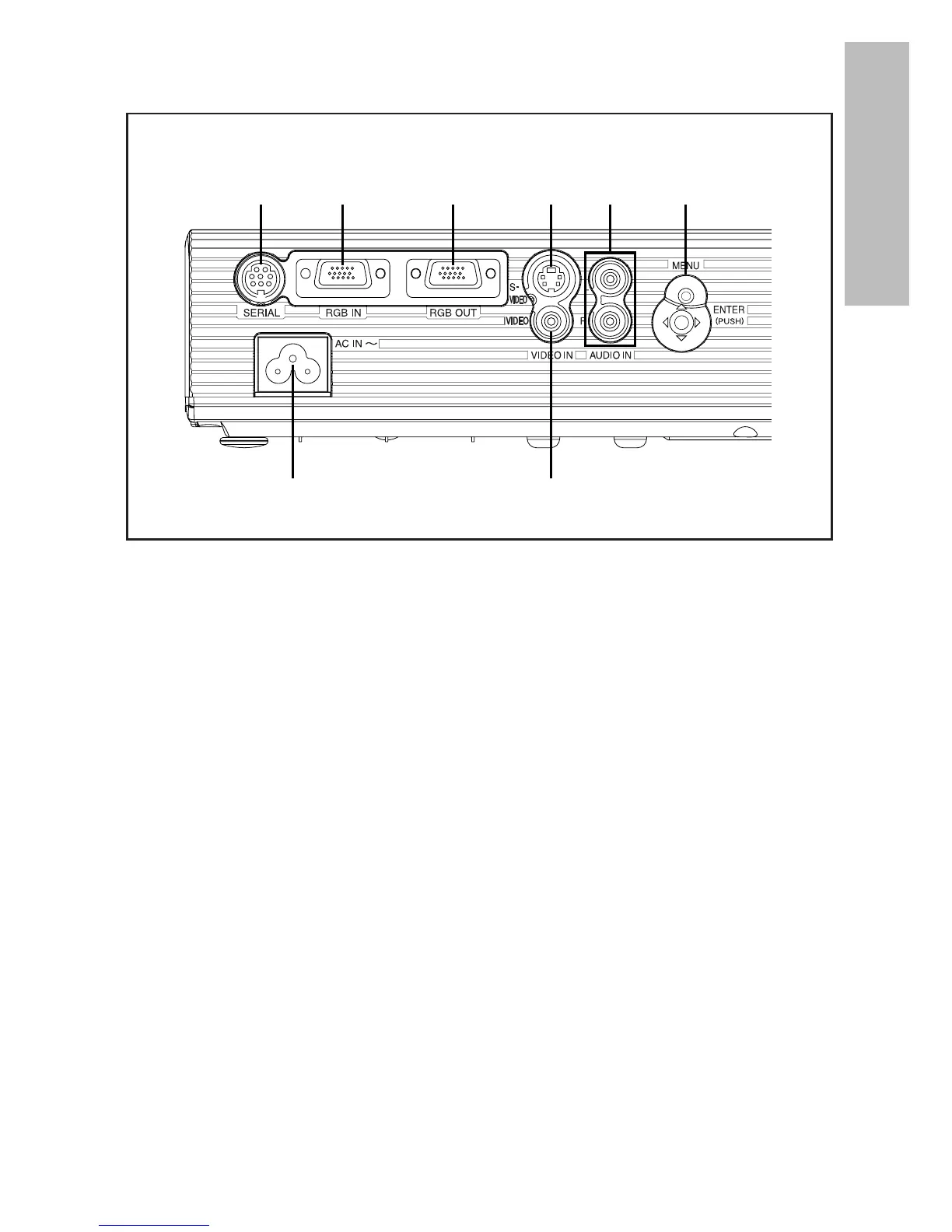
Connector panel
# Power input socket (AC IN) (page 24)
The accessory mains lead is connected here.
Do not use any mains lead other than the accessory mains lead.
$ SERIAL connector (pages 21, 22 and 62)
This connector is used to connect a personal computer to the projector in
order to control the projector externally. (RS-232C compatible)
% RGB IN connector (pages 21 and 22)
This connector is used to input RGB signals and YPBPR signals.
& RGB OUT connector (page 21)
This connector is used to output RGB signals and YPBPR signals from the
RGB IN connector.
' S-VIDEO IN connector (pages 22 and 41)
This connector is used to input signals from S-VIDEO-compatible
equipment such as a video deck. The connector is S1 signal compatible,
and it automatically switches between 16:9 and 4:3 aspect ratios in
accordance with the type of signal being input.
( VIDEO IN connector (page 22)
This connector is used to input video signals from video equipment such
as a video deck.
) AUDIO IN L-R connectors (pages 21 and 22)
* Menu operation (on connector panel) (page 16)



 To Next Page