18-ENGLISH
Setting-up
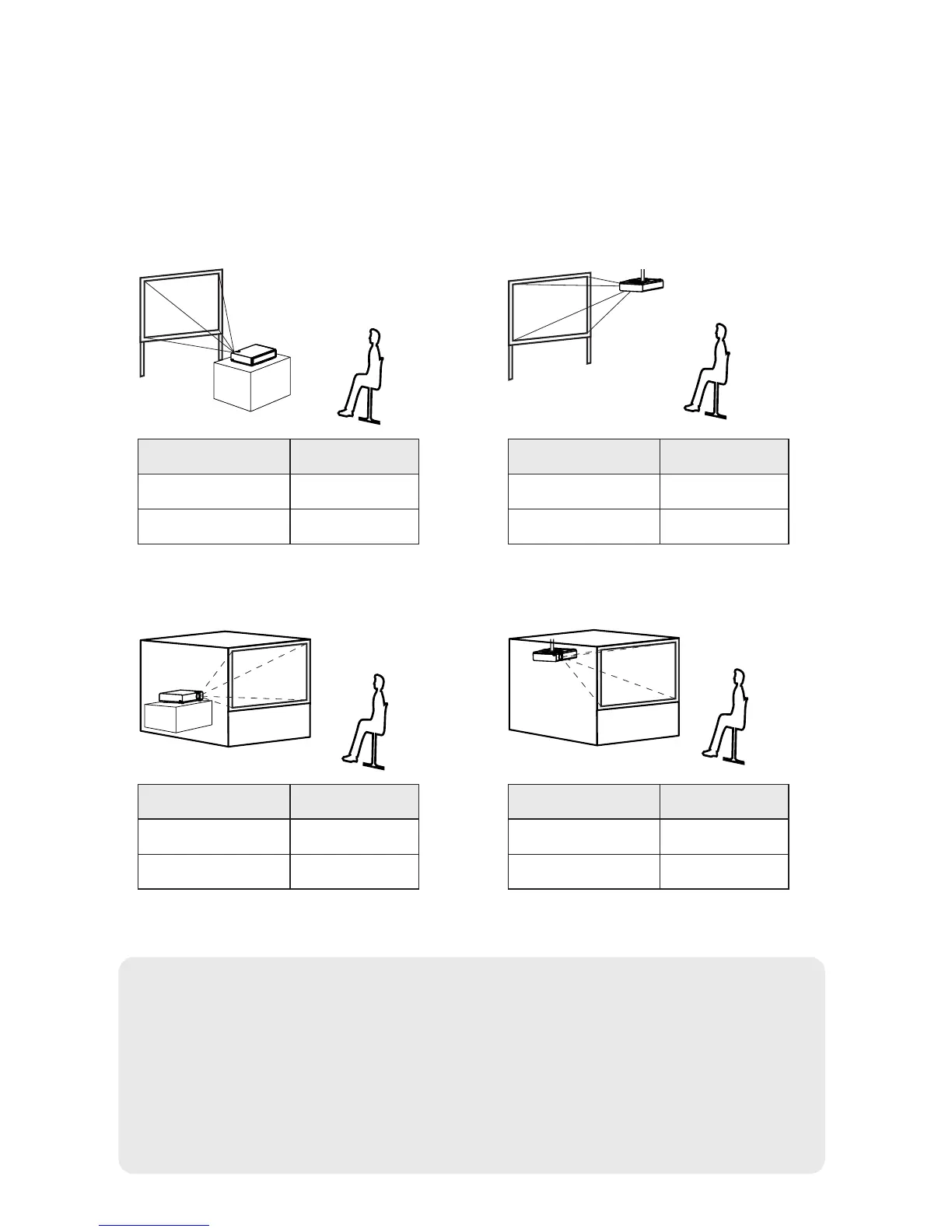
Projection methods
In way of installing projector, any one of the following four projection methods
are used. Select whichever projection method matches the setting-up
method. (The projection method can be set from the “OPTION” menu. Refer
to pages 46 and 47 for details.)
BFront-desk projection BFront-ceiling projection
BRear-desk projection
(Using a translucent screen)
BRear-ceiling projection
(Using a translucent screen)
Menu items Setting
FRONT
DESK
FRONT/REAR
DESK/CEILING
Menu items Setting
FRONT
CEILING
FRONT/REAR
DESK/CEILING
Menu items Setting
REAR
DESK
FRONT/REAR
DESK/CEILING
Menu items Setting
REAR
CEILING
FRONT/REAR
DESK/CEILING
NOTE:
B You will need to purchase the separate ceiling bracket (ET-PKB30)
when using the ceiling installation method.
B Do not set up the projector vertically or tilted horizontally, otherwise it
may cause damage to the projector.
B It is recommended that you set up the projector in a place that is tilted
at less than ±30° vertically. Setting up the projector in places that are
tilted at more than ±30° vertically may shorten component life.



 To Next Page