Powering ON/OFF
ENGLISH -
27
Basic Operation
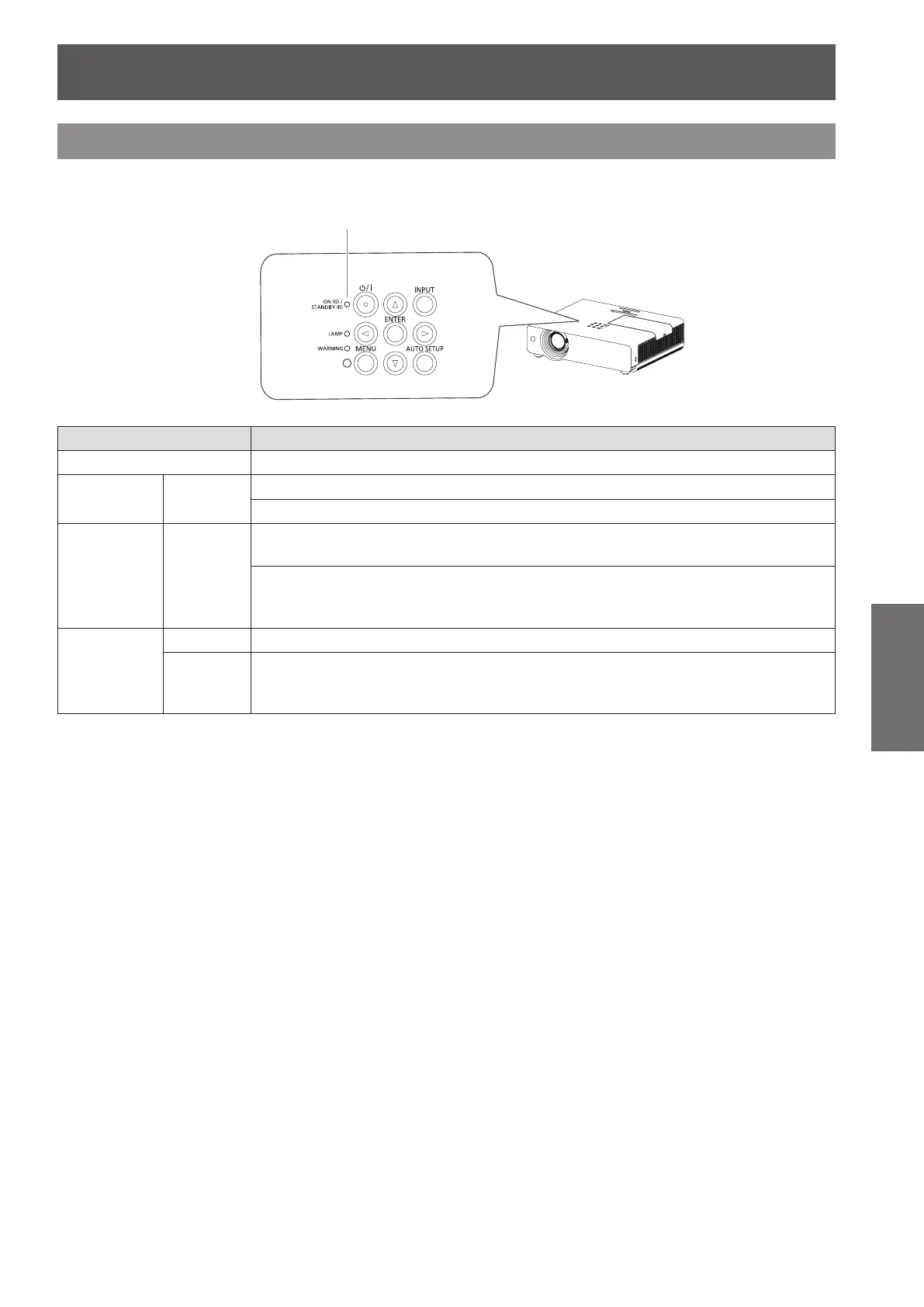
ON(G)/STANDBY(R) indicator
The power indicator informs you the status of the power. Conrm the status of the <ON(G)/STANDBY(R)>
indicator before operating the projector.
ON(G)/STANDBY(R) indicator
Indicator status Status
No illumination or ashing The power cord is unplugged.
RED Lit
The power cord is plugged.
The projector is in stand-by mode, after the cooling is completed.
ORANGE Flashing
The projector is cooling down. The projector cannot be turned on until cooling is
completed and the <ON(G)/STANDBY(R)> indicator stops blinking.
The temperature inside the projector is abnormally high. And the <WARNING>
indicator also blinks in red (
Æ
page 77). The projector cannot be turned on until
cooling is completed and the <ON(G)/STANDBY(R)> indicator stops blinking.
GREEN
Lit Projecting.
Flashing
The projector is in stand-by status with [Power management] function.
The projection lamp will be turned on if the input signal is reconnected or any
button on the control panel or remote control is pressed. (
Æ
page 54)








 To Next Page