Menu Navigation
38
- ENGLISH
Settings
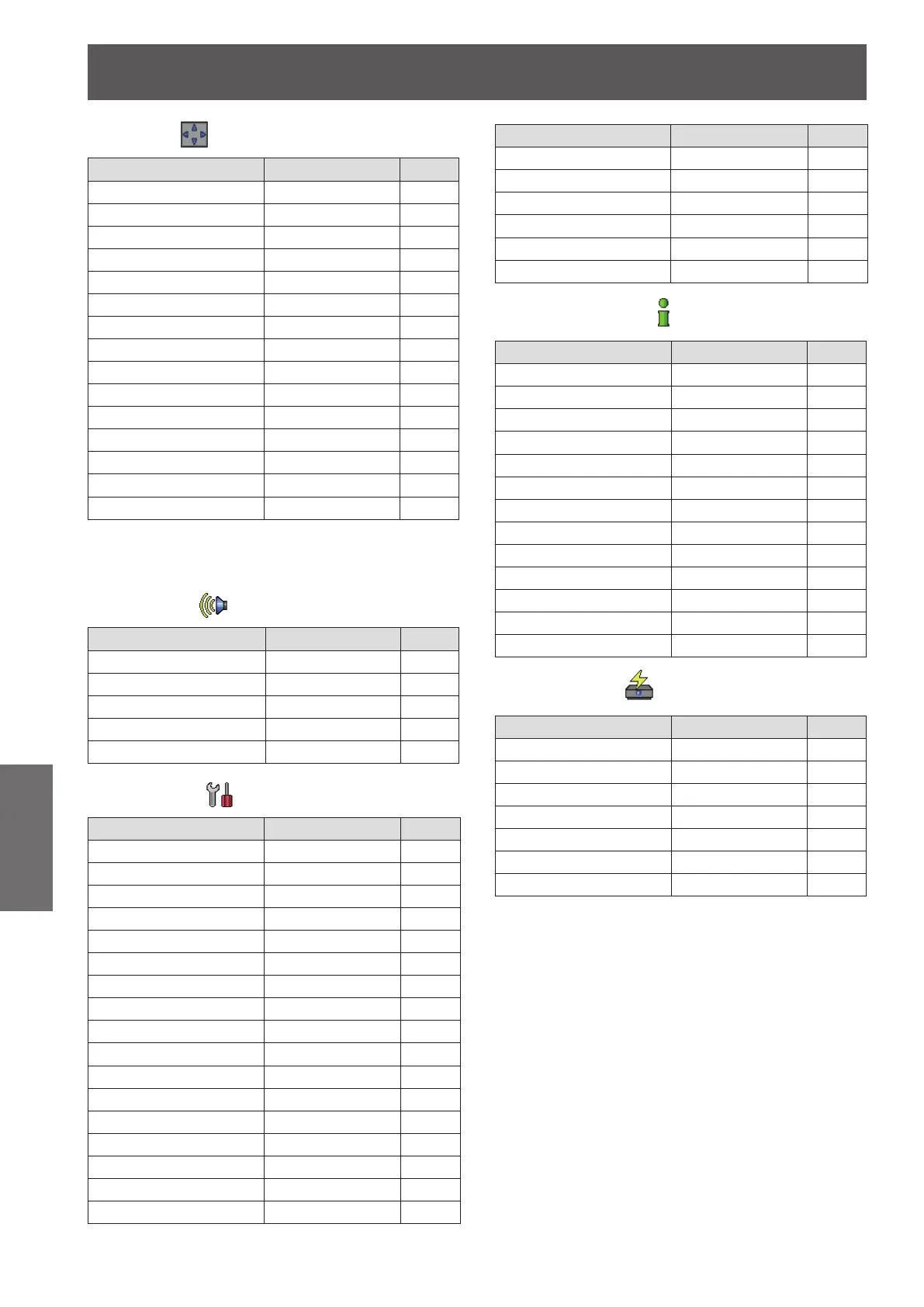
Screen [ ]
Sub-menu item Factory default Page
Normal - 48
Full*
1
- 48
Wide (16:9)*
1
- 48
Zoom *
1
- 48
True*
1
- 48
Natural wide*
2
- 48
Custom - 48
Custom adj.*
1
- 49
Digital zoom +*
1
- 49
Digital zoom -*
1
- 49
Keystone Store 49
Ceiling Off 50
Rear Off 50
Screen aspect*
2
Default(16:10) 50
Reset - 50
When input computer signal to the projector, these *1 :
functions will be available.
PT-VW430U Only.*2 :
Sound [
J
]
Sub-menu item Factory Default Page
Volume 32 51
Mute Off 51
MIC Off 51
MIC gain 32 51
Standby MIC out Off 51
Setting [
J
]
Sub-menu item Factory Default Page
Language English 52
Menu position Center 52
Auto setup - 52
Background Blue 53
Display On 53
Logo - 53
HDMI setup - 54
Terminal Computer 2 54
Power management Shutdown 54
Direct on Off 55
Standby mode Eco 55
P-timer Count up 55
Closed caption Off 56
Lamp power Normal 56
Remote control ALL 56
Security - 56
Fan L 2 57
Sub-menu item Factory Default Page
Fan control Off 57
Video delay control Off 57
Filter counter - 58
Emulate Default 58
Warning log - 59
Factory default - 59
Information [
J
]
Sub-menu item Factory default Page
Input - 60
System - 60
H-sync freq. - 60
V-sync freq. - 60
Screen - 60
Language - 60
Lamp power - 60
Lamp runtime - 60
Power management - 60
Key lock - 60
PIN code lock - 60
Remote control - 60
Serial number - 60
J
Network [ ]
Sub-menu item Factory default Page
Projector name - 61
Network setup - 61
Network control On 62
Network status - 62
AMX D.D. Off 62
Room View Off 62
Network factory default - 62








 To Next Page