EasyManua.ls Logo

Panasonic RX-CS710 - Record Prevention and Maintenance; Record Prevention Tabs; Unit Maintenance

Panasonic RX-CS710
12 pages
Print Icon
To Next Page IconTo Next Page
To Previous Page IconTo Previous Page
Loading...
RECORD
PREVENTION
TABS
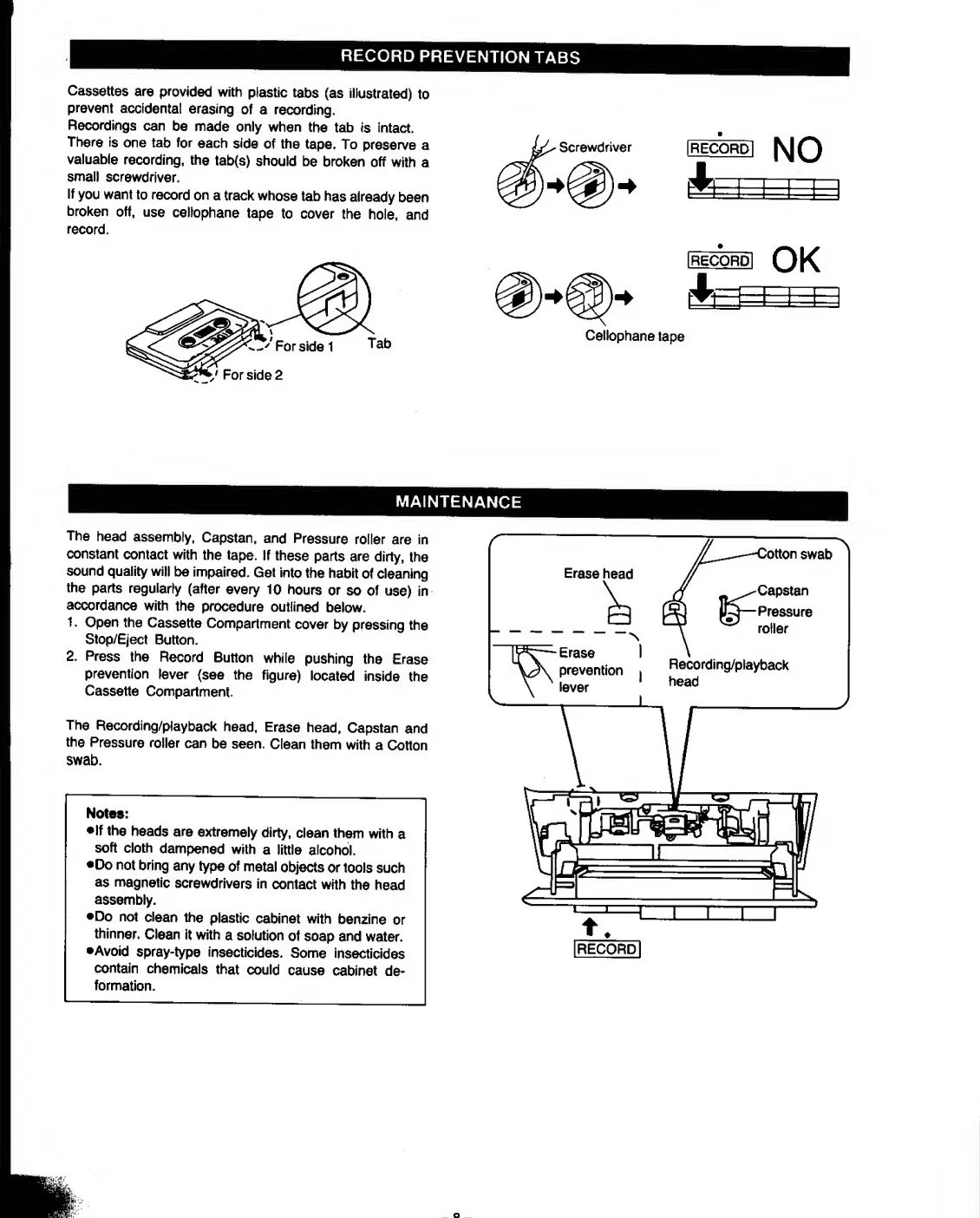
Cassettes
are
provided
with
plastic
tabs
(as
illustrated)
to
prevent
accidental
erasing
of
a
recording.
Recordings
can
be
made
only
when
the
tab
is
intact.
There
is
one
tab
for
each
side
of
the
tape.
To
preserve
a
valuable
recording,
the
tab(s)
should
be
broken
off
with
a
small
screwdriver.
If
you
want
to
record
on
a
track
whose
tab
has
already
been
broken
off,
use
cellophane
tape
to
cover
the
hole,
and
record.
Cellophane
tape
MAINTENANCE
The
head
assembly,
Capstan,
and
Pressure
roller
are
in
constant
contact
with
the
tape.
If
these
parts
are
dirty,
the
sound
quality
will
be
impaired.
Get
into
the
habit
of
cleaning
the
parts
regularly
(after
every
10
hours
or
so
of
use)
in
accordance
with
the
procedure
outlined
below.
1.
Open
the
Cassette
Compartment
cover
by
pressing
the
Stop/Eject
Button.
2.
Press
the
Record
Button
while
pushing
the
Erase
prevention
lever
(see
the
figure)
located
inside
the
Cassette
Compartment.
The
Recording/playback
head,
Erase
head,
Capstan
and
the
Pressure
roller
can
be
seen.
Clean
them
with
a
Cotton
swab.
Notes:
•If
the
heads
are
extremely
dirty,
clean
them
with
a
soft
cloth
dampened
with
a
little
alcohol.
•Do
not
bring
any
type
of
metal
objects
or
tools
such
as
magnetic
screwdrivers
in
contact
with
the
head
assembly.
•Do
not
clean
the
plastic
cabinet
with
benzine
or
thinner.
Clean
it
with
a
solution
of
soap
and
water.
•Avoid
spray-type
insecticides.
Some
insecticides
contain
chemicals
that
could
cause
cabinet
de¬
formation.

Other manuals for Panasonic RX-CS710

Related product manuals