Power Sources
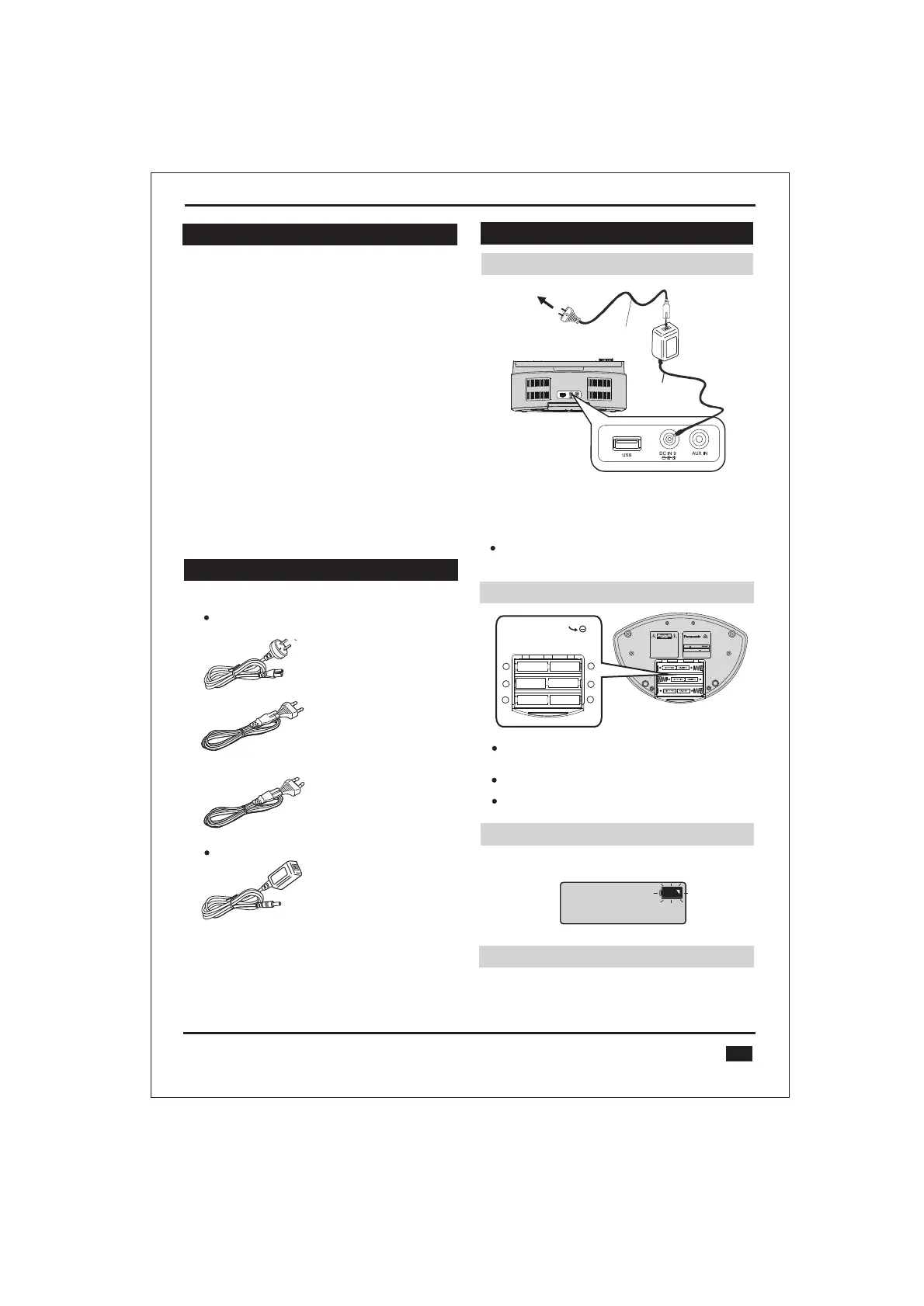
Using the household mains socket Using the household mains socket
To household
mains socket
AC power
adaptor
(included)
Connect the DC cord of the AC power adaptor firmly to the
unit and connect the suitable AC mains lead firmly to the
household mains socket.
Note
The included AC power adaptor is for use with this unit only.
Do not use it with other equipment.
This unit can be powered by either the included AC power
adaptor, or by using six “C” sized alkaline batteries
(not included).
This unit only operates on batteries when the AC power
adaptor is unplugged.
Use only alkaline batteries.
Using batteries (not included)Using batteries (not included)
USB charging portUSB charging port
V
V
AC mains lead
(included)
3
When the battery indicator begins flashing, replace all six of the
batteries.
When to change the batteriesWhen to change the batteries
This CD system included a USB port placed on the rear.
The USB port supports powering and charging most USB
devices. (USB cable sold separately).
Supplied accessories
Check and identity the supplied accessories.
3 x AC mains lead
For
Australia, New Zealand
For
Thailand
For Singapore, Malaysia, Israel
1 x AC Adaptor
Panasonic Corporation
Made in China
Model No. RX-DBT30
Portable Stereo CD System
6 LR14 BATTERIES 9V
DC IN 9V 1.8A
Press towards
while inserting the battery.
(LR14, C)
+
_
+
_
+
_
12
3
4
5
6
Table of contents
Safety precautions ..................................................
Maintenance ............................................................
Use of batteries .......................................................
Power sources ........................................................
Overview of controls ..............................................
Using your CD system ...........................................
Pairing with a Bluetooth device ...........................
Playing audio from a Bluetooth device ...............
To play the radio .....................................................
Setting radio station presets .................................
6
Playing audio from a connected audio device ....
To play a CD ............................................................
To control CD playback .........................................
Repeating a track or CD ........................................
To play tracks in random order ............................
2
2
2
3
4
5
5
5
5
6
6
6
6
6
Program CD/MP3 playback ...................................
Compatible CD .......................................................
Compatible MP3 files .............................................
About Bluetooth ....................................................
7
7
7
8
Troubleshooting guide ..........................................
Specifications ........................................................
9
9
10
Warranty ................................................................
®
®
®
Supplied accessories .............................................
3


 To Next Page