15
6.3.3. Doctor Mode Table 3
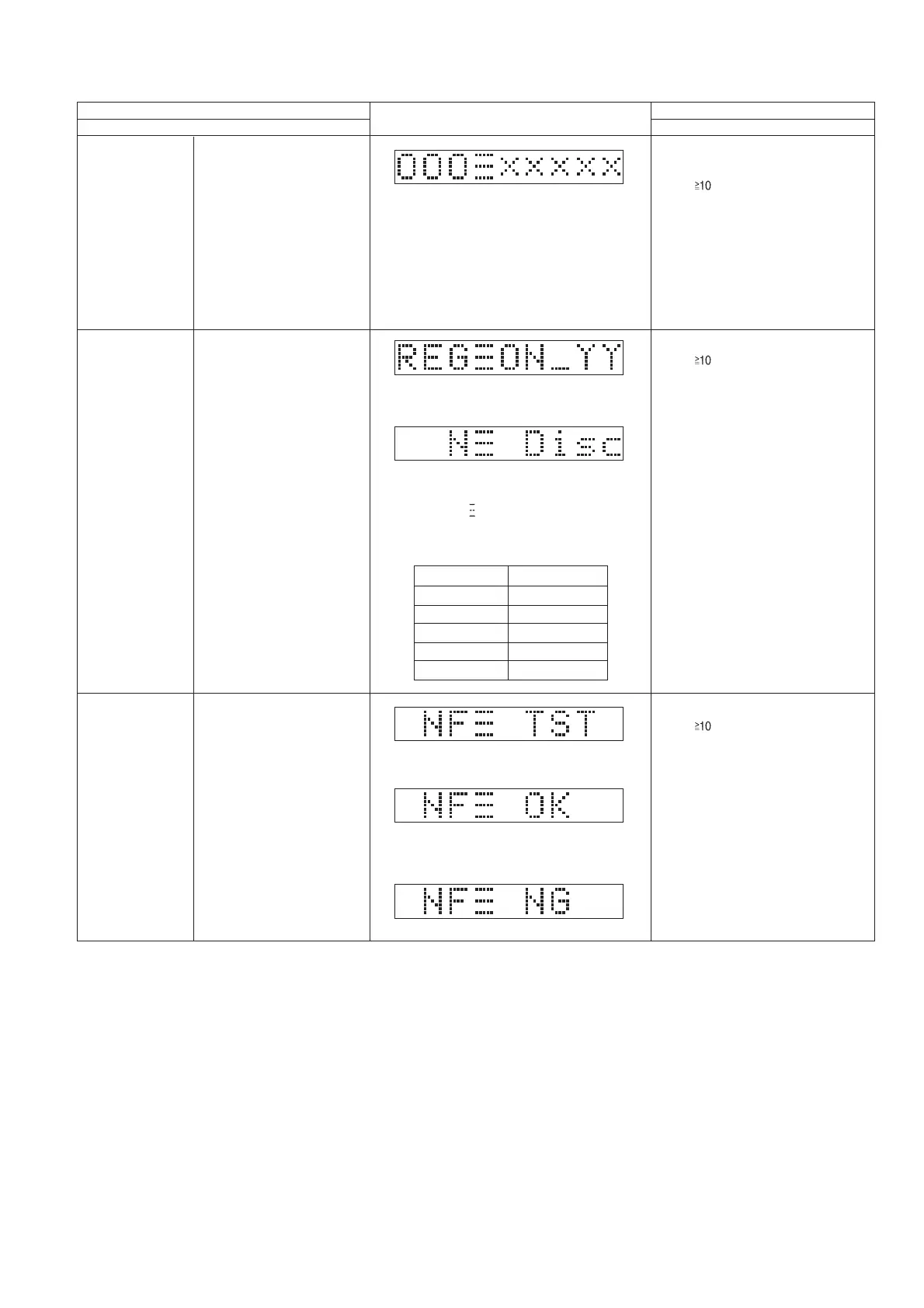
Display of Bluetooth MAC Address will
scroll forever
Bluetooth Address Check
Bluetooth Mac
Address Checking
Press [ ] follow by [3] & then [1]
button on the remote control.
In Doctor Mode:
Select to the Bluetooth Mode
•
To exit Doctor Mode, press
[DEL]
button on the remote control without
power off.
• Unplug the AC cord.
To cancel, press [0] button on remote
control. [CANCEL] will be display and
returns to Doctor Mode.
Item
FL Display
Key Operation
Mode Name Description
Front Key
The [NO DISC] display will appear after 2s.
After writing finished check, OK will display
After writing canot write and read back
data, NG will display
Press [ ] follow by [1] & then [6]
button on the remote control.
AD value of region pin is check and display
will show [REG ON_YY] based on region
table.
YY = 1 ~ 10 based on region table as below.
Checking for model no and
Region
Region Check
NFC Data Writing
NFC Data Test
In Doctor Mode:
•
To exit Doctor Mode, press
[DEL]
button on the remote control without
power off.
• Unplug the AC cord.
To cancel, press [0] button on remote
control. [CANCEL] will be display and
returns to Doctor Mode.
Press [ ] follow by [2] & then [6]
button on the remote control.
In Doctor Mode:
•
To exit Doctor Mode, press
[DEL]
button on the remote control without
power off.
• Unplug the AC cord.
To cancel, press [0] button on remote
control. [CANCEL] will be display and
returns to Doctor Mode.
Value (Y)
0
1
4
9
10
BEB, BGN
BEG
EG, EF, EC, EE
JPN
PC
Region





 To Next Page