22
Recording operations
RQT5621
A
1
2
4
FLAT
MHz
FLAT
SC-AK44
SC-AK44
SC-AK22 SC-AK12SC-AK33
SC-AK22 SC-AK12SC-AK33
2
4
1
MHz
only
SC-AK44
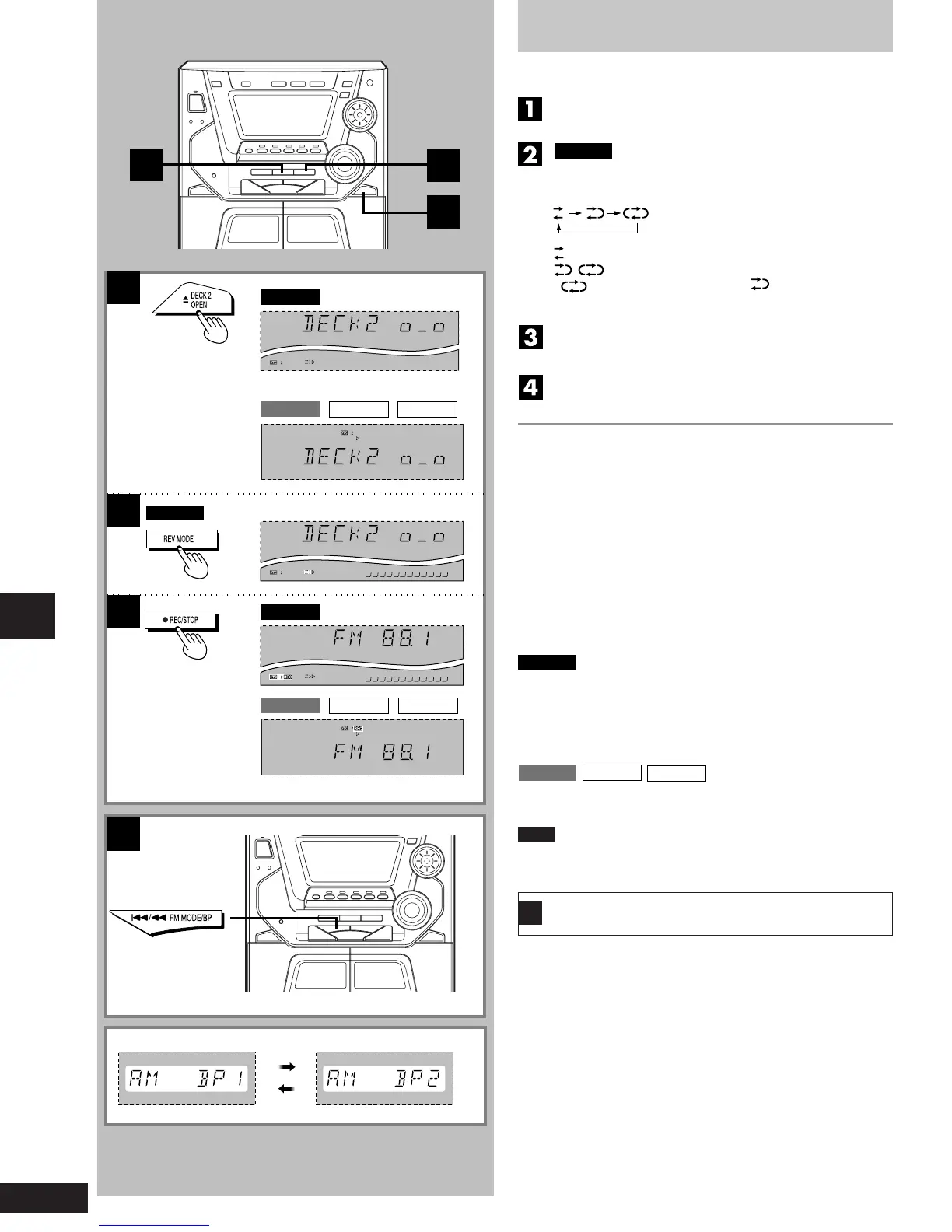
Recording from radio broadcasts
Wind up the leader tape so recording can begin immediately.
Press [c DECK 2 OPEN] and insert the tape.
Close the holder by hand.
only
Press [REV MODE] to select the reverse mode.
Every time you press the button:
: One side, only, records.
: Both sides record (front side → reverse side).
automatically changes to “ ” when [aREC/STOP]
is pressed.
Select a radio station. Perform steps 1 through 3
on page 12.
Press [a
REC/STOP] to start recording.
To stop recording
Press [a REC/STOP] again.
Recording can also be stopped by pressing [L].
To record from a specific point on a tape
Before recording, advance the tape to the point from where you want
to start recording.
To cut an unnecessary part while recording
1. Press [a REC/STOP] during the unnecessary part. The cassette
deck will go into the stop mode.
2. Press [a REC/STOP] to resume recording again. Recording will
continue in the same direction as before.
To start recording on the reverse side
Load a tape and change the tape direction as follows:
1. Press [TAPE, DECK 1/2] and select tape deck 2.
2. Press [// J] and immediately thereafter [L]. The tape direction
will be shown as “4”.
To record on the other side of the tape
Turn the tape over and press [a REC/STOP].
Note
When recording an AM broadcast, sound is momentarily interrupted
when you start and stop the recording.
To reduce noise while AM recording (Beat proof
function)
Press [g/(, FM MODE/BP] while recording.
Each time you press the button, “BP1” and “BP2” will be displayed
alternately.
Select the position where there is less noise.
“ ”
A
SC-AK44
SC-AK33
SC-AK22
SC-AK44
,
SC-AK12



 To Next Page