27
RQT0A22
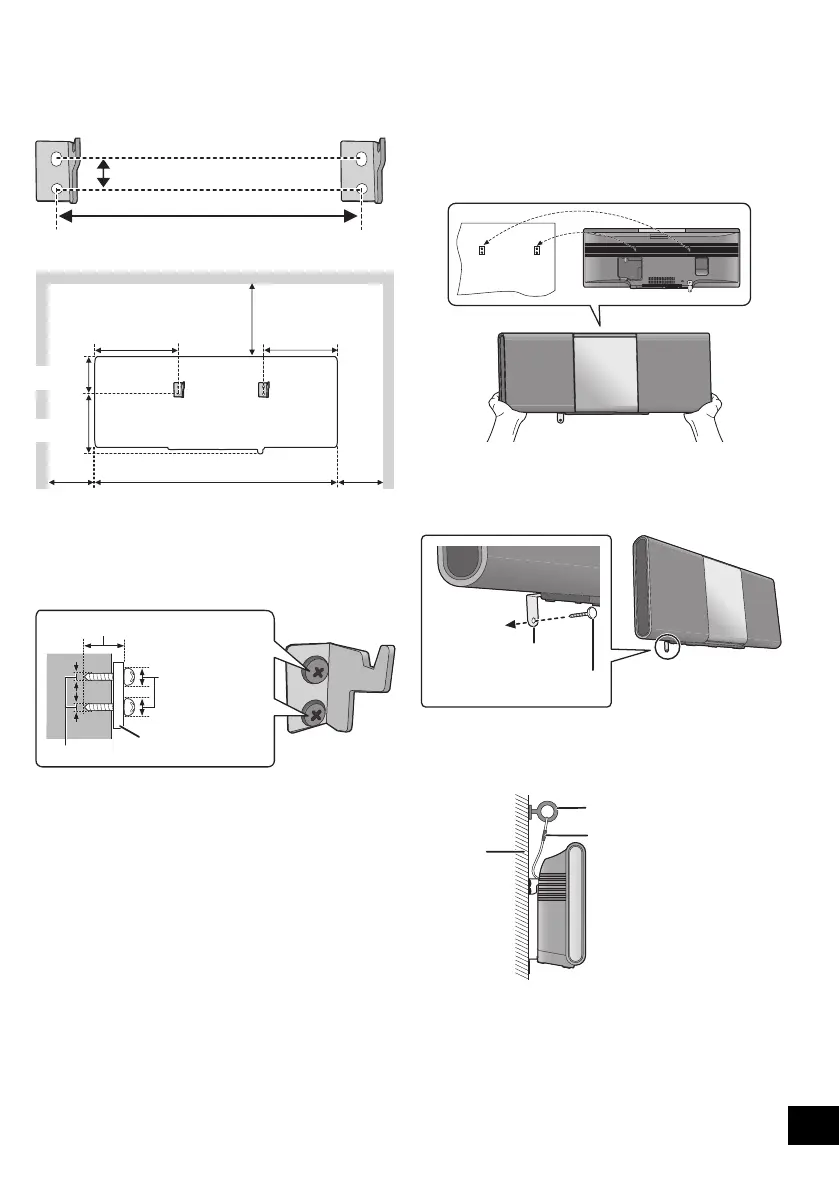
4 Measure and mark the position of both sides of the
wall mount brackets.
≥ Use figures below to identify the screwing positions.
The position to attach the wall mount brackets
Space required
5 Attach the wall mount bracket to both sides of the
wall with two screws (not supplied).
≥ Use a level to ensure both wall mount brackets are
level.
6 Hook the unit securely onto the wall mount
brackets with both hands.
≥ After hanging the unit, release your hands carefully to
confirm the unit sits securely on the wall mount
brackets.
7 Drive the safety holder fixing screw (not supplied)
to secure the safety holder onto the wall.
≥ Refer to step 5 for requirements before screwing.
8 Attach the fall prevention cord (not supplied) to the
wall.
≥ Make sure that the slack of the cord is minimal.
533 mm
83 mm
183 mm 165 mm
100 mm
130
mm
300 mm
100 mm
At least 30 mm
‰7.5 mm to
‰9.4 mm
‰4 mm
Wall mount bracket
≥ Connect the antenna and the AC mains lead to the unit
before hanging the unit onto the wall. (l 5)
Safety holder fixing screw
(not supplied)
Safety holder
Fix to the wall
Cord (not supplied)
Screw eye (not supplied)
Wall
SC-ALL5CD-EGEBGN~RQT0A22.book 27 ページ 2015年7月17日 金曜日 午前11時30分










 To Next Page