5
RQT0A22
Connections
≥ These speakers do not have magnetic shielding. Do not place them near a TV, personal computer or other magnetic devices.
≥ Tape the antenna to a wall or column in a position with the least amount of interference.
≥ If radio reception is poor, use a DAB outdoor antenna (not supplied).
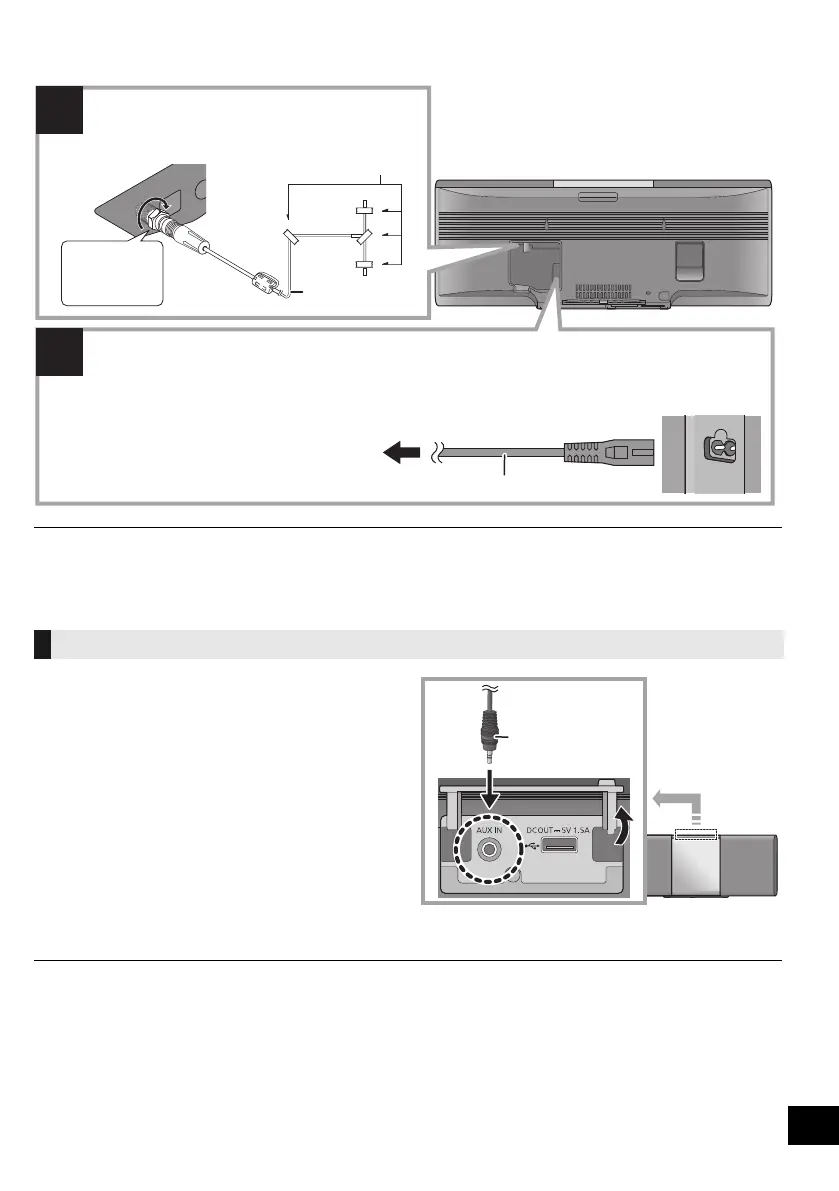
1 Connect an external music device using an audio
cable (not supplied).
≥ Plug type: ‰3.5 mm stereo
2 Press [RADIO/EXT-IN] repeatedly to select “AUX”
and start playback on the connected device.
∫ To select the sound input level of the
external device
1 While in AUX mode, press [SOUND] repeatedly to
select “INPUT LEVEL”.
2 Press [3, 4] to select “NORMAL” or “HIGH” and
then press [OK].
≥ The factory default is “NORMAL”.
≥ To improve sound distortion when “HIGH” is selected, select “NORMAL”.
≥ Switch the equalizer off or turn the volume of the external device down to reduce the input signal. High level of input signal will
distort the sound.
≥ For details, refer to the operating instructions of the device.
Connect an external music device
Connect the antenna.
This unit can receive DAB+ and FM stations with
the DAB antenna.
Adhesive tape (not supplied)
DAB indoor antenna
(supplied)
Be sure to
tighten the nut
fully.
To a mains socket
AC mains lead (supplied)
Connect the AC mains lead after all other connections are completed.
This unit consumes a small amount of AC power (l 28) even when turned off.
≥ In the interest of energy conservation, if you will not be using this unit for an extended period of time,
unplug it from the mains socket.
Audio cable
(not supplied)
SC-ALL5CD-EGEBGN~RQT0A22.book 5 ページ 2015年7月17日 金曜日 午前11時30分










 To Next Page