15
RQT6220
Disc operations
Discs—Convenient functions
Repeat play
[DVD-A] [DVD-V] [CD] [VCD]
During play
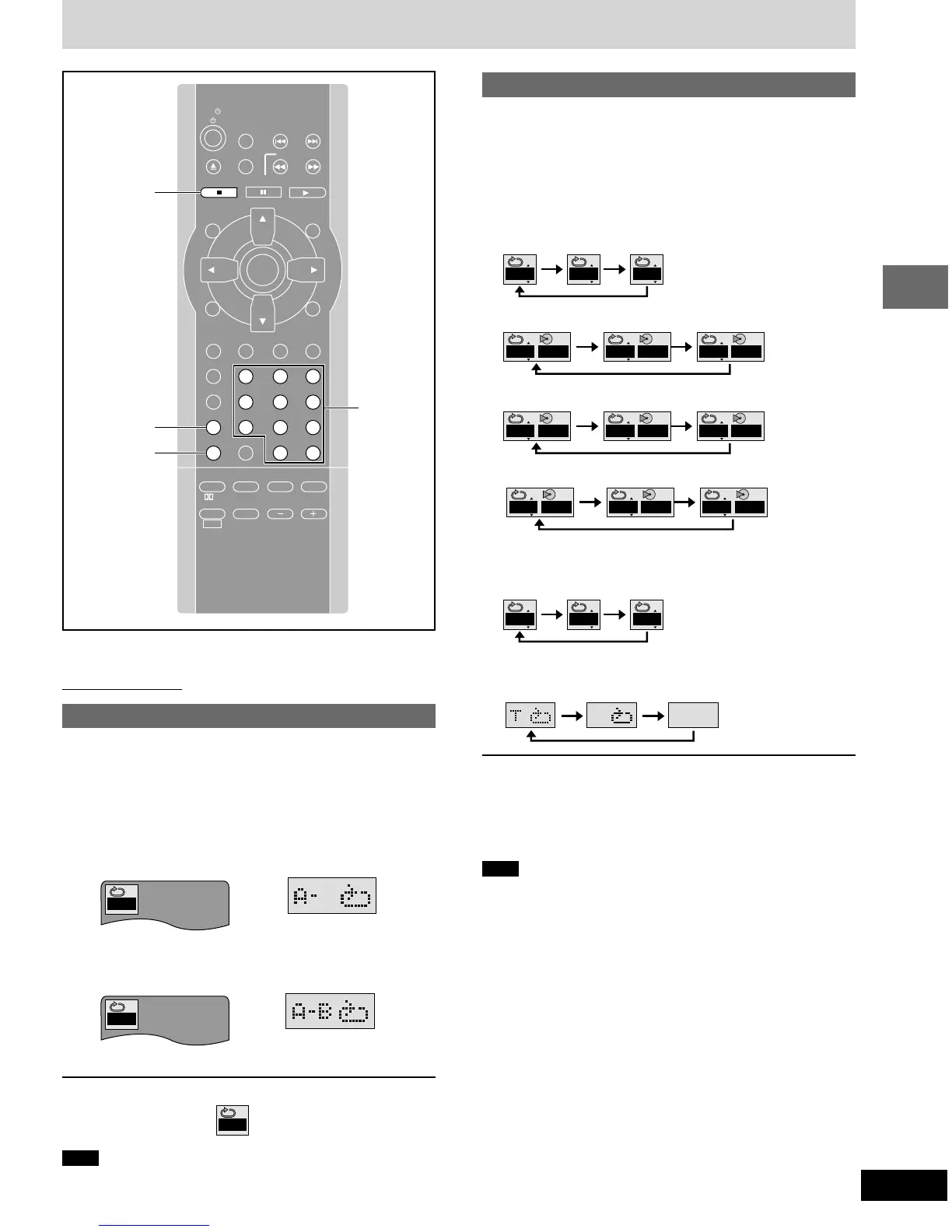
Press [REPEAT].
Each time you press the button:
[DVD-A]
≥Normal play
Track Whole group OFF
≥All group play
Track All groups OFF
≥Program play
Track Whole program OFF
≥Random play
Track All selected groups OFF
[DVD-V]
[CD] (MP3 disc)
Chapter Title OFF
[CD] [VCD] (There is no on-screen display.)
Track Entire disc OFF
If the Video CD has playback control
1. Press [∫].
2. Press the numbered buttons to select a track to start play
(➡ page 13).
3. Press [REPEAT] (➡ above).
Note
You cannot use repeat play to repeat an entire DVD-Video or an
entire MP3 disc.
∫ To repeat only your favorite tracks
[DVD-A] [CD] [VCD]
Start program play (➡ page 16) and press [REPEAT] to select the
repeat mode.
(When the elapsed play time is displayed)
Remote control only
A-B repeat play
[DVD-A] [DVD-V] [CD] [VCD]
You can repeat a section between points A and B within a title or
track.
1 During play
Press [A-B REPEAT] at the starting
point (A).
2 Press [A-B REPEAT] at the finishing
point (B).
A-B repeat starts.
To cancel
Press [A-B REPEAT] until “
✱
✱
” is displayed.
Note
≥Some subtitles recorded around point A or B may fail to appear.
≥The unit automatically determines the end of a title/track as point B
when the end of the title/track is reached.
A
✱
A B
SLOW/SEARCH
P.MEMORY
STOP DVD/CD
MENUTOP MENU
CH
SELECT
TEST
ENTER
PROGRAM
RANDOM
REPEAT
A-B REPEAT
S.SRND CINEMA
D.ENH
EQ
PL FM MODE
MIX 2CH
SHIFT VOLUME
MUTING
CANCEL
RETURN
LIGHT
ACTION
XW
SKIP
TV/VIDEO
TUNER/AUX
TV CH
XW
123
456
78
0
S10
9
PAUSE
TV
REPEAT
∫
STOP
A-B REPEAT
GUI DISPLAY
SUBTITLE
SUBWOOFER
LEVEL
AUDIO
PAGE
ANGLE
GROUP
SLEEP
C T
OFF
Numbered
buttons
T G
OFF
ALLT
OFF
ALL A ALL
PGMT
OFF
PGM A PGM
RNDT
OFF
RND A RND












 To Next Page