RQT6220
16
Disc operations
Program play
[DVD-A]
[CD] [VCD] (There is no on-screen display.)
To play a maximum of 24 tracks in a programmed order
1 While stopped
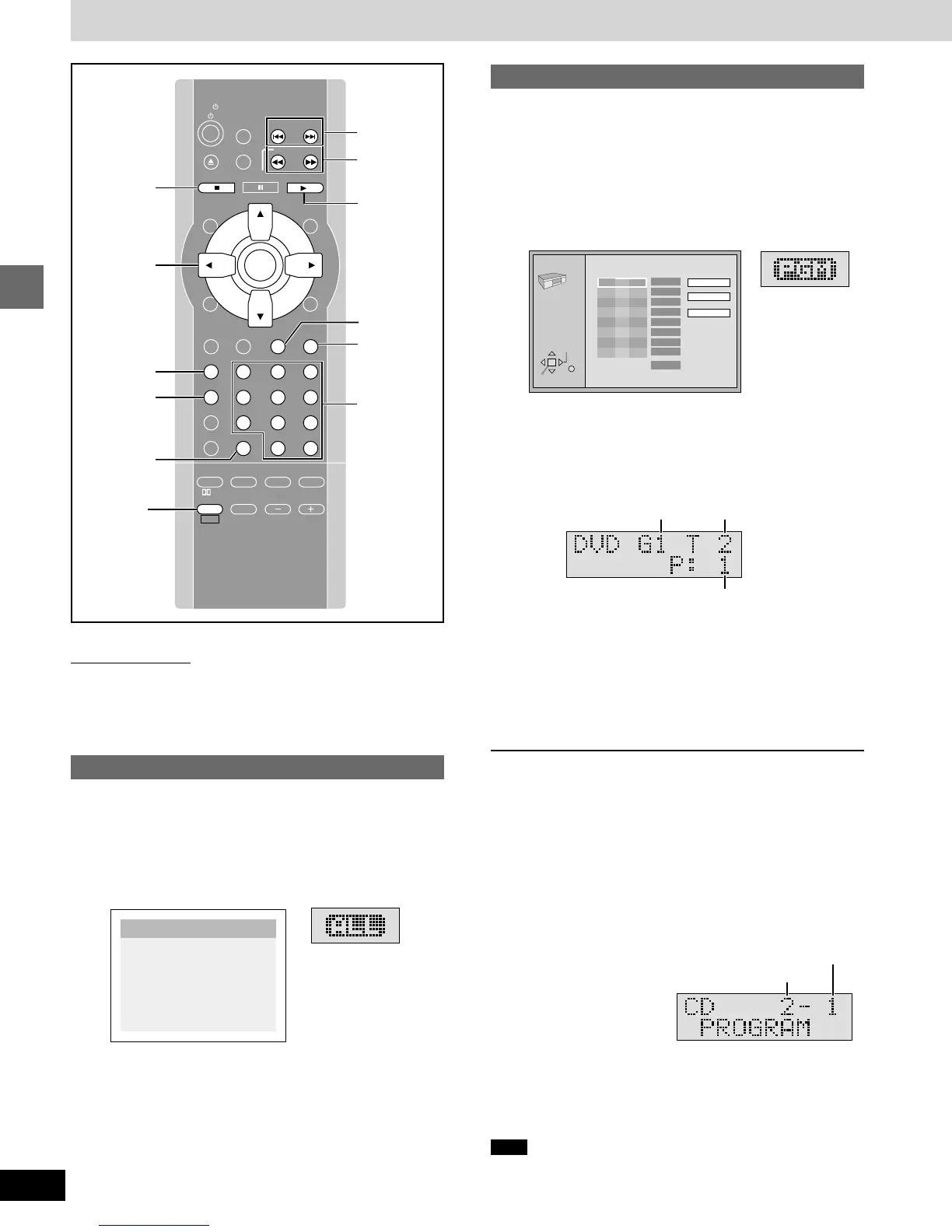
Press [PROGRAM] until the following
display appears.
e.g. [DVD-A]
2 [DVD-A]
Press the numbered buttons to select
a group.
3 Press the numbered buttons to select
a track.
≥Repeat steps 2 and 3 to program other tracks.
≥[DVD-A] To select a track using the cursor buttons
Press [ENTER] and [3, 4] to select a group or track, then
press [ENTER] again to register the number.
All the tracks in the selected group are selected when you
select “ALL”.
4 Press [1 DVD/CD].
Play now begins in the programmed sequence.
[DVD-A] (Follow the on-screen instructions.)
To add or change groups or tracks
Press [3, 4] to select an available item, then repeat steps 2 and 3.
To move to the page before or after the one shown
Press [
6, 5
].
To clear a track
1. Select the item you want to clear with [
3, 4
].
2. Press [CANCEL], or select “Clear” with [
3, 4, 2, 1
] and press
[ENTER].
To clear the whole program
Select “Clear all” with [
3, 4, 2, 1
] and press [ENTER].
[CD] [VCD] (On the unit’s display)
To add tracks
Repeat step 3.
To clear the last track
Press [CANCEL].
To clear the whole program
Press [∫].
To check the contents of the program
After stopping play, press [:, 9]. The track numbers and pro-
gram positions are displayed in order.
To exit the program mode
Press [PROGRAM] while stopped.
Note
When playing DVD-Audio, the program is cleared when you switch
the unit to standby, open the disc tray, select another source, or exit
the program mode.
Discs—Convenient functions
SLOW/SEARCH
P.MEMORY
STOP DVD/CD
MENUTOP MENU
CH
SELECT
TEST
ENTER
PROGRAM
RANDOM
REPEAT
A-B REPEAT
S.SRND CINEMA
D.ENH
EQ
PL FM MODE
MIX 2CH
SHIFT VOLUME
MUTING
CANCEL
RETURN
LIGHT
ACTION
XW
SKIP
TV/VIDEO
TUNER/AUX
TV CH
XW
123
456
78
0
S10
9
PAUSE
TV
1DVD/CD
GROUP
3, 4, 2, 1
ENTER
∫
STOP
RANDOM
PROGRAM
6
,
5
SLOW/
SEARCH
:, 9
! SKIP "
GUI DISPLAY
SUBTITLE
SUBWOOFER
LEVEL
AUDIO
PAGE
ANGLE
GROUP
SLEEP
CANCEL
PAGE
SHIFT
Remote control only
[DVD-A]
If you select bonus groups, you will have to enter a 4-digit password
(➡ page 17).
All group play
[DVD-A]
To play all the groups on a disc
1 While stopped
Press [PROGRAM] until the all group
play screen appears.
2 Press [1 DVD/CD].
Press PLAY to start
All Group Playback
PLAY MODE
ENTER
RETURN
6
∫
1
5
Choose a group and track, then press ENTER.
No Time
G
Total Time
0 Press PLAY to start
T
Play
Clear
Clear all
0:00
SELECT
1
Numbered
buttons
Track No.
Program No.
Group No.
Track No.
Program No.












 To Next Page