27
RQT6220
Other functions
Common procedures
Remote control only
See page 26 for menu and option details.
Preparation
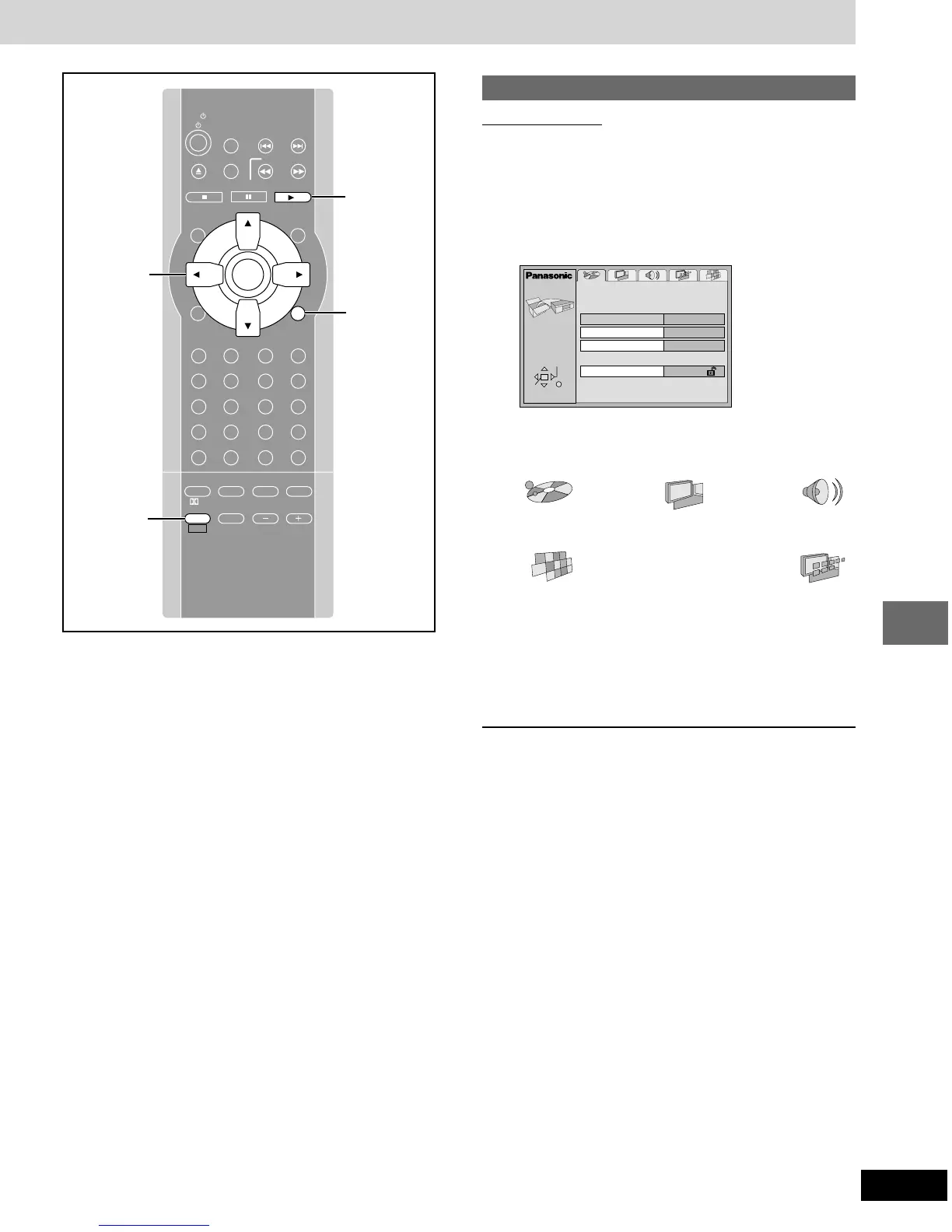
Press [1 DVD/CD] to select “DVD/CD”.
1 Press [SHIFT]
ii
ii
i [ACTION] to show the
menus.
2 Press [2, 1] to select the menu’s tab.
The screen changes to display the menu.
Disc Video Audio
(-----) (-----)
::
;;
Others Display
(--------------------------------------------------)
3 Press [3, 4] to select the item you
want to change and press [ENTER].
4 Press [3, 4] to select the option and
press [ENTER].
The screen now shows the menu again.
To return to the previous screen
Press [RETURN].
When you are finished
Press [SHIFT] i [ACTION].
Disc
Audio
Subtitle
Menus
Ratings
English
English
Automatic
Level 8
ACTION
SELECT
ENTER RETURN
SLOW/SEARCH
P.MEMORY
STOP DVD/CD
MENUTOP MENU
CH
SELECT
TEST
ENTER
PROGRAM
RANDOM
REPEAT
A-B REPEAT
S.SRND CINEMA
D.ENH
EQ
PL FM MODE
MIX 2CH
SHIFT VOLUME
MUTING
CANCEL
RETURN
LIGHT
ACTION
XW
SKIP
TV/VIDEO
TUNER/AUX
TV CH
XW
123
456
78
0
S10
9
PAUSE
TV
ACTION,
RETURN
3, 4, 2, 1
ENTER
SHIFT
GUI DISPLAY
SUBTITLE
SUBWOOFER
LEVEL
AUDIO
PAGE
ANGLE
GROUP
SLEEP
1 DVD/CD












 To Next Page