EasyManua.ls Logo

Panasonic SC-HTX5 - User Manual

Panasonic SC-HTX5
28 pages
Print Icon
To Next Page IconTo Next Page
Loading...
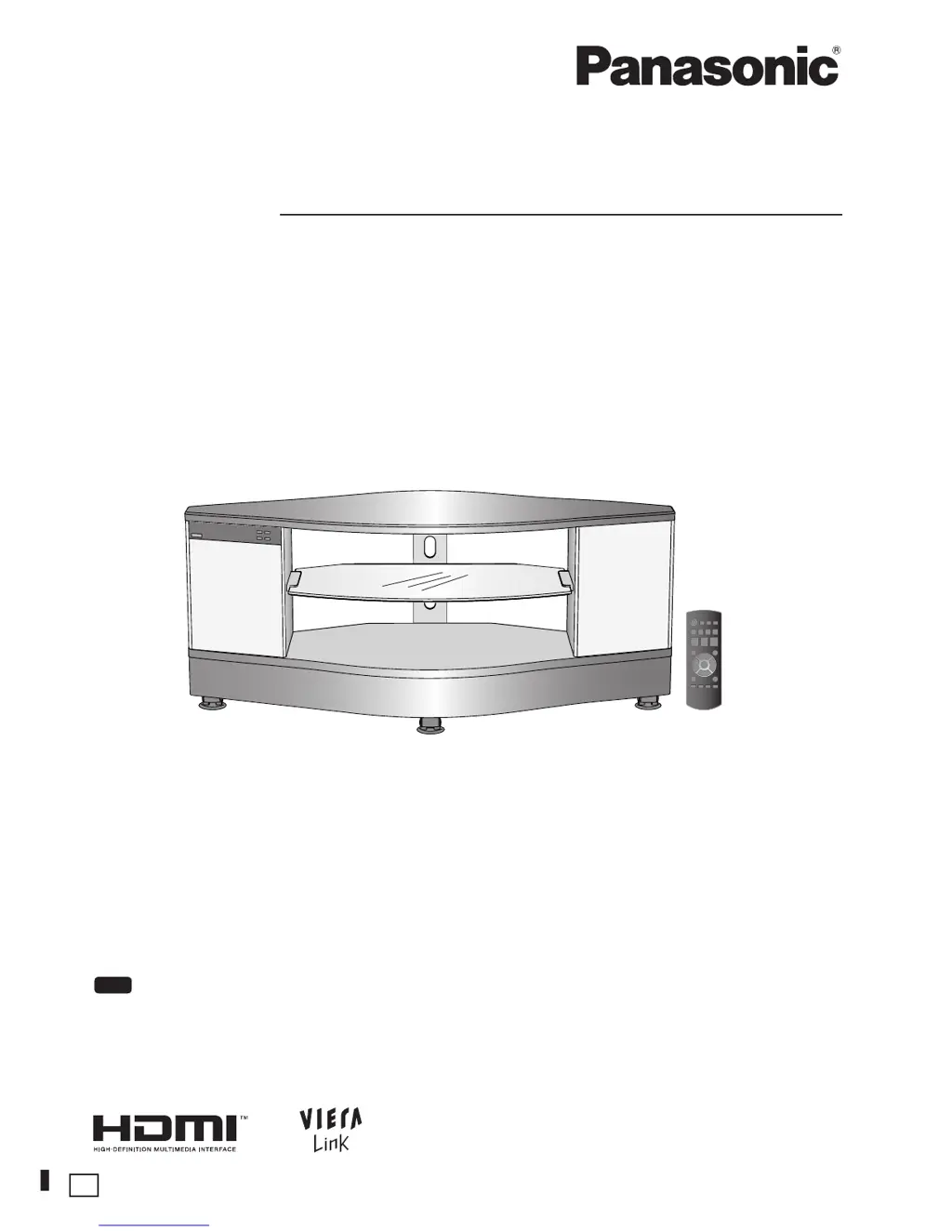
Operating Instructions
Home Theater Audio System
Model No. SC-HTX5
RQT9478-B
Dear customer
Thank you for purchasing this product.
For optimum performance and safety, please read these instructions carefully.
Before connecting, operating or adjusting this product, please read the instructions completely.
Please keep this manual for future reference.
“EB” on the packaging indicates the United Kingdom.
EB
Note

Table of Contents

Questions and Answers

  • R
    Rachel MooreJul 29, 2025
    What does U701 mean on Panasonic SC-HTX5 Home Cinema speakers?
    • J
      Janet WatersJul 29, 2025
      The error code U701 on your Panasonic Home Cinema speakers indicates that the equipment connected via the HDMI cable is not compatible with the system’s copyright protection technology.
  • K
    Kirk Bradford DDSAug 3, 2025
    What to do if Panasonic SC-HTX5 display SWITCH OFF POWER?
    • B
      Brandon DixonAug 3, 2025
      If your Panasonic Home Cinema system displays 'SWITCH OFF POWER', turn off the system, unplug it from the AC mains, and then consult your dealer.
  • J
    jasonhowardAug 7, 2025
    What to do if Panasonic Home Cinema speakers display TURN OFF DTS FIX MODE?
    • T
      Theresa RodriguezAug 7, 2025
      If your Panasonic Home Cinema speakers display 'TURN OFF DTS FIX MODE', you need to cancel DTS FIX.
  • Y
    ymcclureAug 11, 2025
    What to do if Panasonic SC-HTX5 display NOT POSSIBLE FOR THIS PCM SOURCE?
    • C
      Caitlin WatersAug 11, 2025
      If your Panasonic Home Cinema speakers display 'NOT POSSIBLE FOR THIS PCM SOURCE', it means you cannot use Dolby Virtual Speaker, SFC, and Dolby Pro Logic effect with PCM signals having a sampling frequency over 48 kHz. Also, SFC is not available for multi-channel LPCM signal.
  • E
    Elizabeth GregoryAug 16, 2025
    Why Panasonic SC-HTX5 display NOT POSSIBLE FOR THIS INPUT SOURCE?
    • T
      Timothy GuerraAug 16, 2025
      If your Panasonic Home Cinema speakers show 'NOT POSSIBLE FOR THIS INPUT SOURCE', it means you cannot use Dolby Virtual Speaker, SFC, and Dolby Pro Logic for dual sounds.
  • A
    Adam SmithAug 20, 2025
    What does MUTE (Blinking) mean on Panasonic SC-HTX5?
    • K
      kimberlywilkersonAug 20, 2025
      The 'MUTE (Blinking)' display on your Panasonic Home Cinema speakers indicates that muting is currently active.
  • D
    Danielle SmithAug 25, 2025
    How to cancel mute function on Panasonic Home Cinema speakers?
    • C
      castrojasonAug 25, 2025
      To cancel the mute function on your Panasonic Home Cinema speakers, cancel muting for operation.

Summary

Before Use

Supplied Accessories

Lists all items included in the product package.

Safety and Handling Precautions

General guidelines for safe operation, placement, and AC mains lead.

Control Guide

System Overview

Identifies front and rear panel controls, indicators, and terminals on the main unit.

Remote Control Guide

Details the functions of the remote control buttons and how to prepare it.

Installation and Assembly

Rack Installation Steps

Instructions for assembling the rack, handling components, and lifting.

Rack Equipment and TV Installation

Guidance on placing the glass shelf, equipment, and the television onto the assembled rack.

Securing and Finishing Touches

Instructions for stabilizing the TV, managing cables, and setting caster trays.

Connections

Basic Audio;Video Connections

Illustrates fundamental connections using various audio and video cables.

HDMI Connections

Details connecting devices like TVs and DVD recorders using HDMI cables.

Advanced Connection Setup

Covers HDMI notes, connecting STBs, and VIERA auto input switching.

Non-HDMI Connections

Guides on connecting devices like DVD players and VCRs using non-HDMI cables.

Additional Connections and Power

Explains connecting second HDMI devices, audio equipment, and the AC power lead.

Wireless Surround Speaker Setup

Connecting the Wireless Surround Speakers

Instructions for inserting the digital transmitter and setting up wireless speakers.

Enjoying Audio and Video

Basic Playback Operation

Steps to turn on the system, select audio/video sources, and adjust volume.

Sound Field Effects

Explains how to use Dolby Virtual Speaker, SFC, and Dolby Pro Logic II modes.

VIERA Link Integration

Details how to operate the system with a VIERA TV for linked functions.

VIERA Link Setup and Usage

Covers correct usage, connection, setup, and disabling VIERA Link.

Functions and Settings

Special Playback Modes

Explains WHISPER-MODE SURROUND, GAME mode, and Muting features.

Speaker Output Adjustment

How to balance the volume of subwoofer and surround speakers during playback.

Sound Quality and Balance Settings

Adjusts bass, treble, front speaker balance, and speaker distances.

Power Saving Settings

Configures standby power consumption, including HDMI off mode.

VIERA Link Control Settings

Enables or disables VIERA Link "HDAVI Control" functionality.

Audio Timing and Sound Options

Adjusts audio delay, switches dual sounds, and applies clear audio for low volumes.

System Input and Reset Settings

Adjusts input detection, attenuator, and resets system to factory defaults.

Remote Control Code Setup

Configures remote control codes for multi-equipment operation.

Troubleshooting and Information

Error Messages and Solutions

Lists common error displays and their corresponding causes and countermeasures.

Supported Digital Signals

Information on digital audio formats like Dolby Digital, DTS, and LPCM that can be played.

System Maintenance

Instructions for cleaning and caring for the system to ensure longevity.

Troubleshooting Guide

A comprehensive chart of common issues, their causes, and possible solutions.

HDMI Connection Troubleshooting

Specific solutions for problems encountered with HDMI connections and VIERA Link.

Disposal Information

Guidelines for the proper collection and disposal of old equipment and batteries.

Panasonic SC-HTX5 Specifications

General IconGeneral
TypeSoundbar
Channels2.1
SubwooferYes
BluetoothYes
HDMI Inputs1
Optical Inputs1
USB PlaybackYes
DVD PlayerNo
HDMI Output(s)1
Playable File TypesMP3

Related product manuals