RQT6530
11
Listening operations
The radio: preset tuning
By remote control only
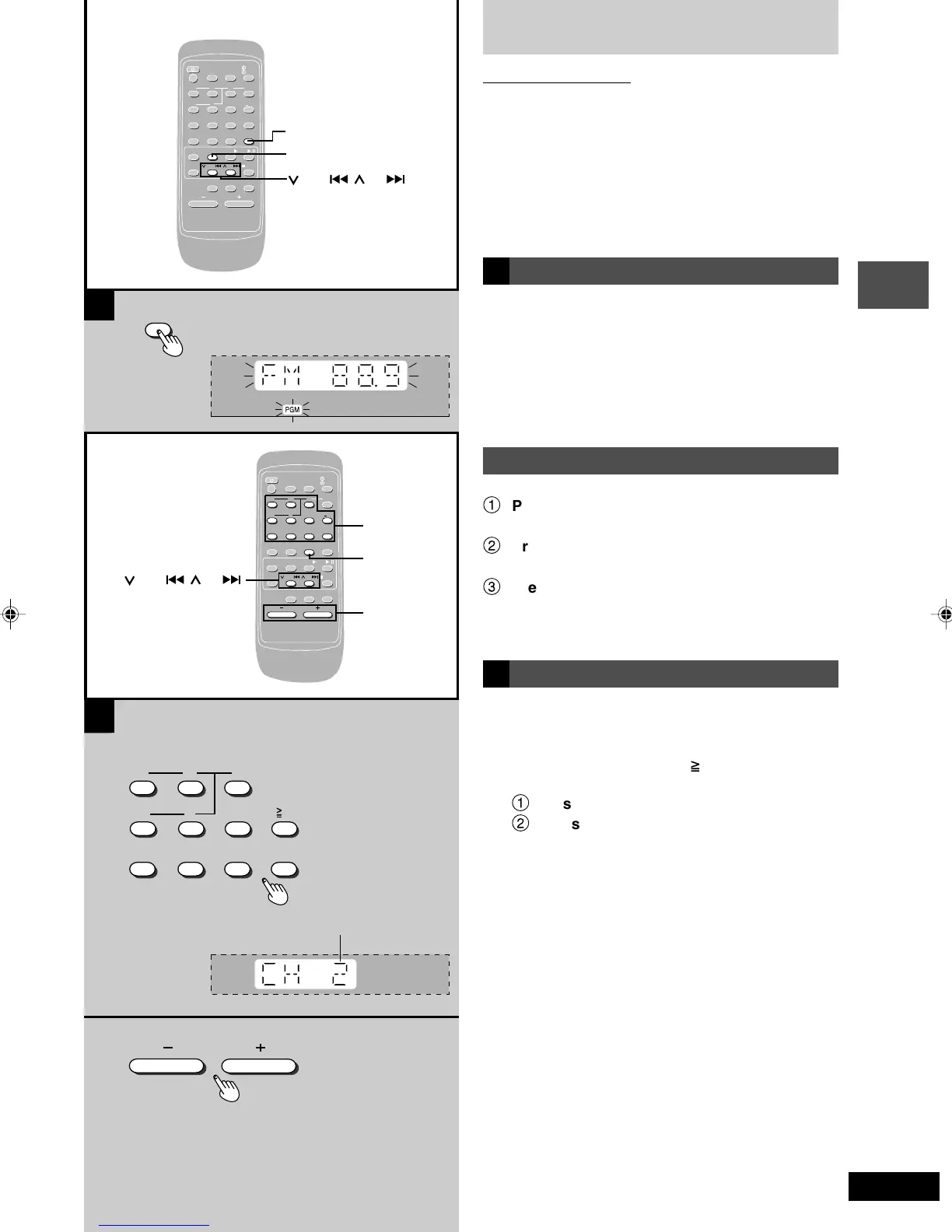
There are two methods of pre-setting stations.
Automatic presetting: All the stations the tuner can
receive are preset.
Manual presetting: You can select the stations to pre-
set and the order they are preset
in.
Up to 15 stations each can be set in the FM and AM bands.
Preparation:
Press [TUNER] to select “FM” or “AM”.
A Automatic pre-setting
Do the following once each for FM and AM.
Preparation:
Tune to the frequency where pre-setting is to begin (\ page
10).
Press and hold [PROGRAM].
The tuner presets all the stations it can receive into the
channels in ascending order. When finished, the last station
memorized is tuned in.
Manual pre-setting
Pre-set the stations one at a time.
1
Press [PROGRAM] then press [
44
44
4/REW/
g]
or [
33
33
3
/FF/f] to tune to the required station.
2
Press [PROGRAM] then press [
44
44
4/REW/
g]
or [
33
33
3
/FF/f] to select a channel.
3
Press [PROGRAM].
The station occupying a channel is erased if another station
is preset in that channel.
B Selecting channels
1 Press the numeric buttons to select the
channel.
For channels 1 to 9, press the corresponding number.
For channels 10 to 15, press [ 10], then the two digits.
OR
1
Press [PLAY MODE] to select “PRESET”.
2
Press [
44
44
4/REW/g] or [
33
33
3/FF/f] to
select the channel.
2 Adjust the volume.
A
B
1
2
123
456
10
7890
VOLUME
PROGRAM
SLEEP
-AUTO OFF
CLOCK/
TIMER
PLAY/
REC
123
DISC
456
≥
10
7890
DISPLAY DIMMER
AUX TUNER TAPE CD
PLAY MODE
/
PROGRAM
/REW/ /FF/ /CLEAR
MUTING
S SOUND EQ PRESET EQ
VOLUME
ALBUM
PROGRAM
/REW/ /FF/
TUNER
SLEEP
-AUTO OFF
CLOCK/
TIMER
PLAY/
REC
123
DISC
456
≥
10
7890
DISPLAY DIMMER
AUX TUNER TAPE CD
PLAY MODE
/
PROGRAM
/REW/ /FF/ /CLEAR
MUTING
S SOUND EQ PRESET EQ
VOLUME
ALBUM
PLAY MODE
/REW/ /FF/
1
2
,
,
Preset channel
RQT6530(11-15).p65 5/9/2002, 6:39 PM11






 To Next Page