RQT6530
9
Before use
SLEEP
-AUTO OFF
CLOCK/
TIMER
PLAY/
REC
123
DISC
456
10
7890
DISPLAY DIMMER
AUX TUNER TAPE CD
PLAY MODE
/
PROGRAM
/REW/ /FF/ /CLEAR
MUTING
S.SOUND EQ PRESET EQ
VOLUME
?
@
[
.
&
-
\
]
^
=
5
:
;
<
~
(
)
!
%
ALBUM
>
_
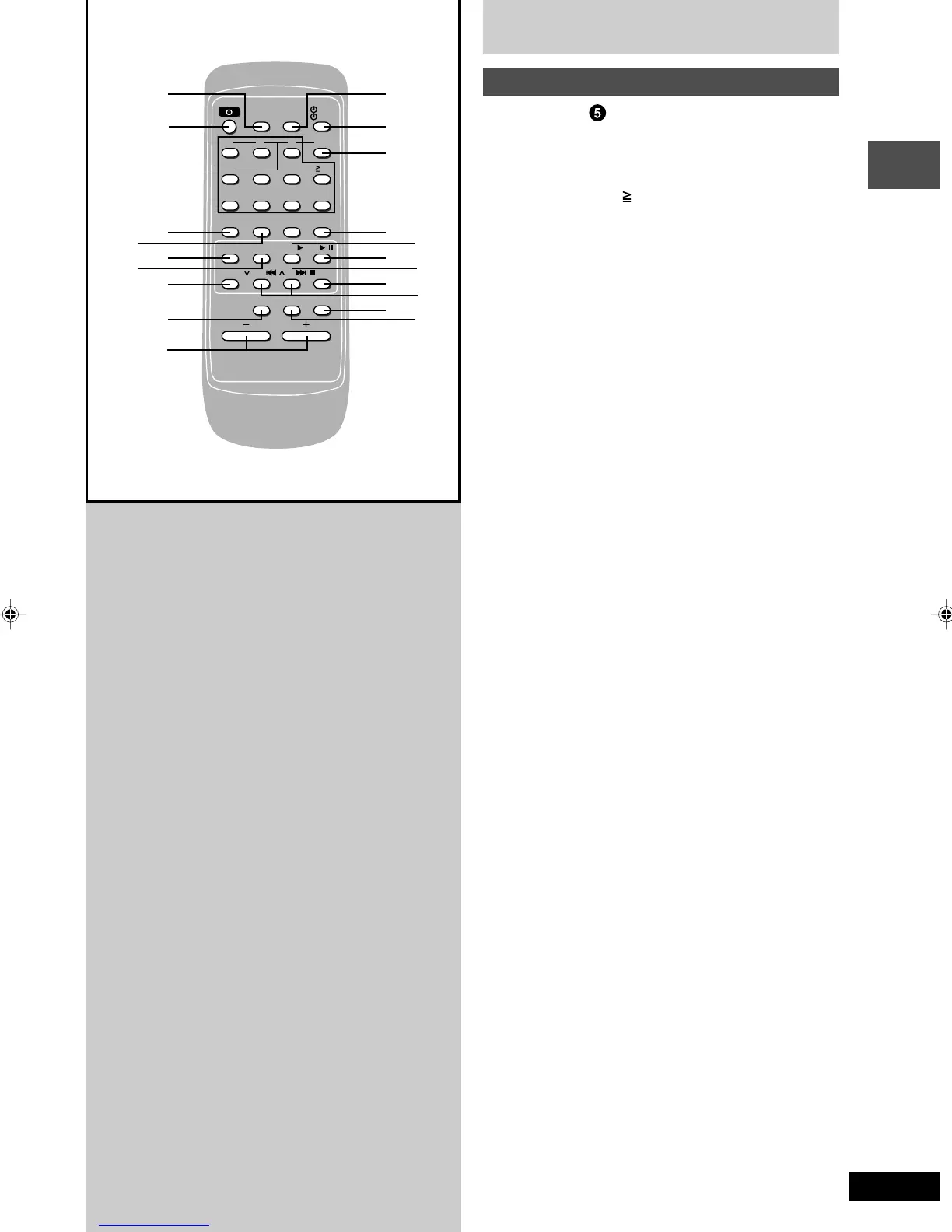
Front panel controls
Remote Control
Buttons such as
5
function in exactly same way as the
buttons on the main unit.
::
::
: Sleep timer/auto off button
(SLEEP, –AUTO OFF) ....................................... 23, 27
;;
;;
; Numeric buttons ( 10, 1–9, 0) ......................... 11, 17
<<
<<
< Display button (DISPLAY) ................................ 15, 17
==
==
= Dimmer button (DIMMER) ...................................... 24
>>
>>
> Album button (ALBUM) .......................................... 15
??
??
? Clock/timer button (CLOCK/TIMER).......... 24, 25, 26
@@
@@
@ Play timer/recording timer button
(
˚˚
˚˚
˚PLAY/
˚˚
˚˚
˚REC) ....................................................... 25
[[
[[
[ Disc button (DISC) .................................................. 16
\\
\\
\ CD Program, tuner preset button
(PROGRAM) ...................................................... 11, 18
]]
]]
] Play mode select button
(PLAY MODE) ........................................ 10, 16, 17, 21
Use this for selecting repeat mode, CD play mode, tune
mode, FM mode and AM beat proof function.
^^
^^
^ Stop/program clear button (L /CLEAR) .... 12, 18, 19
__
__
_ Muting button (MUTING) ....................................... 24
RQT6530(2-10).p65 5/9/2002, 6:37 PM9









 To Next Page