EasyManua.ls Logo

Panasonic SC-PM46 - User Manual

Panasonic SC-PM46
16 pages
Print Icon
To Next Page IconTo Next Page
Loading...
Operating Instructions
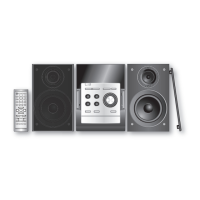
CD Stereo System
Model No. SC-PM46
Before connecting, operating or adjusting this product, please read
the instructions completely.
Please keep this manual for future reference.
RQTV0304-1B
GN
GCS
Operations in these instructions are described using remote
control, but you can do the operations with the main unit if the
controls are the same.
Unless otherwise indicated, illustrations in these operating
instructions are for Australia and N.Z.
Your unit may not look exactly as illustrated.
Table of contents
Safety precautions ................................ 3
Placement of speakers .......................... 3
Simple setup .......................................... 4
Preparing the remote control ............... 5
Demo function ....................................... 5
Overview of controls ............................. 6
Discs ....................................................... 8
Cassette tape ......................................... 9
Using the FM/AM Radio ........................ 10
Using the timer ...................................... 11
Using sound effects .............................. 12
Using other equipment ......................... 12
Troubleshooting guide .......................... 14
Specifi cations ........................................ 15
Maintenance ........................................... 15

SUPPLIED ACCESSORIES
Please check and identify the supplied accessories.
1 x Remote control
Australia and N.Z.
(N2QAYB000087)
2 x Remote control
batteries
1 x AM loop antenna
1 x FM indoor antenna
Southeast Asia
(N2QAYB000078)
1 x AC mains lead
PM46_GN_GCS_En_new11.indd 1PM46_GN_GCS_En_new11.indd 1 1/30/08 5:15:17 PM1/30/08 5:15:17 PM

Questions and Answers

  • A
    Antonio BestAug 17, 2025
    Why is my Panasonic SC-PM46 Stereo System remote control not working?
    • A
      alicia91Aug 17, 2025
      If the remote control for your Panasonic Stereo System isn’t working, first check if the batteries are correctly inserted. If they are, try replacing them with fresh batteries.
  • F
    Francisco LewisAug 20, 2025
    How to fix no sound on my Panasonic SC-PM46 Stereo System?
    • B
      Brandon PerezAug 20, 2025
      First, ensure the volume is turned up. Then, check the speaker cords to make sure they are properly connected. Turn the unit off before checking and correcting the connections, and then turn it back on. Also, keep AC power cords and fluorescent lights away from the unit's cables. If “- -:- -” appears on the display, set the time. If “F76” is displayed, check and correct the speaker cord connections. If the problem persists, it may indicate a power supply issue, and you should consult a dealer.
  • K
    Krista HarrisAug 23, 2025
    Why doesn't the remote control work on my Panasonic Stereo System?
    • J
      James BuckAug 23, 2025
      Check that the batteries are inserted correctly. If they are, replace the batteries, as they may be worn.
  • E
    Erik GonzalezAug 26, 2025
    What to do if my Panasonic Stereo System has no sound?
    • E
      edavisAug 26, 2025
      If your Panasonic Stereo System isn't producing any sound, first, ensure the volume is turned up. Then, check the speaker cords to confirm they are properly connected. If issues persist, keep other appliances and leads away from the unit’s cables. In some areas, reversing the AC mains lead’s plug may also help. If the unit displays “ERROR” or “- -:- -”, read the instructions and try again. If “- -:- -” appears, especially after a power failure, set the time. For an “F76” error, or if problems continue, consult the dealer as it may indicate a power supply issue.
  • J
    Jeanette CobbAug 28, 2025
    What to do if my Panasonic SC-PM46 display is wrong or play won’t start?
    • T
      Tony JohnsonAug 28, 2025
      If your Panasonic Stereo System's display is showing incorrect information or playback won't start, check that the disc is inserted correctly (not upside down). Ensure the disc is clean by wiping it. If the disc is scratched, warped, or non-standard, replace it. If condensation has formed inside the unit due to temperature changes, wait about an hour for it to clear before trying again.
  • A
    Anthony PadillaAug 31, 2025
    What should I do if my Panasonic Stereo System won't record?
    • B
      bgilesAug 31, 2025
      If your Panasonic Stereo System is not recording, check the erasure prevention tabs on the cassette. If these tabs have been removed, cover the holes with adhesive tape.
  • J
    Jesse AguirreSep 2, 2025
    What to do if my Panasonic SC-PM46 Stereo System USB drive is not reading?
    • A
      Andrew SparksSep 2, 2025
      If your Panasonic Stereo System isn't reading a USB drive, or if the operation is slow, try disconnecting and reconnecting the USB device. Alternatively, turn the unit off and then back on. Note that the USB host function may not work with all USB devices. Large files may take longer to read, and devices exceeding 8 gigabytes may not always work. Also, ensure the USB device's rating does not exceed 500mA. Finally, verify that the content is in MP3 format, as only MP3 files can be played.
  • L
    Leah TorresSep 5, 2025
    Why does the picture on my TV disappear when using my Panasonic SC-PM46 Stereo System?
    • K
      Keith HensonSep 5, 2025
      If the picture on your TV disappears or stripes appear on the screen when using your Panasonic Stereo System, it could be due to the antenna's location or direction. If you're using an indoor antenna, try switching to an outdoor antenna. Also, make sure the TV antenna wire is not too close to the unit; separate the antenna wire from the unit.
  • J
    Joseph JordanSep 8, 2025
    What to do if my Panasonic SC-PM46 Stereo System doesn't read USB drive?
    • C
      Cassandra WalkerSep 8, 2025
      First, verify that the USB drive's format and content are compatible with the system; only MP3 format files can be played. If you see a “USB OVER CURRENT ERROR”, disconnect the USB device, then turn the unit off and back on. Note that USB devices with storage capacity exceeding 8 gigabytes may not function correctly, and large files or high-memory USB drives may take longer to read. If the USB mass storage device rating exceeds 500mA, disconnect the USB device and restart the unit.
  • E
    Elizabeth WilliamsonSep 12, 2025
    What to do if Panasonic Stereo System display is wrong?
    • L
      Lisa CoxSep 12, 2025
      Ensure the disc is not upside down and wipe it clean. If the disc is scratched, warped, or non-standard, replace it. If condensation has formed inside the unit due to a sudden temperature change, wait about an hour for it to clear, then try again.

Summary

Safety Precautions

Placement and Environment

Set the unit up away from direct sunlight, high temperatures, humidity, and vibration. Avoid metal objects and liquids.

Electrical Safety and Service

Do not use high voltage/DC power. Ensure AC lead connection. Do not repair yourself; contact dealer for service.

Speaker Placement and Usage

Remote Control Operation

Overview of Controls

Main Unit Controls

Describes buttons and indicators on the main unit, including standby/on switch, volume, disc controls, and ports.

Remote Control Buttons

Details buttons on the remote control for various functions like sleep timer, program, play mode, numeric input, and mute.

Discs - Basic Play

Cassette Tape - Recording

Using the FM;AM Radio

Using the Timer

Setting Play or Record Timer

Set a timer to wake you up or record. Prepare source, set start/finish times, and activate by pressing PLAY/REC.

Using Other Equipment

Connecting Portable Audio

Troubleshooting Guide

Common Problems and Solutions

Addresses issues like no sound, distorted audio, humming, error messages, and remote control not working.

Radio and Cassette Issues

Provides solutions for radio noise, distorted sound, weak AM reception, and recording problems.

Disc and USB Troubleshooting

Helps resolve issues with disc playback, USB drive not reading, slow operation, or 'USB OVER CURRENT ERROR'.

Specifications

Amplifier and CD Section Specs

Details output power, impedance, sampling frequency, bit rate, and supported audio file formats.

Speaker and Tuner Specs

Provides information on speaker type, impedance, frequency response, tuner frequency range, and sensitivity.

Cassette, USB, and General Specs

Lists cassette deck features, USB media compatibility, power supply, consumption, and operating conditions.

Panasonic SC-PM46 Specifications

General IconGeneral
RMS rated power40 W
Number of speakers2
TypeHome audio micro system
Cassette deckYes
Product colorBlack
Speaker depth201 mm
Speaker width145 mm
Speaker height227 mm
Dimensions (WxDxH)164 x 314 x 227 mm
Headphone connectivity3.5 mm
USB 2.0 ports quantity1
Weight and Dimensions IconWeight and Dimensions
Weight3400 g

Related product manuals