EasyManua.ls Logo

Panasonic SC-PM42DB - User Manual

Panasonic SC-PM42DB
20 pages
Print Icon
To Next Page IconTo Next Page
Loading...
EB
Operating Instructions
CD Stereo System
Model No. SC-PM38DB
SC-PM42DB
Operations in these instructions are described using
remote control, but you can do the operations with the
main unit if the controls are the same.
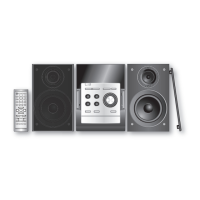
Your unit may not look exactly as illustrated.
RQTX0190-2B
Dear customer
Thank you for purchasing this product.
Before connecting, operating or adjusting this product,
please read the instructions completely.
Please keep this manual for future reference.
These operating instructions are applicable to the
following system.
System SC-PM38DB SC-PM42DB
Main unit SA-PM38DB SA-PM42DB
Speakers SB-PM48 SB-PM48
SUPPLIED ACCESSORIES
Note
Model number suffix “EB” denotes UK model.
EU
Caution for AC mains lead .......................................... 2
Placement of speakers ................................................ 3
Simple setup ................................................................ 4
Preparing the remote control ..................................... 5
DEMO function ............................................................. 5
Overview of controls ................................................... 6
Discs ............................................................................. 7
Using the FM radio ...................................................... 9
DAB ............................................................................... 9
Using the timer .......................................................... 13
Using sound effects .................................................. 14
Using other equipment ............................................. 15
Troubleshooting guide .............................................. 17
Specifications ............................................................ 19
Maintenance ............................................................... 19
Safety precautions ..................................... Back cover
Table of contents
1 x Remote control
(N2QAYB000389)
2 x Remote control batteries
1 x AC mains lead
(K2CZ3YY00005)
1 x FM indoor antenna
or
(RSA0007-M) (RSAX0002)
1 x DAB “T” antenna
(N1EADY000001)
1 x Antenna plug adaptor
(K1YZ02000013)
Please check and identify the supplied
accessories.
Use numbers indicated in parentheses when asking
for replacement parts. (Product numbers correct as of
February 2009. These may be subject to change.)
SC-PM38DB
SC-PM42DBEB.indb 1 1/6/2010 10:13:55 AM

Questions and Answers

  • K
    Karen KingSep 23, 2025
    What to do if Panasonic SC-PM42DB Stereo System says “STATION FULL”?
    • K
      Kathy HendrixSep 23, 2025
      If your Panasonic Stereo System displays “STATION FULL”, the DAB station memory is full. To clear the memory: 1. Press [DAB MENU]. 2. Press [e,r] to select “STATION CLEAR”. 3. Press [OK]. “OK? Push OK” will be displayed. 4. Press [OK]. The station memory will be erased, and the unit will automatically begin Auto scanning.
  • K
    Krista CaseAug 23, 2025
    How to fix no sound on Panasonic Stereo System?
    • J
      James BlevinsAug 23, 2025
      If there is no sound from your Panasonic Stereo System, first, ensure the volume is turned up. If the issue persists, the speaker cords may not be properly connected. Turn the unit off, check, and correct the connections, then turn the unit back on.
  • S
    Shannon BradleyAug 25, 2025
    What causes sound problems from Panasonic SC-PM42DB speakers?
    • J
      Jonathan ChenAug 26, 2025
      If the sound from your Panasonic Stereo System sounds unfixed, reversed, or is only coming from one speaker, check the speaker connections.
  • J
    Jim HortonAug 27, 2025
    What does “NO SIGNAL” mean on my Panasonic SC-PM42DB Stereo System?
    • S
      Steve WilliamsAug 27, 2025
      If your Panasonic Stereo System displays “NO SIGNAL”, this station cannot be received. Check your antenna.
  • P
    Philip LeeAug 27, 2025
    What to do if my Panasonic SC-PM42DB Stereo System displays “F76”?
    • V
      vcamposAug 27, 2025
      If “F76” is displayed on your Panasonic Stereo System, check and correct the speaker cord connections. If the problem persists, disconnect any USB devices, turn the unit off, and then back on. If the issue still isn't fixed, it may indicate a power supply problem, and you should consult a dealer.
  • P
    Pamela MitchellSep 16, 2025
    Why does my Panasonic SC-PM42DB Stereo System display “- -:- -”?
    • V
      Veronica PettySep 16, 2025
      If “- -:- -” appears on the display of your Panasonic Stereo System, it may be because you plugged the AC mains lead in for the first time, or there was a recent power failure. Try setting the time.
  • K
    kevinjonesSep 13, 2025
    What does “ERROR” mean on Panasonic SC-PM42DB?
    • J
      jhowellSep 13, 2025
      If “ERROR” is displayed on your Panasonic Stereo System, an incorrect operation was performed. Read the instructions and try again.
  • H
    Heather ColeSep 15, 2025
    How to improve DAB reception on Panasonic SC-PM42DB Stereo System?
    • B
      bryan69Sep 15, 2025
      If the DAB reception is poor on your Panasonic Stereo System, keep the antenna away from computers, televisions, other cables, and cords. You can also try using an outdoor antenna.
  • P
    perkinsroySep 5, 2025
    Why can't Panasonic Stereo System read my USB drive?
    • C
      clarkcharlesSep 5, 2025
      If the USB drive or its contents cannot be read by the Panasonic Stereo System, it may be due to the USB drive format or its contents not being compatible with the system. Note that the USB host function of this product may not work with some USB devices, and USB devices with a storage capacity of more than 8 gigabytes may not work in some instances.
  • N
    Nathaniel GutierrezSep 3, 2025
    How to fix distorted music on Panasonic SC-PM42DB with iPod?
    • Y
      ykellySep 3, 2025
      If the music is distorted or the sound level is too low when playing from your iPod on the Panasonic Stereo System, make sure the equalizer function of your iPod is turned off.

Summary

System Introduction and Supplied Accessories

Supplied Accessories List

Lists all items included with the CD Stereo System.

Model Identification

Identifies the SC-PM38DB and SC-PM42DB CD Stereo System models.

AC Mains Lead Safety and Support

Fuse Replacement Procedure

Details how to safely replace the fuse in the AC mains plug.

Sales and Support Contact Information

Provides contact details for customer care and sales support.

Speaker Placement and Environmental Responsibility

Speaker Setup and Usage Precautions

Advises on speaker positioning, ventilation, and safe usage to prevent damage.

Disposal Guidelines and Battery Symbol

Provides instructions for disposing of old equipment and explains battery symbols.

Simple Setup and Connections

Connecting Speaker Cables

Step-by-step instructions for connecting speaker cables to the main unit.

Connecting Antennas and Power Lead

Guide on connecting FM, DAB antennas, and the AC mains lead.

Setup Enhancements and Remote Control

Optional Antenna Connections

Information on connecting optional FM and DAB outdoor antennas for improved reception.

Remote Control Preparation and Use

Instructions for installing batteries and basic remote control operation.

DEMO Function Control

How to activate or deactivate the unit's demonstration mode.

Main Unit Controls Overview

Main Unit Top and Front Panel Controls

Identifies and describes the buttons, display, and ports on the main unit.

Speaker and Headphone Connections

Details the headphone jack and speaker connection points on the main unit.

Remote Control and Basic Disc Playback

Remote Control Functions Explained

Explains the various buttons on the remote control and their functions.

Basic Disc Playback Operations

Step-by-step guide for playing audio CDs and MP3 discs.

Disc Playback Modes

Explains different playback modes available for discs like 1-TRACK, RANDOM.

Advanced Disc Operations

Disc Information Display

How to view track, folder, and artist/album information for discs.

Repeat and Program Playback

Details how to repeat tracks/discs and create custom playlists.

Radio Tuning and DAB Introduction

FM Radio Tuning and Presets

Covers manual/automatic tuning and storing FM radio stations.

DAB Digital Radio Overview

Explains DAB bands, frequencies, and ensemble/station terminology.

DAB Reception and Operation

DAB Auto Scan and Station Tuning

How the unit scans and memorizes DAB stations, and selects them.

DAB Station Memory Updates

Managing station memory, including updates and handling 'NO SERVICE'.

DAB Presetting and Display Features

DAB Channel Presetting and Selection

How to preset and select DAB channels for quick access.

Viewing DAB Broadcast Information

Explains how to display dynamic labels, PTY, ensemble, frequency, and time.

DAB Clock and Signal Quality Check

Features for automatic clock adjustment and checking DAB signal quality.

DAB Auto Scan Frequency Configuration

Changing Auto Scan Frequency Range

How to change the auto scan mode between 'United Kingdom' and 'ALL BAND III'.

Timer Functions

Clock Setting and Display

Instructions for setting and viewing the 24-hour clock.

Play Timer Operation

Guide to setting a timer to automatically turn on the unit and play music.

Sleep Timer Operation

How to set the unit to turn off automatically after a specified time.

Sound Effects and Audio Enhancements

Preset Equalizer (EQ) and Bass;Treble Adjustment

How to select sound profiles and manually adjust bass/treble levels.

Surround Sound and D.BASS Features

Explains how to activate surround sound and D.BASS for enhanced audio.

Digital Re-master Functionality

Details the re-master feature for improving sound quality of MP3 and iPod sources.

iPod Integration and Playback

iPod Docking and Charging Procedures

Guide to inserting, connecting, charging, and playing an iPod using the built-in dock.

iPod Playback Controls and Navigation

How to play, pause, skip tracks, and navigate iPod menus.

USB Device Operation and Remote Configuration

USB Mass Storage Playback and Compatibility

Instructions for connecting USB devices and playing MP3 files, including compatibility.

Remote Control Code Management

How to change and match the remote control codes with the main unit.

Troubleshooting Common Issues

No Sound and Audio Problems

Solutions for when there is no sound or audio is distorted or unbalanced.

Operational Errors and Display Messages

Explains common error messages and display indicators like 'ERROR'.

Radio Interference and Reception

Resolving radio noise, TV interference, and improving reception.

Troubleshooting Device-Specific Issues

iPod and USB Device Troubleshooting

Solutions for iPod not turning on, charging, or USB read errors.

DAB Reception and Station Errors

Fixes for poor DAB reception, scrambled signals, and station memory issues.

Technical Specifications and Maintenance

System Component Specifications

Details power output, frequency ranges, impedance, and dimensions for unit components.

Unit Cleaning and Care

Instructions for cleaning the exterior of the unit with a soft cloth.

Critical Safety Precautions

Placement, Ventilation, and Electrical Safety

Guidelines for safe unit placement, ventilation, and handling AC power.

Foreign Matter, Service, and Environmental Warnings

Advice on foreign objects, service, laser use, fire hazards, and climate.

Panasonic SC-PM42DB Specifications

General IconGeneral
TypeMicro System
Power Output40 W
Speaker Configuration2.0
Radio TunerYes
USB PortYes
CD PlayerYes
ConnectivityBluetooth, AUX In
Playable MediaCD, MP3
Speakers2 Speakers

Related product manuals