RQT6530
13
Listening operations
1
2
3
4
VOLUME
DOWN UP
2 3
CD CHANGE
CD 1 CD 2 CD 3 CD 4 CD 5
CD CHECK
A
CD CHECK
1
CD CHECK
4
CD 1 CD 2 CD 3 CD 4 CD 5
DEMO
1
CD
/
c
CD indicator
Elapsed play time
Track number
Disc tray
Label must face upward.
Tray
number
CDs
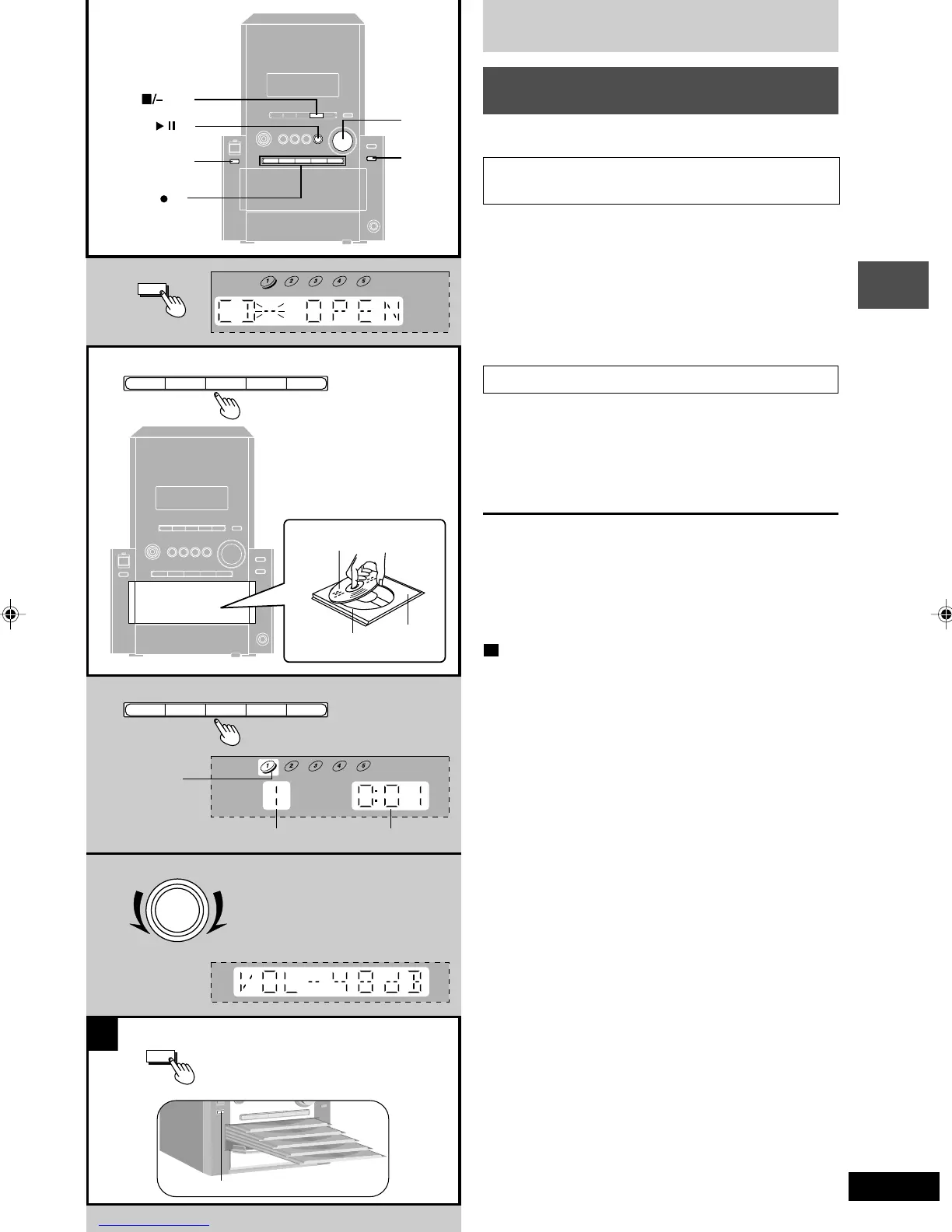
Listening to a CD placed in a
specific tray
Preparation: Press [2/J CD] and then [L/–DEMO].
Selecting the desired tray number and placing
a CD in it
1 Press [c CD CHANGE].
2 (Within about 10 seconds)
Press [CD 1] – [CD 5] to open the tray and
insert the CD.
Press [c CD CHANGE] again to close the tray.
Repeat steps 1 and 2 to insert other CDs. You can load
up to 5 CDs.
Listening to the CD placed in a specific tray
3 Press [CD 1] – [CD 5] to start play.
The selected CD is played from the first track to the last
track in order. After the last track, the player stops auto-
matically.
4 Adjust the volume.
To remove the CD
While one CD is playing (except in All-Disc Random play or
program play), you can change the CDs in the other trays.
1 Press [c CD CHANGE].
2 Press [CD 1] – [CD 5].
Press [c CD CHANGE] again to close the tray.
A
To check which tray the CD is in (CD CHECK)
The CD check feature lets you check whether a 12cm CD is
in a tray.
Press [CD CHECK].
If the player is stopped, all trays will open.
If a CD is being played, the corresponding tray will not open.
Press [CD CHECK] again to close the trays.
• Do not remove or insert CDs during a CD check.
• Do not pull out the trays during a CD check.
RQT6530(11-15).p65 5/9/2002, 6:39 PM13









 To Next Page