RQT6530
17
Listening operations
CDs
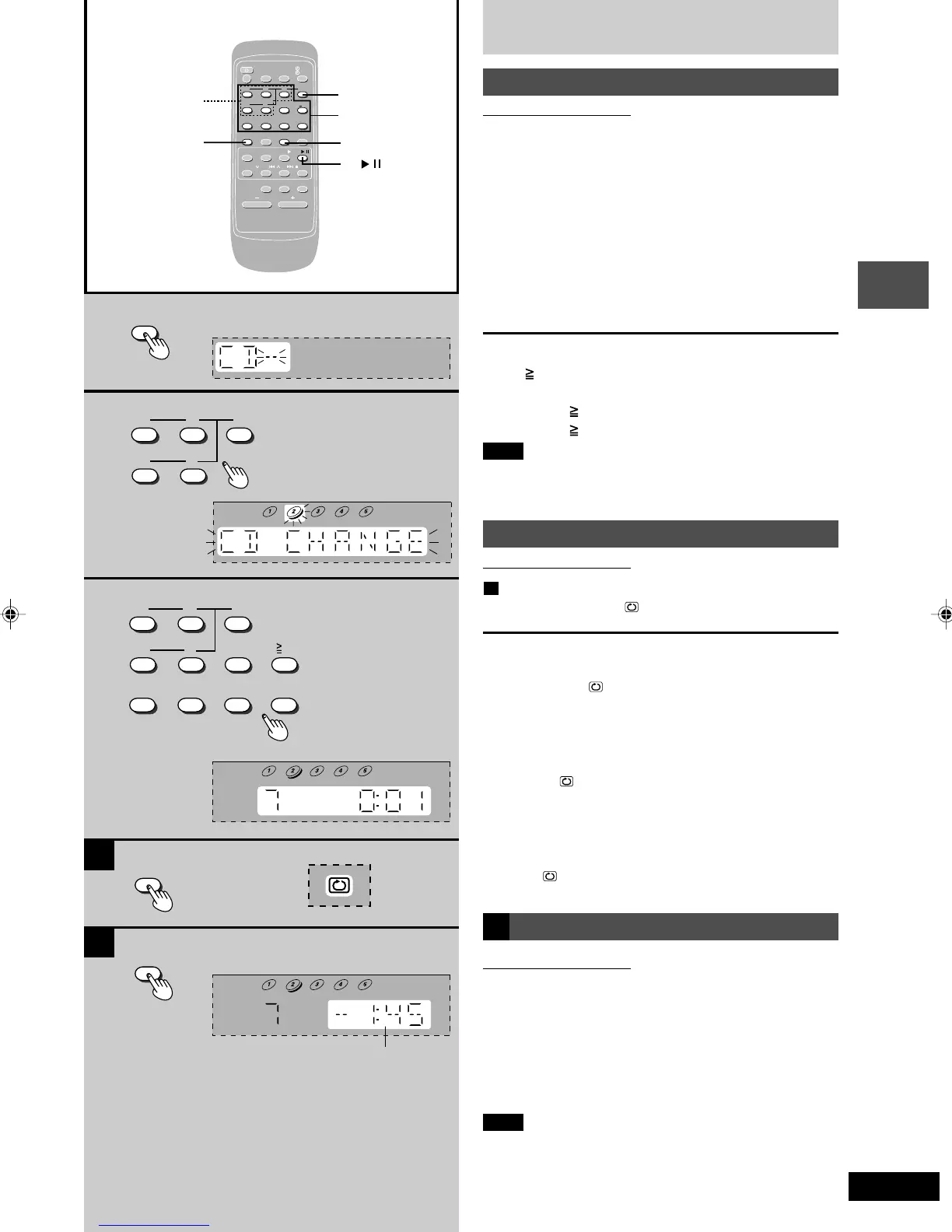
Direct access play
By remote control only
Direct access allows you to start normal play from a specific
track to the last track of the CD.
1 Press [DISC].
2 (within 10 seconds or so)
Press [1] – [5] to select the disc you want.
3 Press the numeric button(s) to select the
desired track number.
Play will start with the track you select.
To select a two-digit track
Press [ 10] and then the two numbers you want.
For example
Track no. 20: [ 10]→[2]→[0]
Track no. 35: [ 10]→[3]→[5]
Note
You cannot use direct access play with 1-RANDOM or
A-RANDOM mode.
Repeat play
By remote control only
A
Press and hold [PLAY MODE] before or during play.
“REPEAT ON” and “ ” are displayed.
To cancel repeat play
Press and hold [PLAY MODE] once again. “REPEAT OFF”
is displayed and “ ” is cleared.
To repeat your favorite tracks
1. Program the tracks you want (perform steps 1 ~ 6 on
page 18.)
2. Press and hold [PLAY MODE] and make sure “REPEAT
ON” and “ ” are displayed.
3. Press [CD 2/J]. Playback will start.
To use repeat play with CD Play Mode function
Set the desired mode (A page 16), press and hold [PLAY
MODE] before or during playback, and make sure “REPEAT
ON” and “ ” are displayed.
B CD display
By remote control only
This function allows you to display the remaining play time
of the current track.
During play or pause mode
Press [DISPLAY].
Every time you press the button:
Elapsed play time ↔ Remaining play time
Note
When track number 25 or greater is playing, remaining play
time display shows “– –:– – ”.
A
B
1
2
3
123
45
DISC
PLAY MODE
DISPLAY
123
456
10
7890
3
2
SLEEP
-AUTO OFF
CLOCK/
TIMER
PLAY/
REC
123
DISC
456
≥
10
7890
DISPLAY DIMMER
AUX TUNER TAPE CD
PLAY MODE
/
PROGRAM
/REW/ /FF/ /CLEAR
MUTING
S SOUND EQ PRESET EQ
VOLUME
ALBUM
1
CD
PLAY MODE
/
DISPLAY
Remaining play time
RQT6530(16-22).p65 5/9/2002, 6:41 PM17









 To Next Page