EasyManua.ls Logo

Panasonic SC-PM5DB - Overview of Controls

Panasonic SC-PM5DB
20 pages
Print Icon
To Next Page IconTo Next Page
To Previous Page IconTo Previous Page
Loading...
RQTX0237
7
Main unit
Main unit
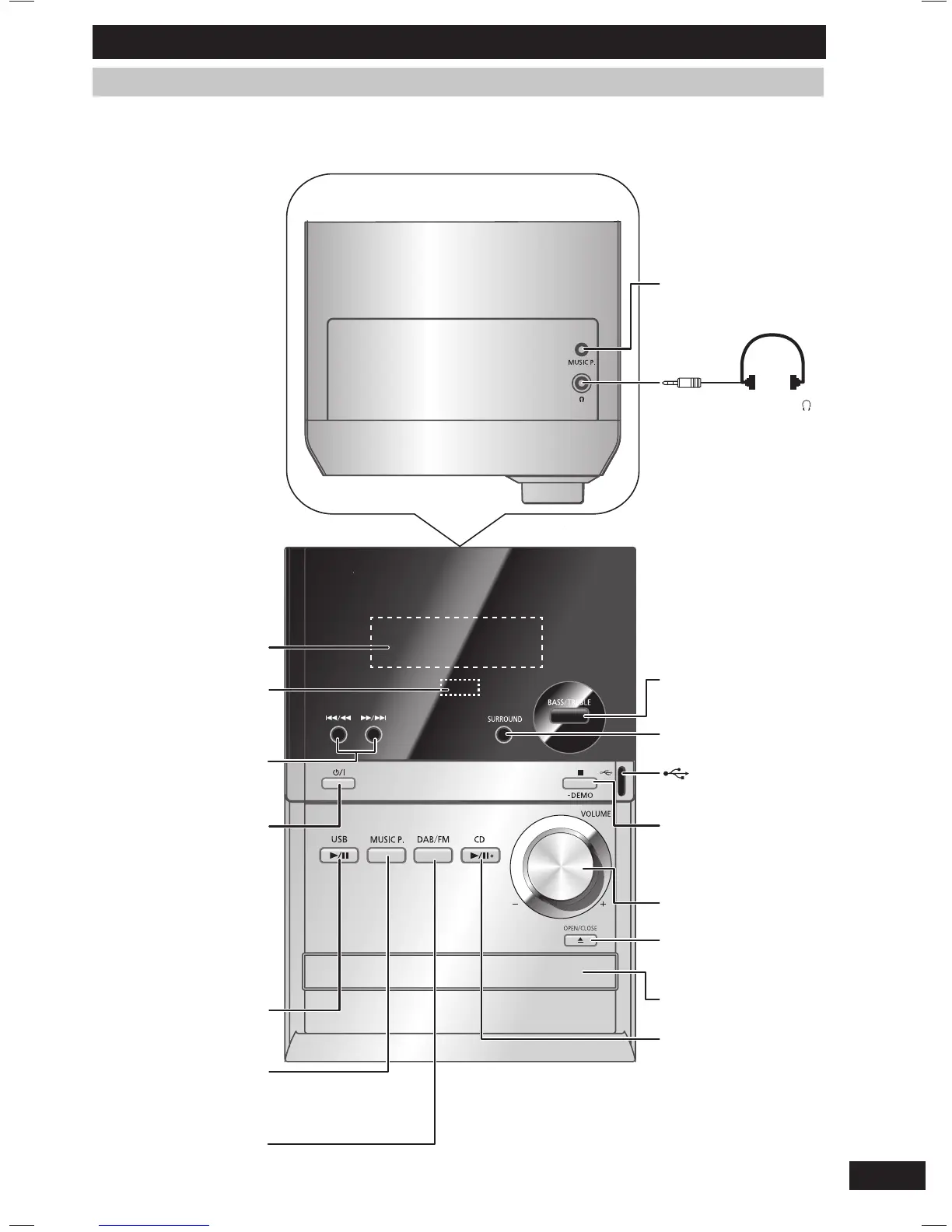
Refer to the numbers in parentheses for page reference. Buttons labelled such as 1 function in exactly the
same way as the controls on the remote control. (
page 8)
Top of unit
Overview of controls
Display panel
Remote control
signal sensor
7
1 Standby/on switch
(y/l)
Press to switch the
unit from on to standby
mode or vice versa. In
standby mode, the unit
is still consuming a small
amount of power.
2
6
3
Music port jack (17)
Headphone jack ( )
Avoid listening for
prolonged periods of
time to prevent hearing
damage.
Excessive sound
pressure from
earphones and
headphones can cause
hearing loss.
Plug type: Ø 3.5 mm
stereo (not included)
BASS or TREBLE
selection (16)
8
USB port (16)
Stop playback,
Demonstration
function (5)
4
Disc tray open or
close (9)
Disc tray
5
RQTX0237-B_En.indd 7RQTX0237-B_En.indd 7 3/19/09 4:13:06 PM3/19/09 4:13:06 PM

Related product manuals