6
TQBJ2189
Overview of controls
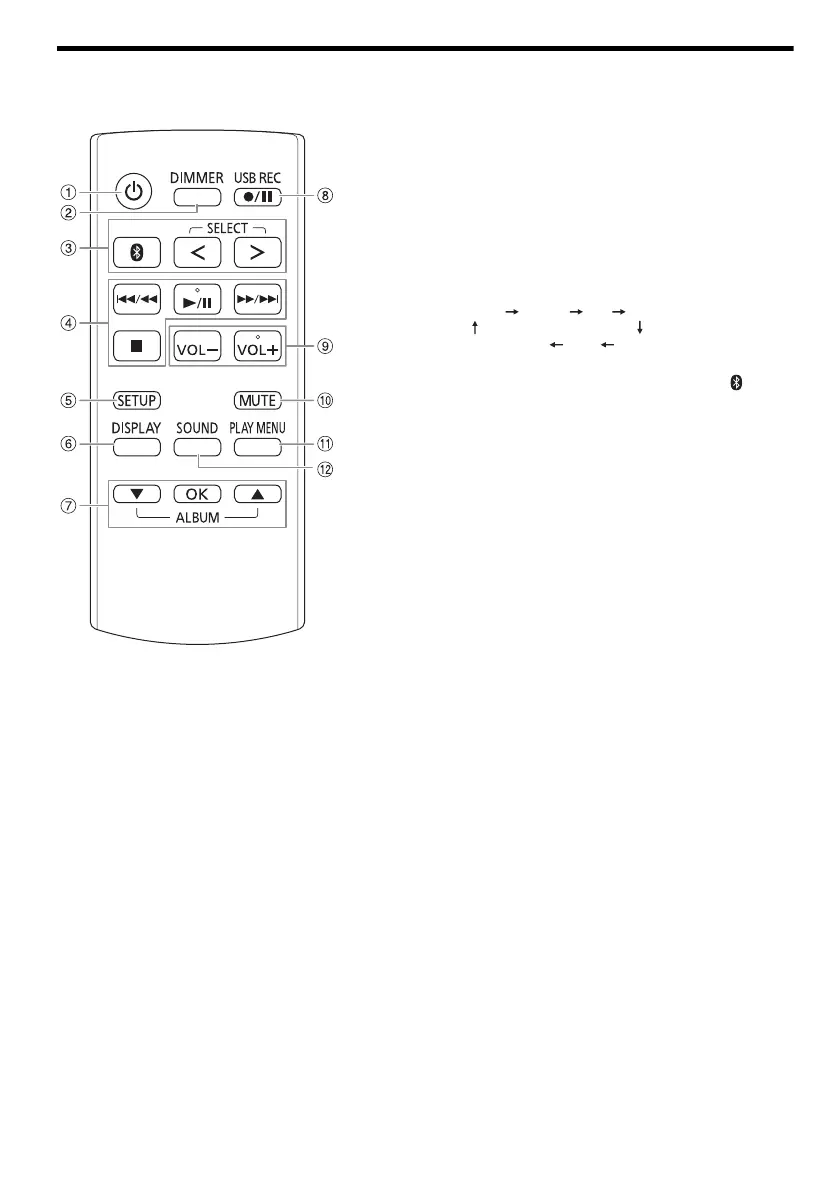
Do the procedures with the remote control. You can also use the buttons on the unit if they are the same.
A Standby/on switch [`], [1]
Press to switch the unit from on to standby mode or
vice versa. In standby mode, the unit is still consuming
a small amount of power.
B Decrease the brightness of the display panel
The illumination is also switched off.
To cancel, press the button again.
C Select the audio source
Press [SELECT <, >] (unit: [SELECT]) repeatedly to
select the source:
On the unit:
To start Bluetooth
®
pairing, press and hold [ ].
D Basic playback control
E View the setup menu
F View the content information
G Select or confirm the option
H Recording operation control
I Adjust the volume level
On the unit:
Press [VOL] and then turn [VOLUME/MULTI
CONTROL] to adjust the volume.
Adjust the microphone volume level
Press and hold [–MIC VOL] until “MIC VOL” is shown.
Turn [VOLUME/MULTI CONTROL] to adjust the
volume.
J Mute the sound
To cancel, press the button again.
“MUTE” is also canceled when you adjust the volume
or when you switch off the system.
K View the play menu
L Select the sound effects
M Select DJ effect or DJ sampler
N Select the illumination effects
O Select MP3 album or track
Press [ALBUM/TRACK] to select album or track.
Browse tracks or albums
Press [R, T] or turn [VOLUME/MULTI CONTROL] to
browse.
To start playback from the selection, press [4/9].
P Select the Karaoke effects
To cancel, press and hold [–OFF] until “OFF EFFECT”
is shown.
Q Volume or multi control knob
Do not turn knob fast to prevent irregular of volume
operation.
R Select DJ jukebox
Select DEMO play
Press and hold [–DEMO] for more than 2 seconds, the
built-in demonstration song will be played.
Press [8] to stop the demonstration.
S Open or close the disc tray
USB A USB B
AUXBLUETOOTH
FMCD
D-IN
SC-TMAX40.50PU_TQBJ2189 En.fm Page 6 Wednesday, June 12, 2019 3:29 PM




 To Next Page