RQT7704
5
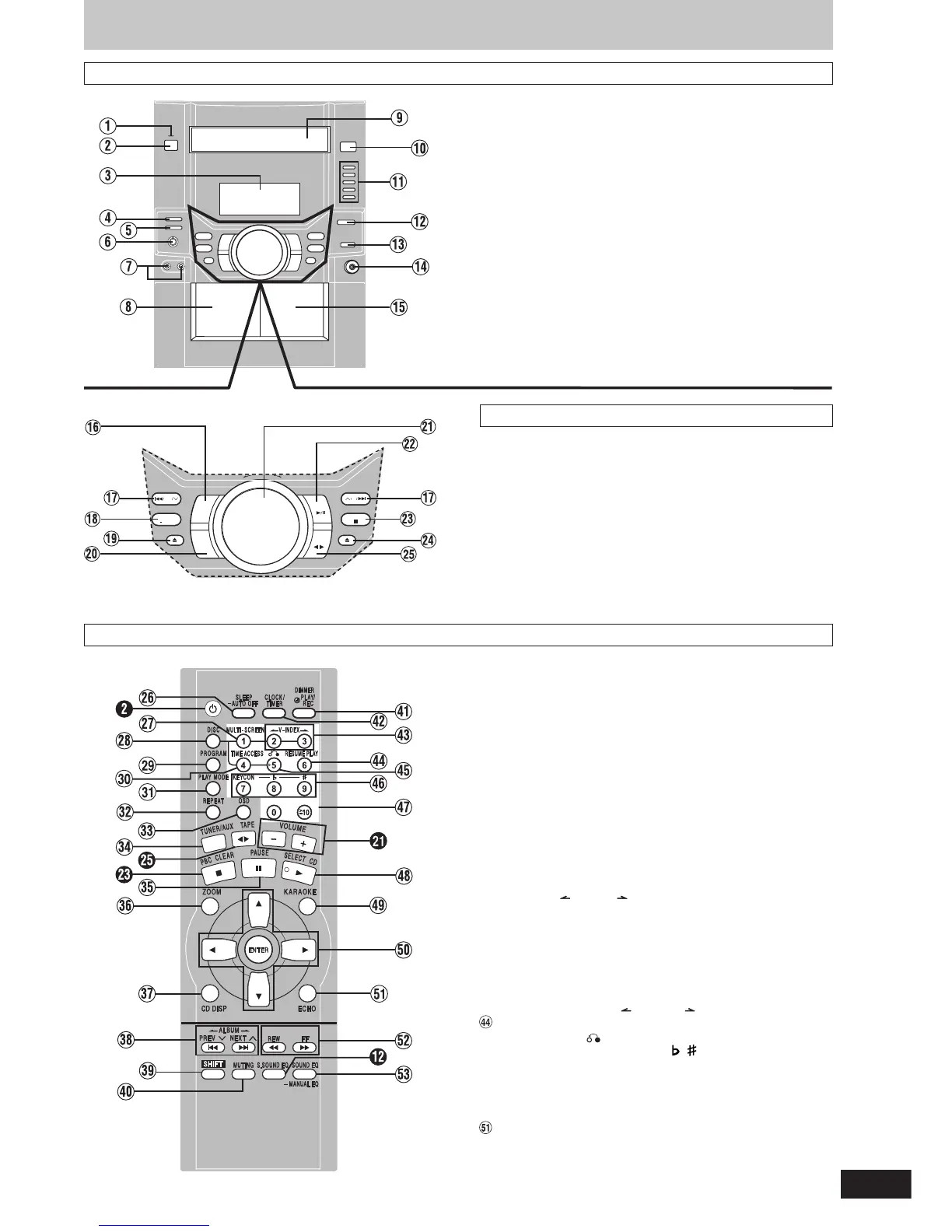
1 AC supply indicator [AC IN]
This indicator lights when the unit is connected to the AC mains
supply.
2 Standby/on switch [
ff
ff
f/I]
Press to switch the unit from on to standby mode or vice versa. In
standby mode, the unit is still consuming a small amount of power.
3 Display
4 Deck select button [DECK 1/2] .............................................. 13
5 Record button [a REC] ......................................................... 14
6 Microphone volume control [MIC VOL] ............................... 14
7 Microphone jacks [MIC 1, 2] ..................................................14
8 Deck 1 cassette holder ......................................................... 13
9 Disc tray
! CD tray open/close button [c OPEN/CLOSE] ....................... 6
! CD direct play buttons [1–5] .................................................. 6
# Super sound EQ button [SUPER SOUND EQ] .................... 13
$ Built-in sound equalizer button [SOUND EQ] ......................13
% Headphones jack [PHONES] ................................................ 16
& Deck 2 cassette holder ......................................................... 13
Main unit
Center console
(
Tuner/band select button [TUNER, BAND] .......................... 12
) CD skip/search/previous/next, VCD slow advance, tape fast-
forward/rewind, tune/preset channel select, time adjust buttons
[g/REW/3, PREV, 4/FF/f, NEXT] ................... 7, 12, 13
~ Display, demonstration button [DISPLAY, –DEMO] ........... 16
+ Deck 1 open button [c DECK 1] .......................................... 13
, AUX button [AUX] .................................................................. 15
- Volume control [VOLUME DOWN, UP] .................................14
. CD play/pause, select button [:/J CD, SELECT] ................. 6
/ Stop/program clear, PBC on/off button [ L STOP, PBC] .... 6, 7, 13
: Deck 2 open button [c DECK 2] .......................................... 13
; Tape play/direction button [;: TAPE] ............................... 13
Remote control
Buttons such as 2 function in exactly the same way as the
buttons on the main unit.
< Sleep timer + Auto off button [SLEEP, –AUTO OFF] ....16, 17
= Multi screen button [MULTI-SCREEN] ................................... 9
> Disc button [DISC] .................................................................. 7
? Program button [PROGRAM] ..................................... 8, 11, 12
@ Time access button [TIME ACCESS] ..................................... 9
[ Play mode select button [PLAY MODE] ........................ 8, 11-14
\ Repeat button [REPEAT] ........................................................ 7
] On-screen display button [OSD] ............................................ 7
^ Tuner/band select, AUX button [TUNER/AUX] .............. 12, 15
_ CD pause button [J PAUSE] .................................................. 6
{ Zoom button [ZOOM] .............................................................. 7
| CD display button [CD DISP] ........................................... 7, 10
} CD skip/search/previous/next, album skip, preset channel
select, time adjust buttons
[g f, ALBUM , PREV 3 NEXT 4] ....... 7-9, 11, 12, 16
V Shift button [SHIFT]
To use functions labeled in orange:
While pressing [SHIFT], press the corresponding button.
0 Muting button [MUTING] ....................................................... 16
1 Dimmer + Play timer/record timer button
[DIMMER, rPLAY/REC] ................................................... 16, 17
2 Clock/timer button [CLOCK/TIMER] ................................16, 17
3 Video index buttons [ V-INDEX ] ................................... 9
Resume play button [RESUME PLAY] ................................... 7
5 Return button [ ] .......................................................... 7, 10
6 Key control buttons [KEYCON, , ] ................................. 15
7 Numbered buttons [
XX
XX
X
10, 1–9, 0] .............................. 6-9, 11, 12
8 CD play, select button [: CD, SELECT] ........................... 6-10
9 Karaoke button [KARAOKE] ................................................ 14
! Cursor buttons [8, 9, ;, :]/Enter button [ENTER] .... 7, 10, 11, 13
Echo button [ECHO] ............................................................. 15
# Tape fast-forward/rewind, manual tuning, VCD slow
advance buttons [( ), REW FF] .............................. 7, 12
$ Built-in sound equalizer/manual EQ button
[SOUND EQ, –MANUAL EQ] .................................................. 13
Front panel controls
DECK 1 DECK 2
UP
DOWN
STOP
REW
PREV NEXT
SELECT
FF
DISPLAY
DEMO
PBC
CD
AUX
TAP E
TUNER
BAND



 To Next Page