RQT7704
8
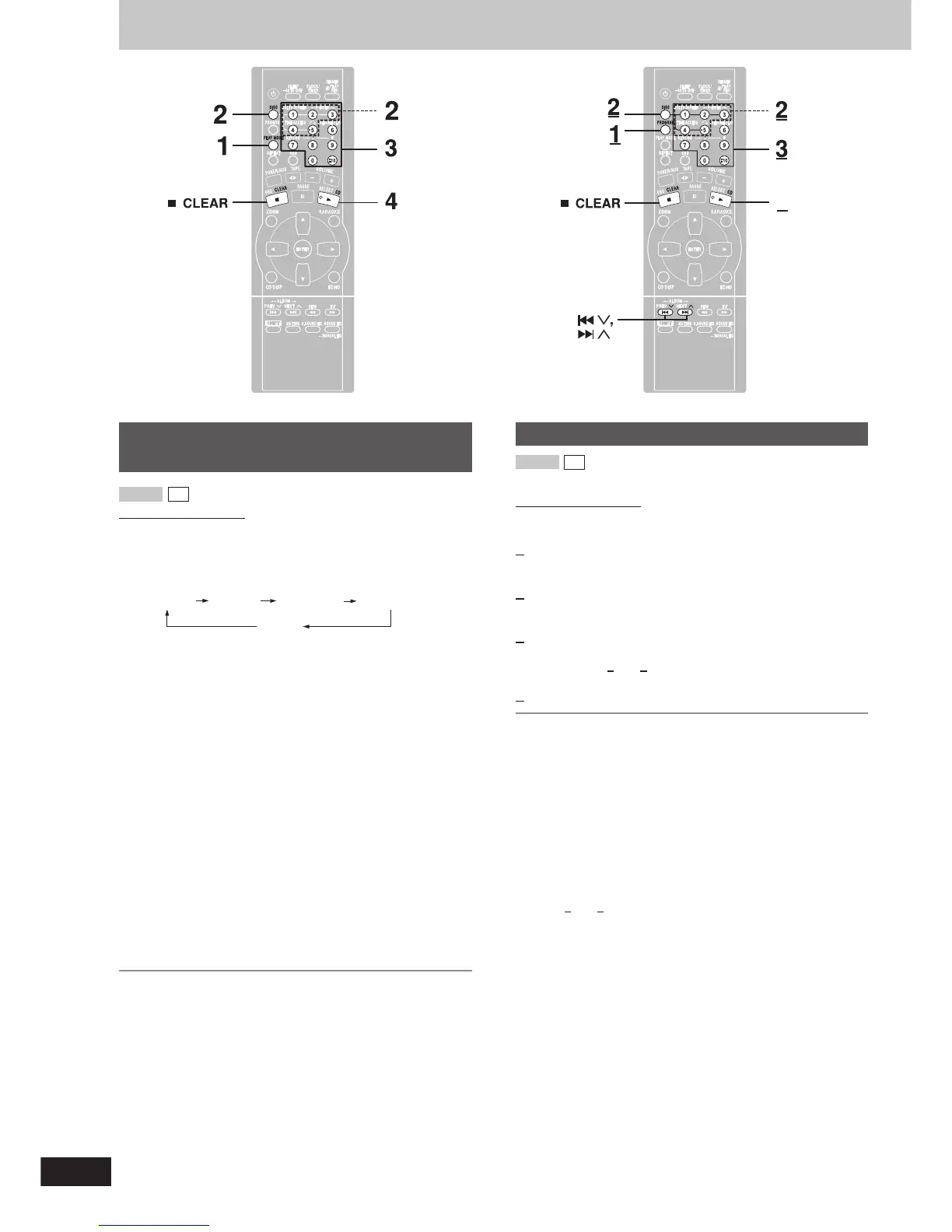
To listen to specific CDs and tracks
(CD Play Mode function)
Remote control only
Preparation: Press [: CD] and then [L CLEAR].
1 Press [PLAY MODE] to select the desired mode.
Every time you press the button:
ALL-DISC 1-RANDOM1-SONG
1-DISC
A-RANDOM
ALL-DISC: Plays all loaded discs in succession from the
selected disc to the final disc
\
.
1-SONG: Plays one selected track on the selected disc.
1-RANDOM: Plays one selected disc in random order.
A-RANDOM: Plays all loaded discs in random order.
1-DISC: Plays one selected disc.
(The original display is restored in about 2 seconds.)
Proceed to step 4 when you selected A-RANDOM in step 1.
2 Press [DISC] and (within 10 seconds) [1]–[5] to select the
disc.
The CD starts.
3 Only when you selected “1-SONG” in step 1
Select the track with the numbered buttons.
To select track 10 or over, press [
X
10] then the two digits.
Play starts from the selected track.
4 Only when you selected “A-RANDOM” in step 1
Press [: CD] to start play.
To stop play
Press [L CLEAR].
When playback ends
The current play mode will be retained.
\
Final disc
For example, if play starts from disc 4, disc 3 will be the “final disc”.
Order of progression: Disc 4
z
5
z
1
z
2
z
3
Program play
You can program up to 24 tracks.
Remote control only
Preparation: Press [
::
::
: CD] and then [L CLEAR].
1 Press [PROGRAM].
“PGM” appears.
2 Press [DISC] and (within 10 seconds) [1]–[5] to select the
disc.
3 Select the tracks with the numbered buttons.
To select track 10 or over, press [
X
10] then the two digits.
Repeat steps 2 and 3 to program other tracks.
4 Press [: CD] to start play.
To exit program mode
Press [PROGRAM] in the stop mode. (You can replay your program
by pressing [PROGRAM] then [: CD].)
To cancel
Press [L CLEAR] in the stop mode. “CLEAR” is displayed.
To check program contents
Press [g 3] or [f 4] while “P” is displayed.
Every time you press the button, the track number and program order
are displayed.
To add to the program
Do steps 2 and 3 while “P” is displayed.
CD
VCD 1.1
CD
VCD 1.1
CDs
4



 To Next Page