9
Setup
9
RQTX0127
ENGLISH
Refer also to the operating instructions for your home theater unit.
Conserving power
The wireless system consumes a small amount of power,
even when it is off (approx. 0.3 W). To save power when
the unit is not to be used for a long time, unplug it from
the household mains socket.
Making the wireless link
1
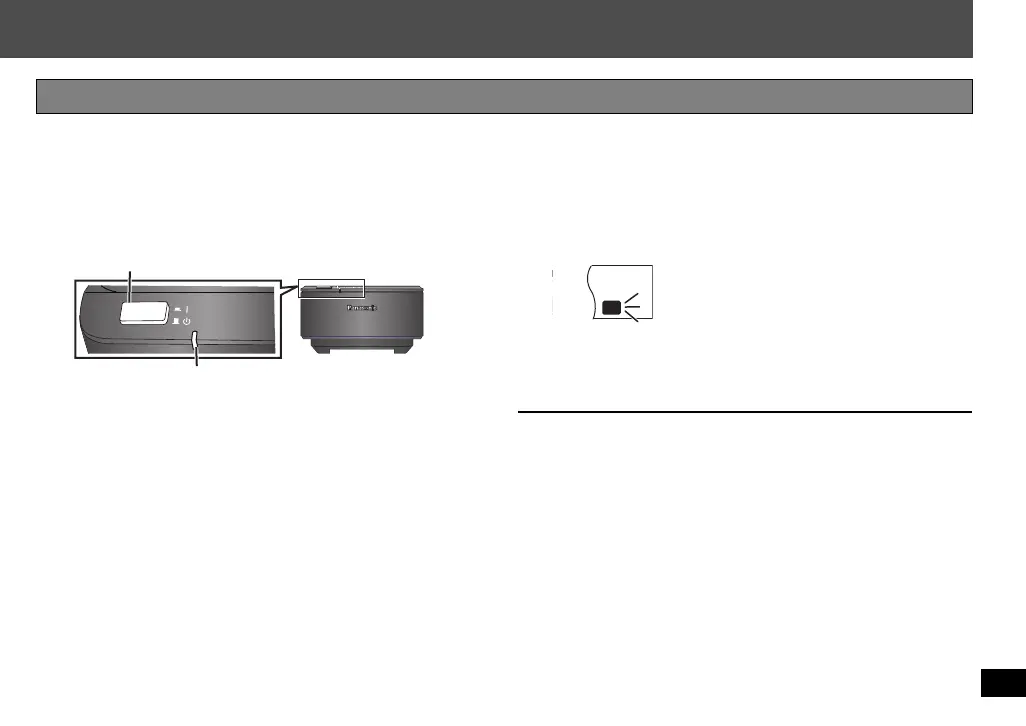
Turn on the wireless system.
AUT
O OPERATION ON/OFF
Unit on/off button [C I, BÍ]
Use this button to turn the unit on and off.
C I: The unit is on. BÍ: The unit is off.
AUTO OPERATION ON/OFF indicator
The indicator lights red when the unit is turned on
and lights green when the wireless link is
activated.
When the wireless link is inactive for a long time, it
turns red.
2
Turn on your home theater unit and check
the wireless link indicator on the home
theater unit.
3
Start play on the home theater unit.
P
ST CT
RDS
RND
PGM
EQ
PRG
SRDE.
PL
DDTS
W2
WS
W1
“ [W1] ” or an indicator should light up.
≥ If “ [W1] ” or an indicator is flashing,
refer to Troubleshooting guide
(➜ page 11).
e.g. Display on the home theater unit
SH-FX67_RQTX0127_En_181107.fm Page 9 Sunday, November 18, 2007 11:04 AM


 To Next Page